Troubleshooting
Problem
Steps on configuring the transimitting identifer.
Resolving The Problem
To have the time stamp on received faxes and sending faxes, TSI Banner must be enabled.
Determine the hardware being used. TSI is not supported by all hardware. The following devices must be used to use this function: D/T 2805, D/T 2793 (internal port).
Note: 7852-400, D/T 2771, D/T 2772 does not support TSI.
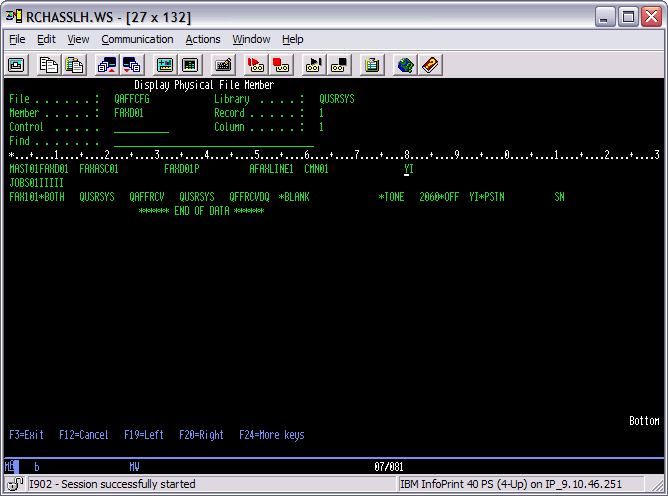
To determine if this is already configured, do the following:
| 1 | On the operating system command line, type the following: DSPPFM FILE(QAFFCFG) MBR(FAXD01) Press the Enter key. Note: This command must be run for each fax description. |
| 2 | On the following screen, Y in the MAST01 row and column 80 indicates the function is turned on. |
To turn on TSI, do the following:
| 1 | Delete each fax description by using the DLTFAXD command. (NOTE: Before deleting make sure you have the information in your configuration file so you can configure all the parameters back as needed.) |
| 2 | To reconfigure TSI, on the operating system command line type the following: CRTFAXD LINKTYPE(*IMANALOG) LIND(FAXLINE1) RSRCNAME(CMN01) TSIBNR(*YES) Press the Enter key. |
| 3 | To add the fax card with the transmitting identifier, on the operating system command line type the following: ADDFAXCRD TSI('COMPANY NAME') Press the Enter key. |
[{"Type":"MASTER","Line of Business":{"code":"LOB57","label":"Power"},"Business Unit":{"code":"BU058","label":"IBM Infrastructure w\/TPS"},"Product":{"code":"SWG60","label":"IBM i"},"Platform":[{"code":"PF012","label":"IBM i"}],"Version":"6.1.0"}]
Historical Number
400035103
Was this topic helpful?
Document Information
Modified date:
18 December 2019
UID
nas8N1015194