White Papers
Abstract
This first in a 2-part article series de-mystifies the work required to set up a DataPower Gateway configuration that uses a Kerberos-secured backend server. This first article describes how to create these configurations in a static fashion using the DataPower Web Graphical User Interface. Part 2 describes how the DataPower custom stylesheet objects are used to configure a gateway to a Kerberos backend server in a more dynamic fashion.
Content
As members of the DataPower support group, we frequently work with customers who have a need to connect their client applications to backend servers that are secured with Kerberos authentication. Inevitably, a large number of these customers have questions regarding how to configure a gateway or proxy to support this type of client and server solution. Kerberos can be a confusing and complicated technology to set up for the first time, which probably explains the frequency of questions related to this topic. There are many articles that provide excellent overviews on Kerberos and describe the various components and interactions that take place as part of the Kerberos security model. We assume that the reader already has a basic level of knowledge of Kerberos security. We will focus on Kerberos-related activities that are directly required for DataPower configuration. In making these articles available, we hope to help avoid delays and confusion when trying to determine how to design and implement Kerberos-related solutions in DataPower. The scenario that we will be working with in this first article involves a customer that has a set of clients that need to connect to a web application on the customer's backend server. This web application is secured via Kerberos authentication. The incoming clients, however, are not secured or authenticated via Kerberos. In our example, we will assume the clients are authenticated via basic authentication and a Lightweight Directory Access Protocol (LDAP) server, but it may be one of several other forms of authentication (Note: Some exposure to LDAP is relevant as LDAP is typically used in conjunction with Kerberos). Although we typically use SSL when using basic authentication, we will not set this up in our example to keep things simple. In order to allow these non-Kerberos clients to communicate and access our Kerberos-secured web application, you will be setting up a Multi-Protocol Gateway in DataPower. This gateway is defined to accept incoming client requests as HTTP GET requests, authenticate, and authorize the clients based on their incoming credentials, and then submit the client's request to the backend server by using a Kerberos token to authenticate with the backend server. The response returned from the backend server will then be passed back from DataPower to the requesting client. See Figure 1. In this example scenario, we are using WebSphere Application Server (hereafter called Application Server) as our backend server to host our web application. The web application will be the sample "snoop" application that ships with Application Server. This Application Server is configured to support Kerberos authentication so that the web application cannot be accessed without a proper Kerberos service ticket. As part of the Kerberos authentication, Application Server has access to a Kerberos keytab file that contains a Service Principal Name (SPN) and a corresponding private key. Access to this keytab file allows the Application Server to process incoming client requests that have been authenticated by the Key Distribution Center (KDC) and have received a Kerberos service ticket to allow them to talk with the web application. In order to clear up any confusion, one important aspect of this interaction between DataPower and the backend server is that all client requests to Application Server will be sent by DataPower under a single authenticated Kerberos user ID. All incoming requests to DataPower are first authenticated and authorized by their LDAP credentials. If a user passes this authentication or authorization stage, they are considered legitimate users for accessing the web application. At this stage if there is a need, certain users can be filtered out from access to the web application. Otherwise, it is perfectly fine to send all requests to the web application under a single Kerberos user ID. If our web application was more sophisticated and did need the actual client user ID, then one option is to pass that user ID to the web application as part of a SOAP message. Another option is discussed in the next article that is part of this series. But for now, in this article, all client requests are sent to the Kerberos-secured web application using a single mapped Kerberos user ID. This section illustrates what Kerberos artifacts are needed to set up the desired configuration and what commands are necessary to generate these artifacts. We will not go into detail on the Kerberos-related configuration that is required on Application Server to secure the web application, other than to briefly mention some general configuration steps and artifacts. For more information, refer to IBM Redbook: Implementing Kerberos in a WebSphere Application Server environment. In order to create an SPN to serve as your DataPower Kerberos client user ID, create a user ID in the Active Directory (AD). You will use the Active Directory Users and Computers console, running on the Domain Controller machine, and create the following user ID: You will next use the "setspn.exe" utility to create an SPN to associate with this new client account. Note: "CSUPPORT.COM" is the AD realm for our AD domain. Substitute it with your appropriate realm value. This creates a SPN called "HTTP/dpkerbclient.csupport.com" and associates this SPN with the "dpkerbclient" user ID. The "HTTP" part of this SPN is an arbitrary, but it is a commonly used prefix. Note that the SPN is used by DataPower to identify how to find a key from a special keytab file (the keytab file is explained immediately below). It is also important to realize that this SPN is case sensitive when used by DataPower, so you must be consistent with case context when you reference this SPN. See Figure 4. Now that you have a user ID and SPN for accessing the web application, you will set up a Kerberos keytab file for the DataPower Kerberos configuration. As the name suggests, the keytab file contains a table of keys. Each key entry has a private key and a Service Principal Name (SPN) associated with that private key. Of course, there is other information in the keytab file, but these two items are the primary attributes that we are interested in. The keytab file contains only one key entry. This is the key and SPN for the user ID that all of the client requests will be mapped to by DataPower when invoking the web application. While still on the Domain Controller, you will use a Windows Note: "CSUPPORT.COM" is the AD realm for our AD domain. Substitute it with your appropriate realm value. On WebSphere Application Server, where the snoop application will be hosted, the administrator has already setup a user ID and a SPN to be used as the Server SPN. The administrator also created a keytab file for that server SPN account. This keytab file has been uploaded to Application Server to decrypt any service tickets that are sent to it. Note: Clients send a service ticket to that Application Server. That service ticket has information encrypted in it that only the server associated with that SPN can decrypt and read (this is why Application Server needs access to the keytab file for the server SPN). This ensures that client requests are consumed by the correct destination. Although we assume this work has already been completed by an administrator, it is important that you know what this server SPN is, in case you are called upon to assist the Application Server administrator in verifying that the Kerberos setup is correct when DataPower communicates with the backend server. Since you are still working in the Domain Controller machine, you will also issue a setspn command to list and verify the server SPN associated with the web application server. We assume this SPN ( You see the following output from this command. In our example, the account name for the server SPN, HTTP/oc4102831681.csupport.com, is "waskerb". This verification of the server SPN eliminates the need to check this later if problems are encountered. Now that you have created the peripheral Kerberos artifacts, you can start working with DataPower to create a Multi-Protocol Gateway (MPG) configuration that allows your clients to make requests to the Kerberos-secured backend web application (the snoop application, in this case). As mentioned in the beginning of this article, these clients are coming into DataPower as HTTP GET requests, secured through basic authentication. DataPower accepts these requests, authenticates the user in LDAP, and then calls the backend snoop application using a Kerberos service ticket to authenticate with the backend server. The response from the snoop application is passed back to the client. Define a Front Side Handler to accept a HTTP GET requests on port "50000" (this is an arbitrary port we have selected for incoming requests), and ignore all requests except those targeted for the "snoop" application. See Figure 8 for the final Back side and Front side settings. In this next section, you will define the MPG Policy to authenticate your incoming client and add a Kerberos token for authenticating to the backend server. The AAA action will be defined next as part of this MPG Policy Rule. This is the most interesting set of configuration steps as it directly involves the Kerberos artifacts that you generated earlier. LDAP Load Balancer Group: Host: Port: SSL Proxy Profile: LDAP Bind DN: LDAP Bind Password: LDAP Search Attribute: LDAP Version: LDAP Search for DN LDAP Prefix: LDAP Suffix: Use Auxiliary LDAP Attributes: Notes: On the final panel of our AAA Access Control Policy, you will configure the Kerberos client and server principals. Kerberos Client Principal: Kerberos Client Keytab: Kerberos Server Principal: Note: "CSUPPORT.COM" is the AD realm for our AD domain. Substitute it with your appropriate realm value, such as Notes: Before testing, you need to configure a KDC server for DataPower to communicate with. Note: The Kerberos realm name must match the realm name used in the client and server SPN values defined earlier in your AAA Post Processing action, such as You can now run a test to determine if your new MPG configuration is set up properly. To make testing as easy as possible to set up, use the "curl" utility to submit your requests to DataPower. In the command above, you are using the If the HTML content from the response is opened with a browser, it appears similar to Figure 25. A tool that is helpful in analyzing traffic flow through DataPower and confirming correct behavior is the "DataPower Probe" utility. As your final activity in testing your Kerberos MPG configuration, you will enable Probe for this configuration and then run the "curl" test one more time. To enable and validate a test using the Probe tool, do the following: This section provides some common problems you might encounter when setting up DataPower for Kerberos authentication. Table 1 shows the associated resolutions for each of these problems. Notes: This article demonstrated how to set up a Multi-Protocol Gateway configuration using the DataPower WebUI, which allowed non-Kerberos, authenticated clients to connect to a backend WebSphere Application Server web application that only accepts requests from Kerberos authenticated clients. As part of this demonstration, you learned how to authenticate your clients using a different authentication method, and then submit all requests to the backend server under a single Kerberos principal name. You also learned how to generate the necessary Kerberos artifacts that your configuration required, and where those artifacts are used and their purpose. Finally, you also looked at a convenient way to test out your MPG configuration using the "curl" utility and how to troubleshoot our configuration if things do not work out successfully from the start. In our next article, we look at how to generate Kerberos tokens in a more programmatic fashion by using the DataPower customer stylesheet dp:get-kerberos-apreq method. We also discuss why you would use this approach and what advantages and disadvantages it has over the approach we demonstrated in this article. If you need further assistance, collect the following MustGather information and contact IBM Support:Introduction
Kerberos solution
Solution scenario

Kerberos interaction
Implementing the solution in DataPower
Create a Kerberos user account
dpkerbclient.
dpkerbclient in the "Full name" field and in the "User logon name" field. Click the Next button, as shown in Figure 2. 

Create a client SPN
setspn -a HTTP/dpkerbclient.csupport.com dpkerbclient

Create the client keytab file
ktpass -out c:\temp\dpkerbclient.keytab -princ HTTP/dpkerbclient.csupport.com@CSUPPORT.COM -mapUser dpkerbclient -mapOp set -pass * -crypto RC4-HMAC-NT

Kerberos keytab file – server application
HTTP/oc4102831681.csupport.com in our example) was set up earlier by the WebSphere Application Server administrator and the KDC administrator. You need to find out what user ID account name is associated with the server SPN. The KDC administrator can provide that information. Once you have that information, issue a command to verify the server SPN as follows: setspn -l <userid associated with the server application SPN>
Registered ServicePrincipalNames for CN=waskerb,CN=Users,DC=csupport,DC=com: HTTP/oc4102831681.csupport.com
DataPower-related activities
Create the Multi-Protocol Gateway
kerbDemo.kerbDemo domain and click on the Multi-Protocol Gateway (MPG) icon.static-backend.Define the front side settings

kerbDemoFSH in the "Name" field, type 50000 for the "Port Number" field, and check the "GET method" checkbox below, as shown in Figure 7. Leave all other fields alone and click the Apply button. 
Define the back side settings
http://9.42.90.238:11000/snoop.
Define the Multi-Protocol Gateway policy
kerbDemoMPGPolicy for the "Policy Name" field.kerbDemoSnoopMatch for the Name field, as shown in Figure 9. 
/snoop for the "URL Match" value, as shown in Figure 10. 

Define an AAA action

(auto) to INPUT. Next change the "Output" value from (auto) to OUTPUT, as shown in Figure 13. 

kerbDemoAAAPolicy and click the Create button.
<load balancer group of LDAP servers; default is "none"><ip address or host name of LDAP server><LDAP port; default value is "389"><name of ssl proxy profile; default is "none"><bind Distinguished Name (DN) that has permission to search LDAP directory> <bind DN password><default is "dn"><default is "v2"><default is "off"><String prepended to username to form a DN to search for, default is "cn="><default is blank field><default is none>


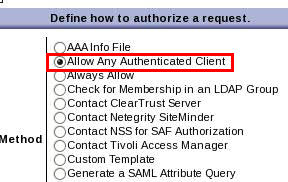
HTTP/dpkerbclient.csupport.com@CSUPPORT.COM<upload the client keytab file previously generated on Domain Controller> <server SPN> (HTTP/oc4102831681.csupport.com@CSUPPORT.COM in our example)HTTP/dpkerbclient.test.com@TEST.COM .


Configuring the Kerberos KDC server

CSUPPORT.COM. Case sensitivity is also important.
Testing the DataPower MPG Kerberos configuration
curl -v --basic -u "mjmwasuser2:passw0rd" http://l2dp1.rtp.raleigh.ibm.com:50000/snoop
--basic -u <username:password> option to send a basic authentication header in the HTTP request, using a valid LDAP username and password. This is the user ID and password that authenticates the client against LDAP in your AAA policy. If the user ID is successfully authenticated, then DataPower generates a Kerberos service ticket and sends a request to the snoop application with this token included as a HTTP header. If everything works correctly and the Kerberos token is properly authenticated by the backend Application Server, then the response looks similar the snippets shown in Listing 1. $ curl -v -u "mjmwasuser2:wasUs3r2" http://l2dp1.rtp.raleigh.ibm.com:50000/snoop * About to connect() to l2dp1.rtp.raleigh.ibm.com port 50000 (#0) * Trying 9.42.125.160... connected * Connected to l2dp1.rtp.raleigh.ibm.com (9.42.125.160) port 50000 (#0) * Server auth using Basic with user 'mjmwasuser2' > GET /snoop HTTP/1.1 > Authorization: Basic bWptd2FzdXNlcjI6d2FzVXMzcjI= > User-Agent: curl/7.19.7 (x86_64-redhat-linux-gnu) libcurl/7.19.7 NSS/3.13.1.0 zlib/1.2.3 libidn/1.18 libssh2/1.2.2 > Host: l2dp1.rtp.raleigh.ibm.com:50000 > Accept: */* > < HTTP/1.1 200 OK < X-Backside-Transport: OK OK < Connection: Keep-Alive < Transfer-Encoding: chunked ... ... ... <tr><td>javax.servlet.context.tempdir</td><td>/opt/ibm/ SDP/runtimes/base_v7/profiles/WTE_APPSRV71/temp/localhostNode01/server1/ DefaultApplication/DefaultWebApplication.war</td></tr> <tr><td>com.ibm.websphere.servlet.event.ServletContextEventSource </td><td>com.ibm.ws.webcontainer.webapp.WebAppEventSource@2e5f2e5f </td></tr> <tr><td>com.ibm.wsspi.portletcontainer</td><td> com.ibm.ws.portletcontainer.pcinvoker.PortletContainerImpl@7c627c62</td></tr> </table><BR><BR> </body></html> * Connection #0 to host l2dp1.rtp.raleigh.ibm.com left intact * Closing connection #0 $

Probe analysis


<apreq> token element as seen in Figure 30. The <spnego-apreq-base64> sub-element, which is contained in this element, is passed to the backend server as an HTTP header (Figure 30). 
<spnego-apreq-base64> sub-element, as part of the header, as shown in Figure 31. This provides confirmation that the Kerberos related processing succeeded and that a Kerberos token was generated for the outgoing request to the backend server.
Troubleshooting tips
CWSPN0011E error mentioned in Table 1 almost always requires additional tracing described in the MustGather document, Problems with Spnego.
Problem Symptom Resolution Invalid Client SPN is used for the Kerberos Client Principal in DataPower AAA Post Processing. Debug level message seen in DataPower error log:
mpgw (kerbDemoMPG): Kerberos error in post processing: Client principal 'HTTP/BADdpkerbclient.csupport.com@CSUPPORT.COM' not found in Kerberos KDC databaseUse the correct SPN for the Kerberos Client Principal Invalid Server SPN is used for the Kerberos Server Principal in DataPower AAA Post Processing. Debug level message seen in DataPower error log:
mpgw (kerbDemoMPG): Kerberos error in post processing: Server principal 'HTTP/BADoc4102831681.csupport.com@CSUPPORT.COM' not found in Kerberos KDC databaseUse the correct SPN for the Kerberos Server Principal. Realm name not included in Client or Server SPN in DataPower AAA Post Processing. Debug level message seen in DataPower error log:
mpgw (kerbDemoMPG): Kerberos error in post processing: Invalid Kerberos principal name: 'HTTP/dpkerbclient.csupport.com'Ensure the Realm name is included in the Kerberos Client Principal and Kerberos Server Principal (–for example, HTTP/dpkerbclient.csupport.com@CSUPPORT.COM). Wrong Client SPN used for Kerberos Client Principal in DataPower AAA Post Processing. In this case, the Client SPN is a valid SPN in the KDC, but it is not the SPN that matches the SPN/key-entry in the client keytab file. Debug level message seen in DataPower error log:
mpgw (kerbDemoMPG): Kerberos error in post processing: Kerberos KDC 'CSUPPORTKDC' required preauthentication that could not be providedEnsure the SPN used in the Kerberos Client Principal field matches the SPN in the client keytab file. Wrong Server SPN used for Kerberos Server Principal in DataPower AAA Post Processing. In this case, the Server SPN is a valid SPN in the KDC, but it is not the SPN that is associated with the backend server that client request is ultimately targeted for. This causes the backend server to receive a Service Ticket token that it cannot decrypt and typically results in an error being logged by the backend server and an error response is returned. A token is generated by DataPower and can be seen in the Probe. For a WebSphere Application Server targeted backend server, the following is an error message that might be observed in the Application Server trace log in this circumstance:
0000000f Context E com.ibm.ws.security.spnego.Context begin CWSPN0011E: A non-valid SPNEGO token has been encountered while authenticating a HttpServletRequest: 0000: a1143012 a0030a01 01a10b06 092a8648 ..0. .... .... .*.HEnsure the SPN used in the Kerberos Server Principal field is the correct SPN for that service. The WebSphere Application Server administrator can issue a "klist" command against the keytab files used by Application Server to verify what the service SPN value is. Checksum option is not turned on in DataPower AAA Post Processing. If the backend server is configured to expect a checksum value in the Service Ticket token, this typically results in an error being logged by the backend server and an error response is returned. A token is generated by DataPower and can be seen in the Probe. For a WebSphere Application Server targeted backend server, the following is an error message that might be observed in the Application Server trace log in this circumstance:
0000000f Context E com.ibm.ws.security.spnego.Context begin CWSPN0011E: A non-valid SPNEGO token has been encountered while authenticating a HttpServletRequest: 0000: a1143012 a0030a01 01a10b06 092a8648 ..0. .... .... .*.HEnsure the "Generate GSS-API Checksum in the "AP-REQ" radio button in the Kerberos Client Keytab configuration panel is checked (this is in the AAA configuration). An older or different Key Version Number (kvno) is associated with the SPN in the client keytab file than what exists in the KDC for that SPN.
Symptom: Debug level message seen in DataPower error log:
mpgw (kerbDemoMPG): Cannot parse file for Kerberos keytab 'dpkerbclientKeytab'Debug level message seen in DataPower error log:
mpgw (kerbDemoMPG): Cannot parse file for Kerberos keytab 'dpkerbclientKeytab'Ensure the kvno in the Client keytab file matches the kvno associated with that SPN in the KDC. Use the "ldifde" command on the KDC Domain Controller machine to determine what kvno value is used by the KDC for the given SPN. Then use the "klist" utility on a Linux machine to determine the kvno in the keytab file (klist -k <keytab file>). If they are different, create a new keytab file to ensure its kvno matches the kvno used by the KDC. When invoking the ktpass command to create a keytab file and explicitly specifying the Key Version Number (kvno) using the "-kvno" parameter, the kvno in the keytab file still does not match the kvno in the KDC. Debug level message seen in DataPower error log:
mpgw (kerbDemoMPG): Cannot parse file for Kerberos keytab 'dpkerbclientKeytab'It appears that some versions of ktpass, if not all versions, force the kvno to be incremented in the KDC each time the keytab file is generated for a given SPN. If the "-kvno" parameter is specified on the command line, it only sets the kvno in the keytab file to the specified value. The kvno in the KDC increments to the next higher value. Many times users will use the "ldifde" command on the Domain Controller to get the current kvno value in the KDC for a given SPN, and then invoke the ktpass command to create a new keytab file that matches that kvno by using the "-kvno" parameter. This does not work as the KDC's kvno for that SPN is incremented as a result of issuing the ktpass command. Instead, simply issue the ktpass command without the "-kvno" parameter and the resulting keytab file has the same
kvno value as the KDC. The Kerberos KDC Server object, under Objects > Crypto Configuration, was not created, or its "Kerberos realm name" value did not match the realm contained within the Kerberos Principal value in the AAA Post Processing panel. Case sensitivity is relevant when matching these realm values. Debug level message seen in DataPower error log:
mpgw (kerbDemoMPG): Kerberos KDC for realm 'CSUPPORT.COM' not foundEnsure the realm specified in the Kerberos KDC Server object matches the realm specified in the Kerberos Principal Names in the AAA Post Processing panel. When monitoring network traffic while testing the DataPower Kerberos configuration, there appears to be no network communication between DataPower and the KDC server. No Kerberos-related IP packets are seen flowing between DataPower and the KDC server when capturing network packets during testing of the Kerberos configuration. However, DataPower is still able to generate Kerberos tokens destined for the backend server. DataPower caches Service tickets sent from the KDC, so it does not request a new Service Ticket for each request. No resolution is needed as this is a normal and correct behavior within DataPower. Conclusion
IBM Support
Was this topic helpful?
Document Information
Modified date:
08 June 2021
UID
ibm11109457