Troubleshooting
Problem
HOW TO RESOLVE ABEND 0c4 Reason Code-0010 in EDITR module IEA995I SYMPTOM DUMP OUTPUT 559 559 SYSTEM COMPLETION CODE=0C4 REASON CODE=00000010 559 TIME=16.03.34 SEQ=01044 CPU=0000 ASID=00D3 559 PSW AT TIME OF ERROR 478D1000 A3C39088 ILC 6 INTC 10 559 ACTIVE LOAD MODULE ADDRESS=23BF8780 OFFSET=00040908 559 NAME=EDITR 559 DATA AT PSW 23C39082 - B01458B0 D0D8D27E B0007000 559 GR 0: 23B9AB3A 1: 23BAA63C 559 2: 23BAA620 3: A3C38B92 559 4: 23C51578 5: 23A5B43C 559 6: 23A5A2E0 7: BFBDA620 559 8: 00000003 9: 40400000 559 A: 00000001 B: 23A5A430 559 C: 23A55090 D: 23A5A2F8 559 E: A3C39010 F: 23B9A620 559 END OF SYMPTOM DUMP
Cause
The most common cause of an ABEND S0C4 in EDITR is from running a map or envelope standard control string that is compiled for the wrong platform.
Resolving The Problem
Use WDI Client to check the "Server platform" in the appropriate "System" under the View menu -> Administration -> Systems
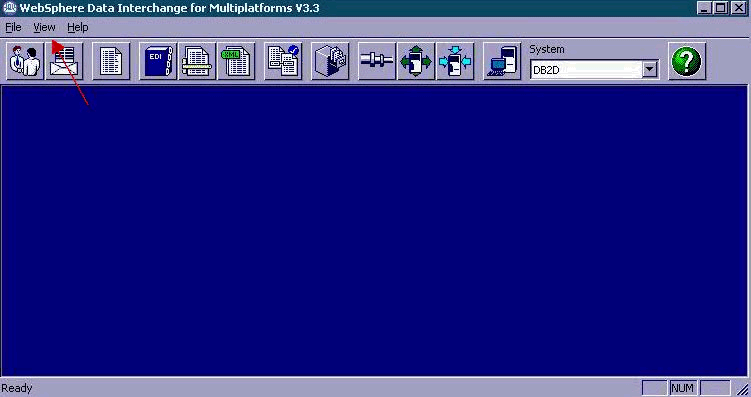
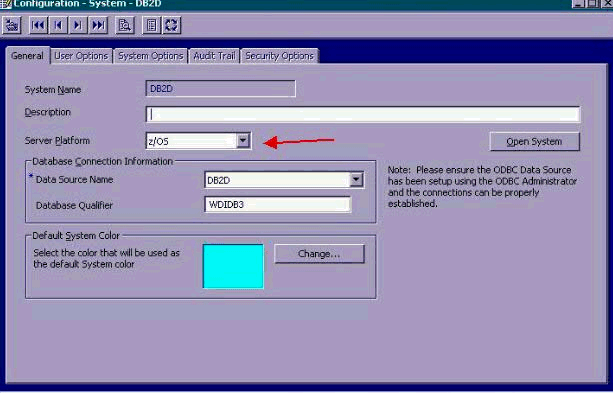
If the "Server platform" is not zOS you will need to change it appropriately, then:
- Recompile the involved map control string by highlighting the involved map and press the compile button:
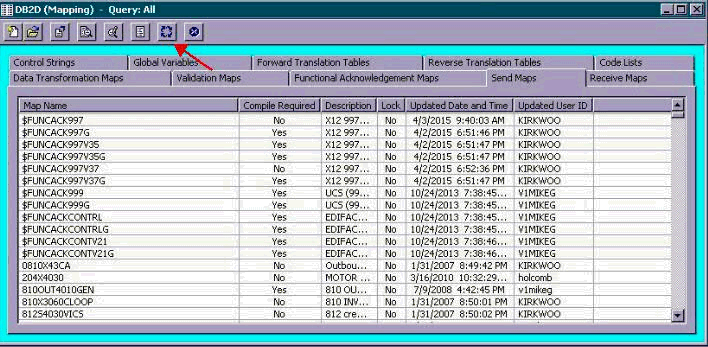
, and
- Recompile the Envelope standard control string. (This is done under EDI Standards, "Envelope standards" tab.)

Was this topic helpful?
Document Information
Modified date:
16 June 2018
UID
swg21220949