Question & Answer
Question
Collecting diagnostic data (MustGather) aids in problem determination and saves time when resolving Problem Management Records (PMRs) related to the use of ClearCase with WebSphere Integration Developer.
Answer
| Examples of issue belong to this category |
- Getting build errors when WebSphere Integration Developer is connected to Clearcase
- Unable to check in or check out files using ClearCase with WebSphere Integration Developer
| Collecting the MustGather data |
- Provide the WebSphere Integration Developer build level (The build level can be found at Help > About IBM WebSphere Integration Developer > Build id)
- Provide the .log file that is in the workspace's .metadata folder
For example: Build id: 7.0.0.2-20100422_1028
- If possible, provide the project in project interchange format, or simply zip up the entire workspace with .metadata folder
- Provide the version of WebSphere Integration Developer the project was created with
- Was ClearCase connected or disconnected when the problem occurred?
- Provide the view type (Dynamic, Snapshot, or Web)
- Are you using ClearCase in Unified Change Management (UCM) process or base ClearCase mode? If you are using UCM mode, is your project a single-stream or multiple-stream project?
- What were the actions taken when presented with ClearCase prompts if any?
- Provide the ClearCase Server version
- Provide the ClearCase client version
- Provide the ClearCase plug-in type (SCM or CCRC) and the version
To quickly check whether or not the SCM Adapter and CCRC are installed, go to Window > Preferences > General > Capabilities > Team > Advanced.

- For SCM and CCRC plug-in name and version, go to Help > About IBM WebSphere Integration Developer > Feature Details


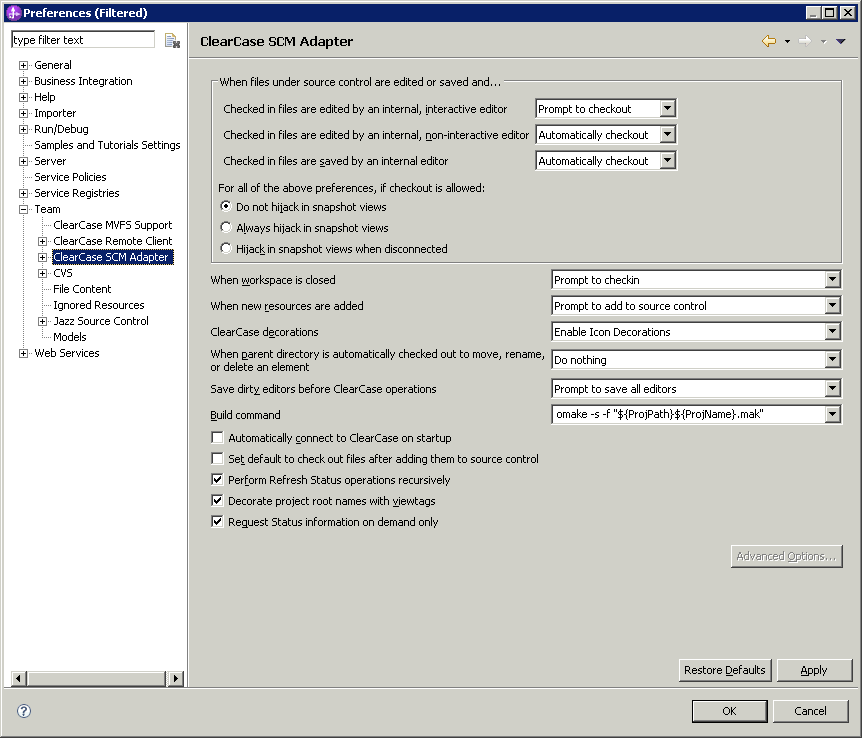
- Provide the preference settings of the Clearcase plug-in (SCM or CCRC)
- For example:
- Provide the preference settings for the "Ignored Resource" filter. This control which file types are to be omitted when adding to source control.
- For example:

[{"Product":{"code":"SSQQFK","label":"WebSphere Integration Developer"},"Business Unit":{"code":"BU053","label":"Cloud & Data Platform"},"Component":"--","Platform":[{"code":"PF016","label":"Linux"},{"code":"PF033","label":"Windows"}],"Version":"7.0.0.3;7.0.0.2;7.0.0.1;7.0;6.2.0.2;6.2.0.1;6.2","Edition":"","Line of Business":{"code":"LOB45","label":"Automation"}}]
Was this topic helpful?
Document Information
Modified date:
15 June 2018
UID
swg21430587