General Page
End-to-end data science workload in IBM Cloud Pak for Data version 3.5 significantly improves performance over version 3.0.1 on IBM Power Systems
Author: Theresa Xu
This performance report summarizes the test results from running the end-to-end data science workload under IBM® Cloud Pak® for Data 3.5 in an IBM POWER9™ big core IBM PowerVM® (hypervisor) based Red Hat® OpenShift® Container Platform 4.5 cluster.
The tests were done using IBM General Parallel File System (IBM GPFS) for Network File System (NFS) as the underlying storage for the Cloud Pak for Data cluster located in the Austin IBM lab.
Test environment
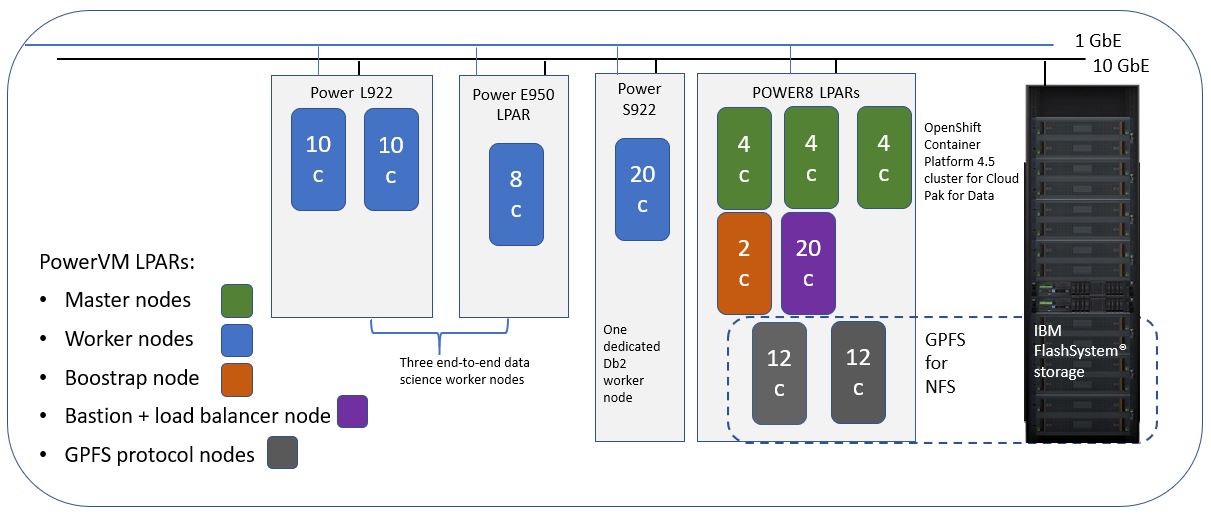
8-node PowerVM cluster – Single Cloud Pak for Data instance: cp4d-cpd-cp4d.apps.cp4d-p.toropsp.com
| 1 Bastion node with load balancer | 160 vCPU (SMT 8), 512 GB RAM |
| perfbriggs3 | IBM Power® System S822LC (8001-22C) @ 3.491 GHz |
| Three controllers (masters) | Per node:32 vCPUs (SMT 4), 240 GB RAM Total: 96 vCPU, 720 GB RAM |
| master1 | Power System E850 (8408-E8E) @ 3.02 GHz (LPAR) |
| master2 | Power System E850 (8408-E8E) @ 3.02 GHz (LPAR) |
| master3 | Power System E850 (8408-E8E) @ 3.02 GHz (LPAR) |
| 1 Db2 Warehouse worker node | Per node: 160 vCPUs (SMT 8), 512 GB RAM |
| perfzz17 | Power S922 @ 2.9 GHz |
| 3 End-to-end data science worker nodes | 2 Power L922 nodes (per node): 40 vCPUs, 160 GB RAM 1 Power E950 node (per node): 32 vCPUs, 128 GB RAM Total: 112 vCPU, 448 GB RAM |
| cpzzp1 | Power L922 @ 2.9 GHz (LPAR) |
| cpzzp2 | Power L922 @ 2.9 GHz (LPAR) |
| c4pdzz | Power E950 @ 3.8 GHz (LPAR) |
| NFS (external to the OpenShift Container Platform cluster) | GPFS for NFS, 2 GPFS servers collocating with protocol nodes Per node: 24 vCPU, 496 GB RAM |
| wmlaaplp1(gpfs server1) | Power System E850 (8408-E8E) @ 3.02 GHz (LPAR) |
| wmlaaplp1(gpfs server2) | Power System E850 (8408-E8E) @ 3.02 GHz (LPAR) |
| Cluster node | user-home-pvc | wdp-couchdb | ||
| 1 GB write (> 209 MBps) |
4 KB write (> 2.5 MBps) |
1 GB write (> 209 MBps) |
4 KB write (> 2.5 MBps) |
|
| cpzzp1 (end-to-end data science) | 795 | 4.9 | 933 | 4.9 |
Workload definition
| Name | Description | Comments |
|---|---|---|
| Data science flow | To simulate a typical data science flow:
|
There are three data sets:
|
Test coverage
Here is the summary of the test cases covered under each category.
| Test | Workloads |
|---|---|
| Workload regression test (release to release) | IBM Watson Studio Local, IBM Watson Machine Learning (Watson ML), Spark |
| Application scalability perf tests | Watson Studio Local, Watson ML, Spark |
| Multitenancy perf tests | Watson Studio Local, Watson ML, Spark |
Key performance metrics
The key performance metrics include:
- Resource consumption: CPU and memory
- Workload performance: Response time (seconds per job) and/or throughput (jobs per hour)
Note: The monitoring scripts capture the CPU- and RAM-related metrics to include min, max, mean, and delta (=max-min) values for a complete view of the resources during the tests.
However, to simplify reporting, and given the different workload characteristics, it has been decided to use the following practice to report the resource consumption and requirement that is more representative: Data science flow - delta value for both CPU and RAM
This is to indicate true resource usage. This is normally less than the total reserve amount, which is the required capacity to run the workload. The reason to use delta value is due to the fact that the needed resource/pod allocation is more dynamic, happening on the fly during the run.
Cloud Pak for Data 3.5 release result summary
Workload regression tests (release to release)
Data science flow
Data science regression flow is run using 10 concurrent users with 1000 data set for version 3.0.1. For version 3.5, three data sets with 1000, 10,000, and 100,000 rows were used. The only comparable data point is with the 1000 data set.
Let us look at the overall performance summary of version 3.5 compared to version 3.0.1 on the 8-node private cluster with OpenShift Container Platform 4.5 and GPFS for NFS setup. For 10 concurrent users running on three worker nodes in the SMT 4 mode, the following observations were made:
- 30% higher throughput
- 80.9% higher worker CPU delta
- 92.3% higher worker memory delta
- Same low failure rate
The CPU and memory utilized for version 3.0.1 is below the expected value. With Version 3.5, the test team observed better utilization of both compute and memory in proportion to what is requested by application pods. This results in a 30% higher throughput and lower error rate at higher user counts (refer to the following section for more details).
Application scalability test
In this scenario, the same end-to-end data science workload was ran using the 1000 data set with 1, 6, and 12 concurrent users. The purpose is to observe how well the workload can maintain the same level of throughput performance as more concurrent users are added.
The following observations were made for this scenario:
- 92% scalability from 1 to 6 users
- 69% scalability from 1 to 12 users
- 74% scalability from 6 to 12 users

As shown in the above graph, under SMT4 the throughput is consistently higher when supporting two or more users concurrently with version 3.5. When compared to version 3.0.1, the increase is in the range of 10% to 50%.
On the same worker nodes with the 1000 data set, with SMT8, the three POWER9 worker nodes can support up to 16 concurrent users without major throughput degradation under version 3.5, whereas, while under version 3.0.1 we can support only up to nine users. That is a 77% increase.

In terms of average per user response time for all the three data sets – 1000, 10000, and 100000, SMT 4 consistently outperforms SMT 8 from 1 to 14 concurrent users. With SMT 4, the maximum number of concurrent users that can be supported is 14.

Summary
Overall, comparing Cloud Pak for Data version 3.5 with the previous version 3.0.1, the current version provides noteworthy performance (throughput), scalability, and stability improvements on POWER9 for the end-to-end data science workload. The throughput increase is measured as iterations per hour – for example, 30% increase for 10 concurrent users from version 3.0.1 to version 3.5. The concurrent user support with small data set under SMT 8 increased from 9 users to 16 users from version 3.0.1 to version 3.5 while within 5% failure rate. The stability is shown with the lower failure rates under SMT 8, For example, for 10 concurrent users, the failure rate in version 3.0.1 was 13.34% while for version 3.5 is 0%, and it was 3.3% for 12 users. The improvements come from both the application’s ability to better utilize and manage the compute and memory resources, as well as the enhancements for the regression workload code.
Disclaimer and notes
Based on IBM internal testing of three Cloud Pak for Data product components: Watson Studio Local, Watson Machine Learning, and Spark, running a data science workload from project creation, data preparation, model build and scoring to clean up all artifacts just created.Results are obtained with version 3.0.1 and version 3.5 and tests are conducted under laboratory conditions. Individual results can vary based on workload size, use of storage subsystems, and other conditions.
Test cases are largely for internal quality assurance and regression testing purposes, and therefore, data volume may not be large (larger scale testing might happen later). When referring to the reported metrics for sizing purpose, be aware that workload complexity is generally implementation-specific and could vary from run to run.
Was this topic helpful?
Document Information
Modified date:
10 August 2021
UID
ibm16397666