Question & Answer
Question
Using ACCE, how do I change the Directory Server Configuration? Specifically, the Directory Server Password is a protected field and doesn't allow updates.
Cause
With the release of IBM FileNet Content Platform Engine version 5.2.1, FileNet Enterprise Manager is deprecated and is replaced with ACCE.
Answer
- Via ACCE, select the Domain, followed by the Directory Configuration tab and then the Name of the Directory Server.
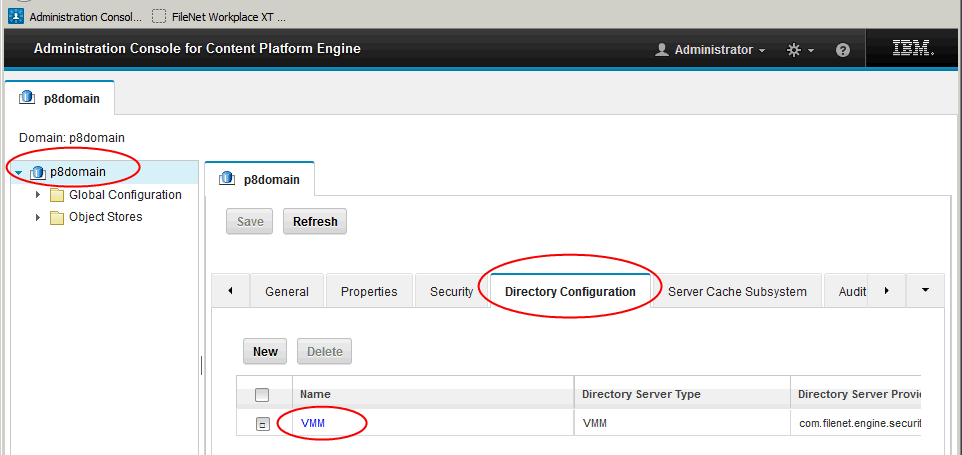
- Scroll downward to the Directory Server Password field. Select the drop down in the adjacent field and select Change Password.

- After changing the password, select OK.

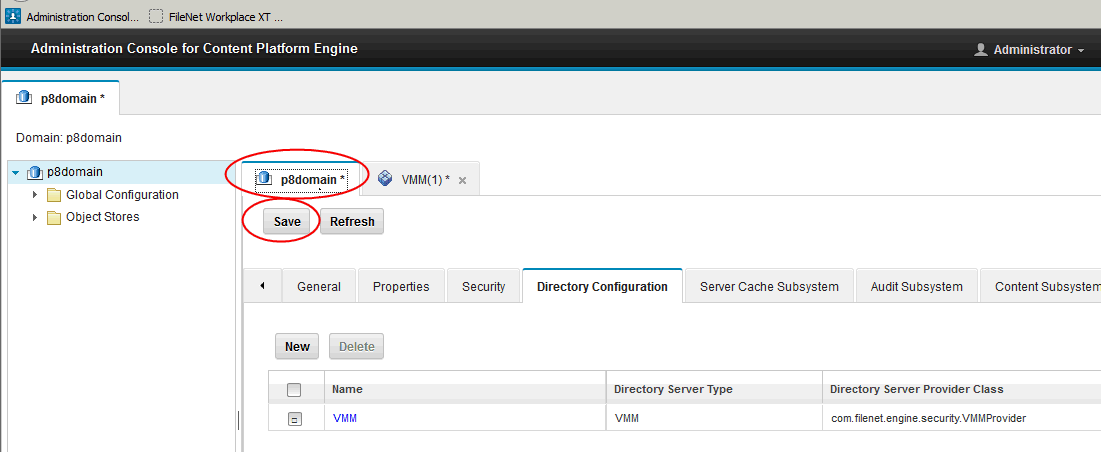
- There is no Save button on this screen. Switch back to the calling tab that displays an asterisk (*) and press Save.
[{"Product":{"code":"SSNW2F","label":"FileNet P8 Platform"},"Business Unit":{"code":"BU053","label":"Cloud & Data Platform"},"Component":"Content Engine","Platform":[{"code":"PF002","label":"AIX"},{"code":"PF010","label":"HP-UX"},{"code":"PF016","label":"Linux"},{"code":"PF027","label":"Solaris"},{"code":"PF033","label":"Windows"}],"Version":"5.2.1","Edition":"","Line of Business":{"code":"LOB45","label":"Automation"}}]
Was this topic helpful?
Document Information
Modified date:
17 June 2018
UID
swg21697482