IBM Support

"CCR has stopped working ... System.IO.FileNotFoundException" caused by .NET Framework 4.5 or later installed on client device

Troubleshooting


Problem

User launches Controller client. User receives error message. Problem will only occur when the client was launched via a website/URL, for example: * directly from URL: [http://servername/cognos8/controllerbin/ccr.exe] * or by clicking 'Consolidate My Financials' from inside Cognos Connection.

Symptom

Initial message:

    Do you want to run or save this file?

After clicking "Run":
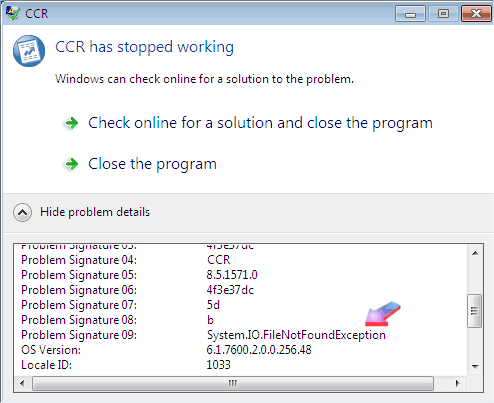
CCR has stopped working

Problem signature:
Problem Event Name: CLR20r3
Problem Signature 01: ccr[1].exe
Problem Signature 02: 8.5.1414.0
Problem Signature 03: 4c086c59
Problem Signature 04: CCR
Problem Signature 05: 8.5.1414.0
Problem Signature 06:4c086c59
Problem Signature 07: 5d
Problem Signature 08: b
Problem Signature 09: System.IO.FileNotFoundException
OS Version: 6.1.7601.2.1.0.256.48
Locale ID: 1033

[No errors reported in the Event Viewer].

[{"Product":{"code":"SS9S6B","label":"IBM Cognos Controller"},"Business Unit":{"code":"BU048","label":"IBM Software"},"Component":"Controller","Platform":[{"code":"PF033","label":"Windows"}],"Version":"8.5.1;10.1.1;10.1","Edition":"","Line of Business":{"code":"LOB76","label":"Data Platform"}},{"Product":{"code":"SSMRTZ","label":"IBM Cognos Controller on Cloud"},"Business Unit":{"code":"BU048","label":"IBM Software"},"Component":" ","Platform":[{"code":"","label":""}],"Version":"","Edition":"","Line of Business":{"code":"LOB76","label":"Data Platform"}}]

Log InLog in to view more of this document

This document has the abstract of a technical article that is available to authorized users once you have logged on. Please use Log in button above to access the full document. After log in, if you do not have the right authorization for this document, there will be instructions on what to do next.

Document Information

Modified date:
08 May 2025

UID

swg21626268