Education
Abstract
If you have problems accessing BOX, this document may serve to assist you with access. Generally a client may have issues accessing BOX due to the password used and how access was created.
Content
If you have problems accessing BOX, this document may serve to assist you with access….
First you will receive an invite from IBM to collaborate with IBM and would have “viewer” access. This will be sent to the email address you provide….
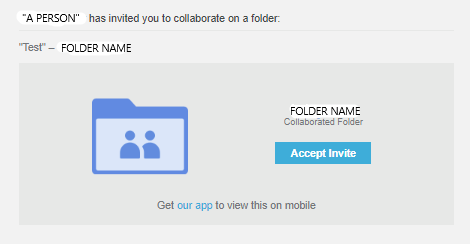
When you select “Accept Invite” you will be taken to a page to complete your registration…
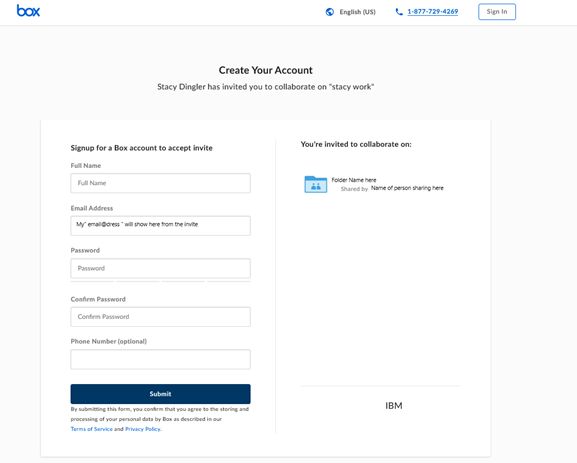
You will fill out your name (your email address will already be populated) and the folder name that is being shared as well as the person who invites you will be shown….
(Note the password will need to have one uppercase letter and a number, it will also state if it is accepted or not.)
You would then select “Submit”.
Then you will be presented with the option to sign in.

You will enter the email address that the BOX access was assigned to by IBM and select “Next”
(Note: if you attempt to “Sign in with Google “at this point and that was not used in the original registration, you may have login issues”, best practice is to use the email address that was registered and select “Next”.)

You will be asked to enter your password, then select “Log in”. You will then have access to the BOX folder….

If you are unable to login to BOX once the collaboration is shared……
(Note: if you attempt to “Sign in with Google “and that was not used in the original registration, you may have login issues”, best practice is to use the email address that was registered.)
You will need to rest your password (https://app.box.com/login/reset_confirmation).
How to Rest BOX Password.

If you need to rest your password, enter the email address that was used / provided to IBM at the time the collaboration was created. Then select “Reset Password”

You will receive an email that ask to “Reset Password” select the link.
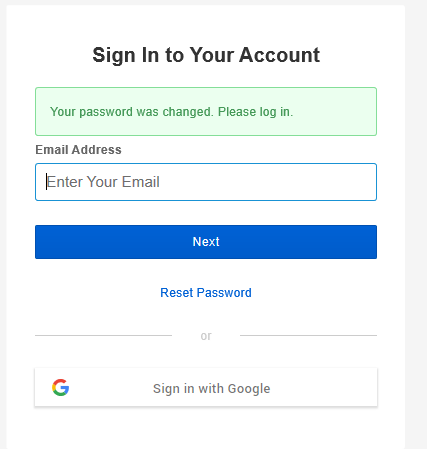
Change your password and enter your email address that was originally provided to initiate the collaboration….
(Note: if you attempt to “Sign in with Google “and that was not used in the original registration, you may have login issues”, best practice is to use the email address that was registered.)

You will then also receive an email stating your password has been changed….
Then you will have access to the BOX folder…

[{"Business Unit":{"code":"BU059","label":"IBM Software w\/o TPS"},"Product":{"code":"SSNTIG3","label":"IBM Blockchain Transparent Supply"},"Component":"","Platform":[{"code":"PF033","label":"Windows"}],"Version":"All Versions","Edition":"","Line of Business":{"code":"LOB59","label":"Sustainability Software"}}]
Was this topic helpful?
Document Information
Modified date:
24 September 2019
UID
ibm11074686