Troubleshooting
Problem
When the ServeRAID M controller has an Intelligent Battery Backup Unit (iBBU08) battery option installed, three user configurable settings for the Battery Backup Unit (BBU) mode become available within Battery Properties. The mode of operation determinesthe retention time of data protected during a power failure, as well as the learn cycle configuration, which as a result can improve the service life of the battery as defined below: Mode Of Operation: mode_1: 12 hours retention with a transparent learn cycle and best service life mode_3: 24 hours retention with a transparent learn cycle and a balanced service life mode_4 (Default): 48 hours retention with a non-transparent learn cycle and a moderate service life When modes 1 or 3 are configured, learn cycles become transparent, which means no further configuration is necessary to define or schedule learn cycles. A transparent learn cycle calibrates the battery in the background while the controller remains in write-back
Resolving The Problem
Source
RETAIN tip: H205412
Symptom
When the ServeRAID M controller has an Intelligent Battery Backup Unit (iBBU08) battery option installed, three user configurable settings for the Battery Backup Unit (BBU) mode become available within Battery Properties. The mode of operation determines the retention time of data protected during a power failure, as well as the learn cycle configuration, which as a result can improve the service life of the battery as defined below:
Mode Of Operation:
|
When modes 1 or 3 are configured, learn cycles become transparent, which means no further configuration is necessary to define or schedule learn cycles. A transparent learn cycle calibrates the battery in the background while the controller remains in write-back cache mode, if so configured. Redundant Array of Independent Disks (RAID) volumes do not change to write-through cache mode during the learn cycles.
By default, mode_4 is selected and features the longest retention time. However, learn cycles require more resources to calibrate. To maintain optimal data protection, the controller will change the cache mode to write-through during the calibration cycle.
Affected configurations
The system may be any of the following IBM servers:
- System x3100 M4, type 2582, any model
- System x3200 M3, type 7327, any model
- System x3200 M3, type 7328, any model
- System x3250 M3, type 4251, any model
- System x3250 M3, type 4252, any model
- System x3250 M3, type 4261, any model
- System x3250 M4, type 2583, any model
- System x3400 M2, type 7836, any model
- System x3400 M2, type 7837, any model
- System x3400 M3, type 7378, any model
- System x3500 M2, type 7839, any model
- System x3500 M3, type 7380, any model
- System x3550 M2, type 4198, any model
- System x3550 M2, type 7946, any model
- System x3550 M3, type 4254, any model
- System x3620 M3, type 7376, any model
- System x3630 M3, type 7377, any model
- System x3650 M2, type 4199, any model
- System x3650 M2, type 7947, any model
- System x3650 M3, type 4255, any model
- System x3650 M3, type 7945, any model
- System x3690 X5, type 7147, any model
- System x3690 X5, type 7148, any model
- System x3690 X5, type 7149, any model
- System x3690 X5, type 7192, any model
- System x3755 M3, type 7164, any model
- System x3850 X5, type 7143, any model
- System x3850 X5, type 7145, any model
- System x3850 X5, type 7146, any model
- System x3850 X5, type 7191, any model
- System x3950 X5, type 7143, any model
- System x3950 X5, type 7145, any model
- iDataPlex dx360 M3 Server, type 6391, any model
The system is configured with one or more of the following IBM Options:
- ServeRAID M5014 SAS/SATA Controller, Option part number 46M0916, replacement part number (CRU) 46M0918
- ServeRAID M5015 SAS/SATA Controller, Option part number 46M0829, replacement part number (CRU) 46M0851
- ServeRAID M5025 SAS/SATA Controller, Option part number 46M0830, replacement part number (CRU) 46M0854
This tip is not software specific.
Additional information
Three (3) ways to identify an iBBU08 battery:
- The battery has replacement part number (FRU) 81Y4451.
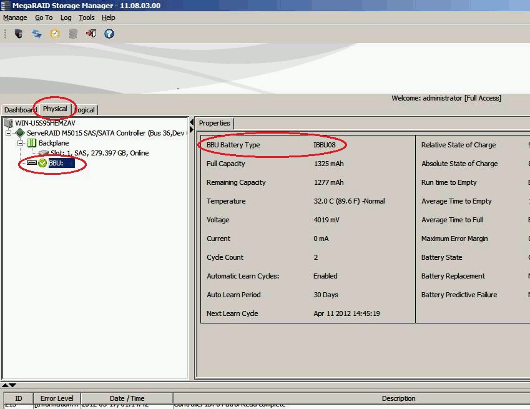
- Use MegaRAID Storage Manager (MSM). In MSM, click on the Physical tab and select the 'BBU:' icon in the left window property screen. The BBU Battery Type is identified in the right side of the screen.
- Use the MegaRAID Command Line Interface (MegaCLI) command:
MegaCLI -AdpBbuCmd -GetBbuProperties -aN|-a0,1,2|-aALL
For example:

There are two ways to change the mode of the iBBU08:
- WebBIOS
- MegaCLI (note this will require a reboot)
Using WebBIOS:
WebBIOS can be entered in a couple of ways depending on your system. If your system is setup to boot in Legacy, then during boot you will see the message below after the F1 Setup screen:
| Virtual Drive(s) handled by BIOS Press 'CTRL-H' for WebBIOS or 'CTRL-Y' for Preboot CLI. After pressing 'CTRL-H', this will get you into WebBIOS and you can proceed to step 6. |
If you are booting into Unified Extensible Firmware Interface (UEFI), then follow these steps to get into WebBIOS:
- During Power On Self Test (POST), select F1 Setup.
- Down arrow and select System Settings.
- Select Adapter and UEFI drivers.
- Down arrow to LSI Extensible Firmware Interface (EFI) Serial Attached SCSI (SAS) drivers and select the 1st Option.
- Select1 for EFI WebBIOS.
- Select adapter, and then select Start.
- Select Controller Properties. Now you are on the MegaRAID BIOS Configuration Utility Controller Information screen.
- Select Next (towards the bottom of the screen.)
- Select Present next to the Battery Backup. Now you are on the MegaRAID BIOS Configuration Utility Battery Module screen.
- In the Lower Right hand window you will see a drop down window that is the Properties window. You will have 3 choices to select from:
- BBU Mode: 1 - 12 hours retention with a transparent learn cycle and best service life.
- BBU Mode: 3 - 24 hours retention with a transparent learn cycle and a balanced service life.
- BBU Mode: 4 - 48 hours retention with a non-transparent learn cycle and a moderate service life.
Make a selection and then press the GO button.Select Home. Now you are back to the MegaRAID BIOS Configuration Utility Virtual Configuration Screen.
- Select Exit.
- Select YES at the Exit confirmation screen.
- When prompted to restart the controller, enter Yes. This will bring you back to the Adapter and UEFI driver screen.
- Press the ESC key to exit this screen. Now you are on the System Settings screen.
- Press the ESC key to exit this screen. Now you are on the Main Screen System Configuration and Boot Management.
- Down arrow to Save settings, and press the Enter Key.
- Down arrow to Exit Setup, and press the Enter Key.
You will receive a message:
Do you want to exit setup Utility?
<Y> Exit Setup Utility
<ESC> Return to setup utility
- Press the Y key. The system reboots and your settings for BBU Mode Selection are saved.
Using MegaCLI:
- Create a file that has 1 of the following entries:
bbuMode=1
bbuMode=3
bbuMode=4
- Save that file in the same directory that MegaCLI resides.
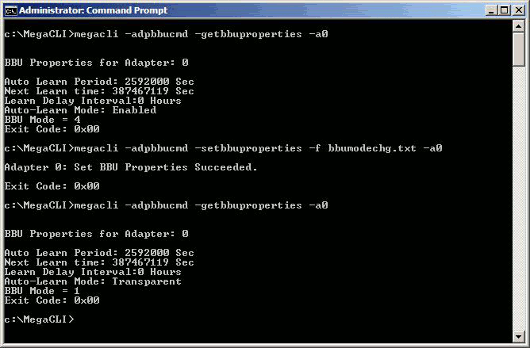
- Issue the following MegaCLI command to change the mode:
MegaCLI -AdpBbuCmd -SetBbuProperties -f<fileName> -aN|-a0,1,2|-aALL - Verify the change using the following command:
MegaCLI -AdpBbuCmd GetBbuProperties -aALL
Here is an example of what you would see before the bbuMode change and after the bbuMode change:
|
|
MegaCLI can be found on the following link: http://www.ibm.com/support/entry/portal/docdisplay?lndocid=MIGR-5073015
Document Location
Worldwide
Was this topic helpful?
Document Information
Modified date:
30 January 2019
UID
ibm1MIGR-5089843