Troubleshooting
Problem
Note: Support for Table Type parameters was implemented in version 8.0.0.2; the content below only applies for versions older than 8.0.0.2 The parameters in the interface specification of a BAPI or RFM can have 'flat' (simple fields, structures) or 'table' types. Previously, when a table should be passed to or returned from a BAPI/RFM, a 'table Parameter' was used. In current versions of SAP ERP, you can also specify parameters having a 'Table Type' for Import, Export or as a "table parameter" to send or receive a table using a BAPI/RFM. TABLE TYPE parameters are currently not supported by the BAPI stage. The only way to pass tables through the BAPI stage is via a table parameter with LIKE addition. For the purpose of this technote, we will use the terms 'TABLE TYPE parameter' and 'table parameter' as follows: - "TABLE TYPE parameter" will denote a parameter associated with a Table Type (regardless if it's used in the Import, Export or the Tables tabs). Example of Table Type: /SAPSLL/API6800_RESULT_T - "table parameter" will denote parameters specified on the Tables tab of the BAPI specification.
Symptom
When a BAPI/RFM with a signature that contains TABLE TYPE parameters is selected in the BAPI Explorer of the BAPI stage GUI and the TABLE TYPE parameter is activated, then the TABLE TYPE parameter is not expanded correctly.
That means that on the 'Columns' tab of the link there is only 1 row listed per TABLE TYPE parameter instead of listing a row for each column of the table that the TABLE TYPE parameter represents.
For example, /SAPSLL/API_6800_SYNCH_MASS contains TABLE TYPE parameters with TYPE addition:
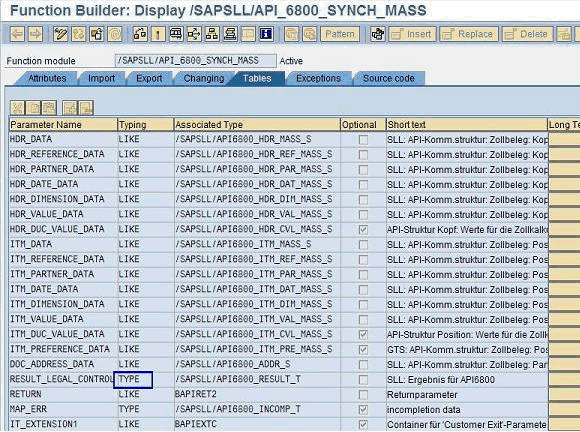
When you select this RFM in the BAPI Explorer, RESULT_LEGAL_CONTROL is not expanded correctly:

Log InLog in to view more of this document
Was this topic helpful?
Document Information
Modified date:
25 April 2025
UID
swg21496706