How To
Summary
The document provides with the steps to Audit the Relational Database Directory.
Objective
Understand who is making changes, additions, removal of Relational Database Directory entries.
Steps
Steps
First, verify that the QAUDJRN journal exists and that you are tracking for Systems Management Change *SYSMGT. Use the DSPSECAUD command and make sure the following settings are configured on your system:


  Security journal QAUDJRN exists . . . . . :  YES
Current QAUDCTL system value  . . . . . . :  *AUDLVL *OBJAUD
Current QAUDLVL system value  . . . . . . :  *SYSMGT
If not listed, use the CHGSECAUD command to add them to your system. The value *SYSMGT for the QAUDLVL system value is required to audit the changes to the Relational Database Directory and *OBJAUD to track the use of the CL commands.
Step 1.
Turn on object auditing on the commands that are used to perform actions on the Relational Database Directory:
  CHGOBJAUD OBJ(ADDRDBDIRE) OBJTYPE(*CMD) OBJAUD(*ALL)
CHGOBJAUD OBJ(CHGRDBDIRE) OBJTYPE(*CMD) OBJAUD(*ALL)
CHGOBJAUD OBJ(DSPRDBDIRE) OBJTYPE(*CMD) OBJAUD(*ALL)
CHGOBJAUD OBJ(RMVRDBDIRE) OBJTYPE(*CMD) OBJAUD(*ALL)
CHGOBJAUD OBJ(WRKRDBDIRE) OBJTYPE(*CMD) OBJAUD(*ALL)
CHGOBJAUD OBJ(CHGDDMTCPA) OBJTYPE(*CMD) OBJAUD(*ALL)
NOTE: This step is optional as the SM (Systems Management Change) auditing value tracks changes to the Relational Database Directory but it does not give you details as what was changed. Auditing the use of these commands will allow you to tracked the parameters used on the above commands.
Analyzing the Results.
Method 1 for releases 7.4, 7.5:
NOTE: This SQL sample uses the AUDIT_JOURNAL_SM table function only available on Releases 7.4 and 7.5. For older releases, use Method 2.
NOTE 2: The SQL table function is available with the following PTFs:
- R750: SF99950 Level 2
- R740: SF99704 Level 23
Step 1: Using the Run SQL Scripts tool, run the following SQL Statement:
SELECT ENTRY_TIMESTAMP,
       QUALIFIED_JOB_NAME,
       PROGRAM_LIBRARY,
       PROGRAM_NAME,
       ENTRY_TYPE,
       ENTRY_TYPE_DETAIL,
       ACCESS_TYPE,
       RDB_NAME,
       RDB_ALIAS
    FROM TABLE (
            SYSTOOLS.AUDIT_JOURNAL_SM(STARTING_TIMESTAMP => CURRENT TIMESTAMP - 7 DAY)  -- adjust the time period
        )
    WHERE ENTRY_TYPE = 'D';
NOTE: Modify the CURRENT TIMESTAMP to specify the number of days to included in the report.
Method 2 for older releases.
Step 1:
Create a file with the contents of SM (Systems Management Change) Operations:
CPYAUDJRNE ENTTYP(SM) OUTFILE(QGPL/QAUDIT) JRNRCV(*CURCHAIN) FROMTIME(020624 070000) TOTIME(020624 130000)
NOTE: Adjust the Time and Date.
NOTE 2: Replace QPGL with the name of the library where the file QAUDITSM is created.
Step 2:
Using the STRSQL command, run the following SQL Statement:
SELECT SMTSTP,
       SMJOB,
       SMUSER,
       SMNBR,
       SMUSPF,
       SMETYP,
       SMATYP,
       SMDRDA
    FROM qgpl/qauditsm
    WHERE SMETYP = 'D'
For more information on the Access Type, refer to the Security Reference Manual:
Step 3 - Analyzing the use of the CL Commands:
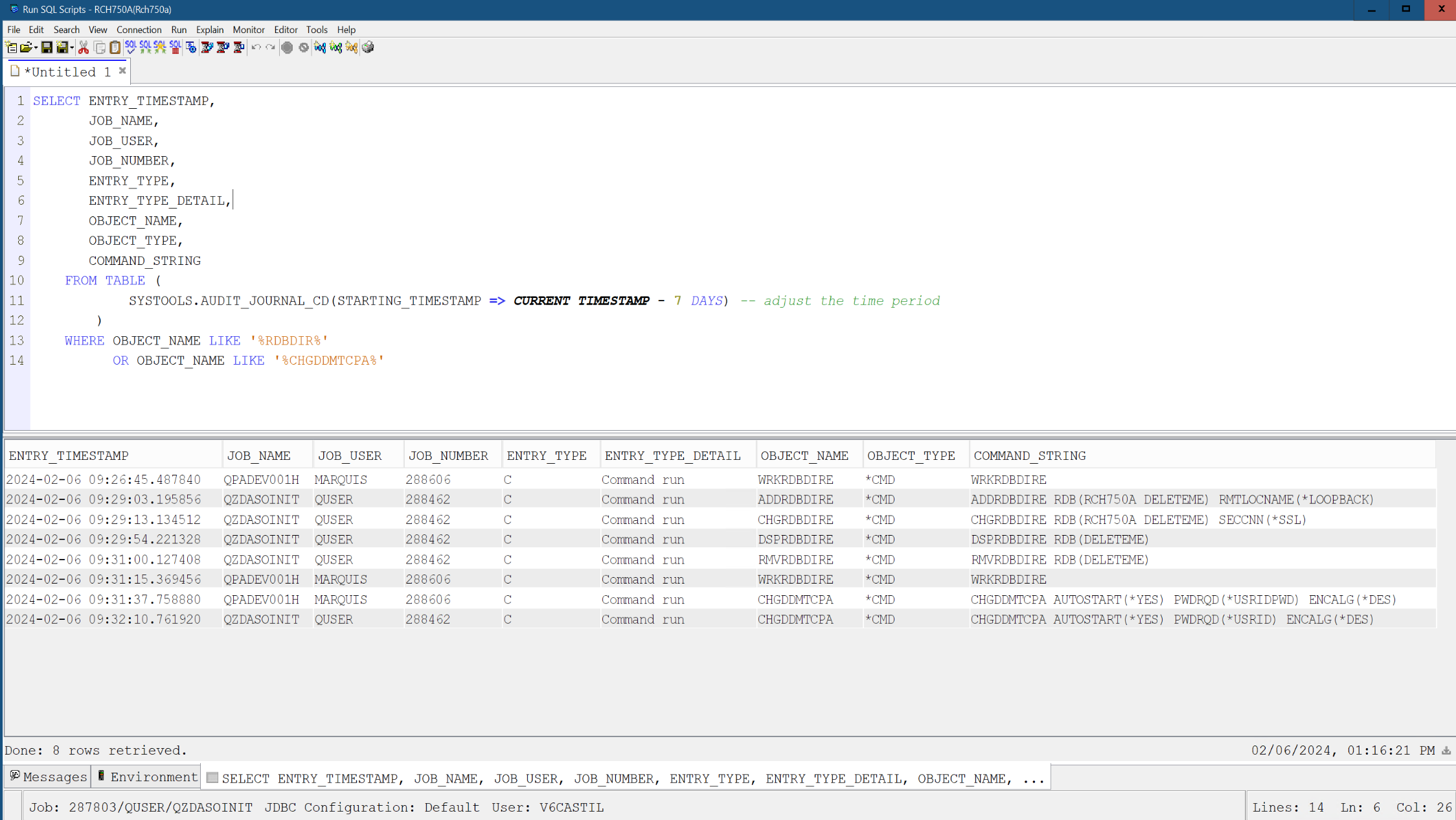
Using the SQL AUDIT_JOURNAL_CD table function you can create a report.
Authorization:
- You must have *USE authority to the journal and to all requested journal receivers.
- *OBJEXIST authority is required to the journal if object-name is omitted or if object-name specifies an object that no longer exists.
- If object-name is *ALL, you must be authorized to every object associated with a journal entry.
Using the RUN SQL Scripts tool, run the following SQL Statement:
SELECT ENTRY_TIMESTAMP,
       JOB_NAME,
       JOB_USER,
       JOB_NUMBER,
       ENTRY_TYPE,
       ENTRY_TYPE_DETAIL,
       OBJECT_NAME,
       OBJECT_TYPE,
       COMMAND_STRING
    FROM TABLE (
            SYSTOOLS.AUDIT_JOURNAL_CD(STARTING_TIMESTAMP => CURRENT TIMESTAMP - 7 DAYS) -- adjust the time period
        )
    WHERE OBJECT_NAME LIKE '%RDBDIR%'
          OR OBJECT_NAME LIKE '%CHGDDMTCPA%'
NOTE: Modify the CURRENT TIMESTAMP to specify the number of days to included in the report.
Document Location
Worldwide
[{"Type":"MASTER","Line of Business":{"code":"LOB57","label":"Power"},"Business Unit":{"code":"BU058","label":"IBM Infrastructure w\/TPS"},"Product":{"code":"SWG60","label":"IBM i"},"ARM Category":[{"code":"a8m0z0000000CHyAAM","label":"Security"}],"ARM Case Number":"","Platform":[{"code":"PF012","label":"IBM i"}],"Version":"7.2.0;7.3.0;7.4.0;7.5.0"}]
Was this topic helpful?
Document Information
Modified date:
06 February 2024
UID
ibm17115280