Troubleshooting
Problem
Advanced Systems Management Adapter (ASMA) Interconnect setup instructions for Servers.
Resolving The Problem
Advanced Systems Management Adapter (ASMA) Interconnect overview
The ASMA Interconnect allows you to connect servers that have an Advanced Systems Management (ASM) processor or ASM adapter, or both, to an ASM Interconnect network. Once these systems are connected to the ASM Interconnect network, you can:
- Connect the ASM adapters and ASM processors from twelve systems to a single ASM Interconnect bus
- Share ASM resources, information, and alerts between multiple systems without the need for additional communications hardware or Network Interface Cards (NICs)
- Use an ASM PCI adapter attached to the ASM Interconnect bus as an Ethernet or Token Ring gateway for your ASM Interconnect bus. This allows all ASM information generated by ASM processors attached to the ASM Interconnect bus to be forwarded to other systems on your Ethernet/Token-Ring network.
Summary
Connect up to 12 systems with ASM adapters and ASM processors, or ASM processors on a dedicated, independent bus. Send alerts and other ASM information between the systems on the ASM Interconnect bus. Install an ASM PCI adapter in a system on the ASM Interconnect bus and configure a gateway to forward alerts and information across your network.NOTES:
- You must purchase the IBM Netfinity ASM Token-Ring Option in order to configure the ASM PCI adapter on a Token-Ring network.
- A single system with an ASM PCI adapter installed can be configured as an Ethernet or Token-Ring Gateway for the ASM Interconnect bus. A maximum of ten systems with single ASM processors installed can be connected to the gateway.
- IBM Netfinity ASM PCI adapter replacement part numbers (FRUs)
- Hardware installation
- Systems configured with the ASM PCI adapter only
- Systems configured with the ASM PCI adapter and ASM processor
- Systems configured with the ASM processor only
- Configuration
- ASM processor and adapter configuration instructions
- ASM connectivity validation
IBM Netfinity ASM PCI adapter replacement part numbers (FRUs)
- 24P6538 Netfinity Advanced Systems Management PCI adapter
- 02K7007 56W Power supply
- 03K9318 Dual serial cable
- 33F8354 Battery FRU
- 28L4335 2x RS-485 cables
- 76H3537 Line cord
- 36L9903 Systems Management CD-ROM
- 09N9581 Ethernet cable
- 03K9319 RS-485 cable
- 03K9321 Peer to Peer Internal ASM Interconnect cable
- 85H3656 PCMCIA card
- 03K9323 Token-Ring cable
Hardware installation
Minimum hardware requirements are two systems, one with an ASM PCI adapter and one with either an ASM processor or an adapter. The internal ASM Interconnect cable is required for systems configured with the ASM processor. This cable connects the ASM processor on the planar to a knockout on the back of the system. Installation of the cable will vary between systems. Review the Hardware Maintenance Manual (HMM) for your system to locate the header for connecting the internal ASM interconnect cable.
- IBM Peer to Peer Internal ASM Interconnect cable, replacement part number (FRU) 03K9321

- ASM interconnect cable (either a or b).
- IBM Interconnect Cable for systems with no ASM PCI adapter installed, replacement part number (FRU) 03K9319

- IBM Interconnect Cable (dual Cable) for systems with a ASM PCI adapter and ASM processor installed, replacement part number (FRU) 28L4335

- IBM Interconnect Cable for systems with no ASM PCI adapter installed, replacement part number (FRU) 03K9319
- Refer to the diagrams below for cabling instructions for your system configuration:
Systems configured with the ASM PCI adapter only
- Connect the ASM Interconnect cable (single cable) to the RJ-485 port on the back of the ASM PCI adapter. An external power supply should be connected to the external power port on the ASM PCI adapter.

- Click here to go to configuration instructions
Systems configured with the ASM PCI adapter and ASM processor
- Connect either ASM Interconnect cable (dual cable) to the RJ-485 port on the back of the ASM PCI adapter. Connect the other to the RJ-485 coming from the internal ASM processor. An external power supply should be connected to the external power port on the ASM PCI adapter.
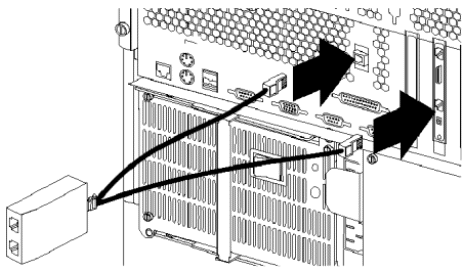
- Click here to go to configuration instructions
Systems configured with the ASM processor only
- Connect the ASM Interconnect cable (single cable) to the RJ-485 coming from the internal ASM processor.
:
- Click here to go to configuration instructions
Configuration
The ASM Interconnect network can support a maximum of 12 individual ASM connections for a single bus. Once the systems are connected using ASM Interconnect cables, they use the ASM Interconnect bus to share ASM resources and information.
Systems can be connected, or daisy-chained together using standard Ethernet cable.
NOTES:
- The ASM Interconnect network is a bus, not a ring. Systems must be connected to the ASM Interconnect bus in SERIES, with a beginning point and ending point. Closed loops are not supported.
- The total length of all Ethernet cables connecting the systems in the ASM Interconnect network should not exceed 300 feet.
- Each ASM PCI adapter or ASM processor that is attached to the ASM Interconnect bus counts as one connection.
Three systems attached to the ASM Interconnect bus

The above three systems are attached to the ASM Interconnect bus. The three machines use four connections. System one is attached to the ASM Interconnect bus through the ASM PCI adapter and ASM processor. System two is attached to the ASM Interconnect bus through the ASM processor. System three is attached to the ASM Interconnect bus through the ASM PCI adapter.
Click here to go to ASM processor and adapter configuration instructions
ASM processor and adapter configuration instructions
- Reboot your system with the IBM Netfinity Advanced System Management PCI adapter update diskette inserted in the diskette drive.
- Four options appear for selection.
- Hardware Status and Information - lists ASM self-test results and the ASM code version
- Configuration Settings - allows settings to be configured for the ASM adapter and ASM processor
- Update System Management Firmware - allows the flash update of the ASM PCI adapter firmware
- Update Secondary Device - allows the flash update of the firmware for the onboard ASM processor (do not use)
Select Configuration Settings, you will be prompted to select which hardware to configure.
- Click here for System Management processor configuration settings
- Click here for System Management adapter configuration settings
Select System Management Processor, you will be prompted to select settings options
- Alert Settings - allows you to configure alerts for hardware failure, over-temperature, voltage and other system events. This is not critical to the ASM Interconnect
- Dial In/Out Settings - allows you to configure dial in or dial out settings for the modem
NOTE: A user name and password is required for modem operation.
- General Settings - enter machine name, number and description (Optional)
- Modem Settings - allows you to configure the modem port. Accept all other default settings
Select System Management Adapter, you will prompted to select settings options
- General Settings
- Enter the identifying name and number for the Advanced System Management hardware.
- Enter the time and date of the ASM clock
- Schedule a time and date for the system to be automatically powered on
- Enter POST, Loader, and O/S time-out values or the Power Off Delay value.
NOTE: The Name and Number help you identify the systems on your network. The Name and Number values can be up to 15 characters in length.
- Network Settings
Enter IP Address, Subnet Mask, Host Name, Gateway and other TCP/IP settings
- Network Interface: select interface 1 or 2.
NOTE: 1 = Ethernet and 2 = Token-Ring
- Enable (or Disable) the network interface: available values are ENABLED and DISABLED.
NOTE: Only one network interface can be enabled at any time.
- Host Name: enter the host name to be used by the network interface.
- IP Address: enter the IP address to be used by the network interface.
- Subnet Mask: enter the subnet mask to be used by the network interface.
- Gateway: enter the IP address of the gateway to be used by the network interface.
- Line Type: select the line type to be used by the network interface. Available values are ETHERNET and TOKEN RING.
- Routing: enable or disable routing. Available values are ENABLED and DISABLED.
- Data Rate: select the data rate to be used. Available values depend on which Line Type is selected.
- If you have selected ETHERNET, available values are 10M, 100M, and AUTO
- If you have selected TOKEN RING, available values are 4M, 16M, and AUTO.
- Duplex: configure the duplex mode to be used by the network interface. Available values are FULL, HALF, and AUTO.
- MTU Size: specify the MTU size to be used by the network interface.
- MAC Address: specify the MAC address of the network interface.
- Network Interface: select interface 1 or 2.
- SNMP Settings
Not used for ASM Interconnect purposes.- SNMP Agent Enabled/Disabled: enable/Disable Netfinity Advanced System Management PCI adapter to forward alerts to SNMP managers on your network.
- Traps Disable: select this checkbox to prevent SNMP traps from being sent.
- System Contact: enter the name of the SNMP System Contact.
- System Location: enter your system's location.
- Community: use the left and right arrow keys to select and define one of up to three SNMP communities.
- Community Name: enter the name of the selected SNMP community.
- Community IP Address 1, 2, and 3: enter the IP addresses for the selected SNMP community.
Click here to go to ASM connectivity validation
ASM connectivity validation
Validate ASM Interconnect through the Web Interface. All the normal problem determination rules apply. If you have difficulty communicating between devices on the ASM Interconnect bus, break the problem down to its simplest components.
Setting up and testing connectivity between two systems on the ASM Interconnect bus
- Connect the IBM Internal ASM Interconnect cable to the Service Processor on Server A. Connect the ASM interconnect cable to the external RJ-485 port.
- Install PCI ASM adapter in Server B. Connect the IBM ASM interconnect cable to the RJ-485 port on the ASM adapter
- Connect the second pigtail (if installed) to the ASM processor port.
- Connect an Ethernet cable to the RJ-45 port on the ASM adapter.
NOTE: This cable should be connected to the same network as the network adapter cards in the two servers.
- Plug in the external power supply to the ASM adapter.
- Connect the two ASM Interconnect cable connectors using standard Ethernet cable.
- Click here to download the latest version of the IBM Netfinity Advanced System Management PCI adapter update diskette.
- Reboot Server A with the IBM Netfinity Advanced System Management PCI adapter update diskette inserted in the diskette drive.
- Select General Settings
- Enter the name of the server.
NOTE: Enter the NUMBER and ASSET fields with more information to describe the role or location of server.
- Select Save Settings
- Reboot server A
- Reboot Server B with the IBM Netfinity Advanced System Management PCI adapter update diskette inserted in the diskette drive.
- Select Configuration Settings. If the system has both the ASM adapter and ASM processor configured, both will be shown in the menu and they are configured one at a time.
- Select the ASM Processor
- Select General Settings
- Enter the name of the server
NOTE: Enter the NUMBER and ASSET fields with more information to describe the role or location of server.
- Select Save Settings
- Press Esc
- Select Network Settings.
- Enter the IP settings for the ASM Adapter. The IP and SUBNET settings should be in the same ranges as the NICs installed in the systems.
- Select Save the settings and exit.
- Reboot server B
- Open a command prompt and "ping" the assigned IP address (step h) to test the Ethernet interface of the ASM Adapter. If you do not get a normal PING response, verify the IP settings of the network adapter card and ASM adapter and make sure that the SUBNET and IP ranges are compatible. Also verify the cabling between the network adapter card, any hub/switch/router, and the ASM adapter.
- Open a Web browser on the system with the ASM adapter installed to test the ASM Interconnect.
- Enter the IP address assigned to the ASM adapter into the address field of the Web browser and press Enter.
- You will be prompted for a user name and password. The default user name is USERID (all caps) and the default password is PASSW0RD (all caps and the 0 in password is a ZERO, not the letter O). After you enter the user name/password, a welcome screen will appear:

- Click the Continue button. The Local System Menu will be displayed:

- Click R - Remote SP Access or type "R" in the Menu Selection box and click the Submit button. The Remote SP Access menu will appear:

- All ASM Interconnect-configured systems should be listed in the Remote SP Access list (as seen above). Click a System to view and change ASM settings and resources.
Document Location
Worldwide
Was this topic helpful?
Document Information
Modified date:
23 January 2019
UID
ibm1MIGR-40439