Troubleshooting
Problem
A table (file) on DB2 for i looks fine when I display it with DSPPFM but when I transfer it to the PC using IBM Access Client Solutions Data Transfer functionality, all the character data (CHAR) looks like it is encoded in Hex.
Cause
Run the command, "DSPFFD YourLib/YourFile" then page down to view the details for the individual fields. You might find some of the CHAR fields have a "Coded Character Set Identifier" (CCSID) of 65535.
65535 is a special character set that indicates the field contains binary data and should not have character conversion run on it.
DSPPFM and other commands run interactively convert the data to the job default CCSID because data in CCSID has no characters associated with them. On an EBCDIC English system, that CCSID is typically 37.
Resolving The Problem
ACS Data Transfer (and most other IBM i data providers) have an option to force CHAR data with CCSID 65535 to be converted based on the CCSID of the job that is servicing the connection. To enable it, click the Properties button in the data transfer request:
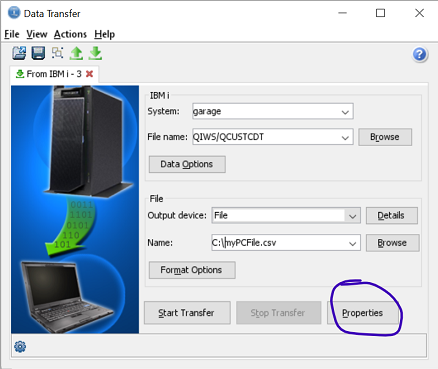
...and check the "Convert CCSID 65535" box:

Hit [OK] and re-try the data transfer.
Document Location
Worldwide
[{"Business Unit":{"code":"BU070","label":"IBM Infrastructure"},"Product":{"code":"SWG60","label":"IBM i"},"ARM Category":[{"code":"a8m0z000000cwMLAAY","label":"Data Access-\u003EData Transfer"}],"ARM Case Number":"TS003747399","Platform":[{"code":"PF025","label":"Platform Independent"}],"Version":"All Version(s)","Line of Business":{"code":"LOB68","label":"Power HW"}}]
Was this topic helpful?
Document Information
Modified date:
16 October 2024
UID
ibm16217631