3Com EtherLink server adapter fault tolerance setup and testing under Microsoft Windows NT 4.0 for Servers and IntelliStation.
3Com EtherLink server adapter fault tolerance setup under Microsoft Windows NT 4.0
This document details the fault tolerant setup and testing of the 3Com EtherLink server adapter under Microsoft Windows NT 4.0. While it is possible to install 3Com Network Interface Cards (NICs) as part of the regular operating system install, this document assumes that the operating system is already installed and up and running. This was done to keep the procedure as simple as possible.
The install will require two diskettes. Diskette one is a common driver diskette that includes the drivers for Windows NT 4. The other diskette is the 3Com DynamicAccess Server software that sets up the actual teaming and load balancing.
Setting up the fault tolerant group
- With the server powered off, install the EtherLink adapters in the system. Try to install the adapters in the same type of slot, i.e. both 64-bit, both hot swap, etc.
- Power up the server and boot up to the operating system. Windows NT 4 does not detect NICs after the initial install.
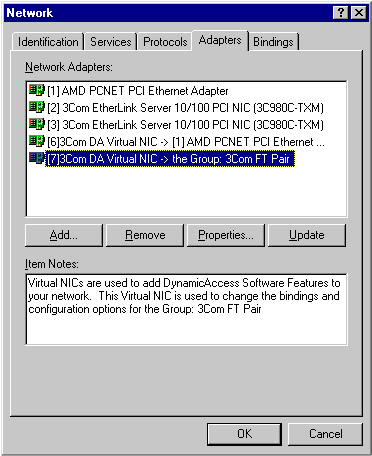
- Right-click Network Neighborhood and select Properties. Select the Adapters tab of Network Properties and select the Add... button. The Add Network Adapter dialog box will appear.
- Place the driver diskette in the diskette drive and select Have Disk... After scanning the diskette, the Select OEM Option window will appear. The 3Com NIC should already be highlighted. Click OK to load the driver. The Network Properties will now display the NICs.
- Remove the driver diskette and insert the 3Com DynamicAccess Software diskette. Open or browse the diskette and run DASERVER.EXE. A dialog box will open explaining that you are about to install the DynamicAccess Software. Click Yes to continue. Another box will open imploring you to please wait while the software installs. After the install completes, you will be prompted to reboot the system. Reboot the system.
- After rebooting, open the control panel and check that you have two 3Com icons, one for DynamicAccess Server and one for DynamicAccess Software. The DynamicAccess Software allows you to configure how the pair prioritizes LAN traffic for different classes of files. No adjustment is needed to create a fault tolerant pair.


- The DynamicAccess Server applet is used to create adapter teaming. Double-click the DynamicAccess Server icon. A dialog box will appear, displaying two panes. The pane on the left shows all the NICs installed in the server. The pane on the right shows all adapter groups that have been configured. To configure a group, click the Create Group button.

- The Create Group dialog box opens. Input group name of your choice and select Load Balancing options. By default Receive (Rx) and Transmit (Tx) load balancing are enabled. Depending on the your setup and LAN hardware, it may not be possible to do Rx and/or TX Load Balancing. To create a simple fail over pair, disable all Load Balancing. When you disable Receive Load Balancing, the Transfer Load Balancing will no longer be grayed-out and can then be deselected. After completing all settings, click OK.

- The DynamicAccess Protocol Properties box will now display the new group that you just created. Notice that the settings used in Create Group are displayed after the group name.

- Now that the group has been created, click each NIC and then click the ADD NIC >> button. The first NIC added to team is the primary NIC, as denoted by the "P" overlay on the icon in the right panel.

- Once all the adapters are added to the group, click OK to close the DAP Properties. If you want to change the primary NIC, just highlight the NIC you want to be primary, then click the Select Primary button. If you want to delete a group, you must highlight and remove each NIC, then highlight the group and click Delete Group.

- A dialog box will open asking if you want to adjust the Traffic Prioritization or Administrative settings before exiting. As stated before, these are not needed to setup a simple adapter pair. Click the No button.

- Right-click Network Neighborhood and select properties. Select the protocol tab, click TCP/IP, and select properties. In the drop down Adapter box, select the adapter group you just created. Here is where the protocol and service properties are set for the group.


- Setup is complete. Click OK to close the Microsoft TCP/IP Properties window. Proceed to Testing the fault tolerant group to ensure everything has been setup and is working correctly.
Testing the fault tolerant group - To test the fault tolerant group after setup, open the Windows NT system event viewer, then unplug the cable going to the Primary adapter. You may have to refresh event viewer to see the error. The first error is a "Received media disconnect".

- The next error message is "Primary Link down".

- Next, you will see the message "Switching to a new NIC".

- Plug the cable back into the primary NIC. The next message is "Received media connect".

- The group then reverts back to the preferred primary NIC.

- Testing is complete. Click Close to exit the Event Detail window.
Back to top
IntelliStation Pro:Windows NT
Older System x:Windows NT
[{"Type":"HW","Business Unit":{"code":"BU016","label":"Multiple Vendor Support"},"Product":{"code":"HW189","label":"Older System x->xSeries 360"},"Platform":[{"code":"PF033","label":"Windows"}],"Line of Business":{"code":"","label":""}},{"Type":"HW","Business Unit":{"code":"BU016","label":"Multiple Vendor Support"},"Product":{"code":"HW18G","label":"Older System x->xSeries 200"},"Platform":[{"code":"PF033","label":"Windows"}],"Line of Business":{"code":"","label":""}},{"Type":"HW","Business Unit":{"code":"BU016","label":"Multiple Vendor Support"},"Product":{"code":"HW18H","label":"xSeries 220"},"Platform":[{"code":"PF033","label":"Windows"}],"Line of Business":{"code":"","label":""}},{"Type":"HW","Business Unit":{"code":"BU016","label":"Multiple Vendor Support"},"Product":{"code":"HW18J","label":"Older System x->xSeries 230"},"Platform":[{"code":"PF033","label":"Windows"}],"Line of Business":{"code":"","label":""}},{"Type":"HW","Business Unit":{"code":"BU016","label":"Multiple Vendor Support"},"Product":{"code":"HW18K","label":"Older System x->xSeries 240"},"Platform":[{"code":"PF033","label":"Windows"}],"Line of Business":{"code":"","label":""}},{"Type":"HW","Business Unit":{"code":"BU016","label":"Multiple Vendor Support"},"Product":{"code":"HW18L","label":"Older System x->xSeries 330"},"Platform":[{"code":"PF033","label":"Windows"}],"Line of Business":{"code":"","label":""}},{"Type":"HW","Business Unit":{"code":"BU016","label":"Multiple Vendor Support"},"Product":{"code":"HW18M","label":"Older System x->xSeries 340"},"Platform":[{"code":"PF033","label":"Windows"}],"Line of Business":{"code":"","label":""}},{"Type":"HW","Business Unit":{"code":"BU016","label":"Multiple Vendor Support"},"Product":{"code":"HW18Q","label":"System x->xSeries 232"},"Platform":[{"code":"PF033","label":"Windows"}],"Line of Business":{"code":"","label":""}},{"Type":"HW","Business Unit":{"code":"BU016","label":"Multiple Vendor Support"},"Product":{"code":"HW18R","label":"Older System x->xSeries 250"},"Platform":[{"code":"PF033","label":"Windows"}],"Line of Business":{"code":"","label":""}},{"Type":"HW","Business Unit":{"code":"BU016","label":"Multiple Vendor Support"},"Product":{"code":"HW18T","label":"Older System x->xSeries 300"},"Platform":[{"code":"PF033","label":"Windows"}],"Line of Business":{"code":"","label":""}},{"Type":"HW","Business Unit":{"code":"BU016","label":"Multiple Vendor Support"},"Product":{"code":"HW18U","label":"Older System x->xSeries 342"},"Platform":[{"code":"PF033","label":"Windows"}],"Line of Business":{"code":"","label":""}},{"Type":"HW","Business Unit":{"code":"BU016","label":"Multiple Vendor Support"},"Product":{"code":"HW18V","label":"Older System x->xSeries 350"},"Platform":[{"code":"PF033","label":"Windows"}],"Line of Business":{"code":"","label":""}},{"Type":"HW","Business Unit":{"code":"BU016","label":"Multiple Vendor Support"},"Product":{"code":"HW18W","label":"Older System x->xSeries 370"},"Platform":[{"code":"PF033","label":"Windows"}],"Line of Business":{"code":"","label":""}},{"Type":"HW","Business Unit":{"code":"BU016","label":"Multiple Vendor Support"},"Product":{"code":"HW18X","label":"Older System x->xSeries 380"},"Platform":[{"code":"PF033","label":"Windows"}],"Line of Business":{"code":"","label":""}},{"Type":"HW","Business Unit":{"code":"BU016","label":"Multiple Vendor Support"},"Product":{"code":"HWN01","label":"Older System x->Netfinity 7000"},"Platform":[{"code":"PF033","label":"Windows"}],"Line of Business":{"code":"","label":""}},{"Type":"HW","Business Unit":{"code":"BU016","label":"Multiple Vendor Support"},"Product":{"code":"HWN02","label":"Older System x->Netfinity 3500"},"Platform":[{"code":"PF033","label":"Windows"}],"Line of Business":{"code":"","label":""}},{"Type":"HW","Business Unit":{"code":"BU016","label":"Multiple Vendor Support"},"Product":{"code":"HWN03","label":"Older System x->Netfinity 3000"},"Platform":[{"code":"PF033","label":"Windows"}],"Line of Business":{"code":"","label":""}},{"Type":"HW","Business Unit":{"code":"BU016","label":"Multiple Vendor Support"},"Product":{"code":"HWN04","label":"Older System x->Netfinity 5500"},"Platform":[{"code":"PF033","label":"Windows"}],"Line of Business":{"code":"","label":""}},{"Type":"HW","Business Unit":{"code":"BU016","label":"Multiple Vendor Support"},"Product":{"code":"HWN05","label":"Older System x->Netfinity 5000"},"Platform":[{"code":"PF033","label":"Windows"}],"Line of Business":{"code":"","label":""}},{"Type":"HW","Business Unit":{"code":"BU016","label":"Multiple Vendor Support"},"Product":{"code":"HWN06","label":"Older System x->Netfinity 1000"},"Platform":[{"code":"PF033","label":"Windows"}],"Line of Business":{"code":"","label":""}},{"Type":"HW","Business Unit":{"code":"BU016","label":"Multiple Vendor Support"},"Product":{"code":"HWN07","label":"Older System x->Netfinity 8500R"},"Platform":[{"code":"PF033","label":"Windows"}],"Line of Business":{"code":"","label":""}},{"Type":"HW","Business Unit":{"code":"BU016","label":"Multiple Vendor Support"},"Product":{"code":"HWN08","label":"Older System x->Netfinity 5600"},"Platform":[{"code":"PF033","label":"Windows"}],"Line of Business":{"code":"","label":""}},{"Type":"HW","Business Unit":{"code":"BU016","label":"Multiple Vendor Support"},"Product":{"code":"HWN09","label":"Older System x->Netfinity 4000R"},"Platform":[{"code":"PF033","label":"Windows"}],"Line of Business":{"code":"","label":""}},{"Type":"HW","Business Unit":{"code":"BU016","label":"Multiple Vendor Support"},"Product":{"code":"HWN10","label":"Older System x->Netfinity 5100"},"Platform":[{"code":"PF033","label":"Windows"}],"Line of Business":{"code":"","label":""}},{"Type":"HW","Business Unit":{"code":"BU016","label":"Multiple Vendor Support"},"Product":{"code":"HWN11","label":"Older System x->Netfinity 7100"},"Platform":[{"code":"PF033","label":"Windows"}],"Line of Business":{"code":"","label":""}},{"Type":"HW","Business Unit":{"code":"BU016","label":"Multiple Vendor Support"},"Product":{"code":"HWN12","label":"Older System x->Netfinity 6000R"},"Platform":[{"code":"PF033","label":"Windows"}],"Line of Business":{"code":"","label":""}},{"Type":"HW","Business Unit":{"code":"BU016","label":"Multiple Vendor Support"},"Product":{"code":"HWN13","label":"Older System x->Netfinity 4500R"},"Platform":[{"code":"PF033","label":"Windows"}],"Line of Business":{"code":"","label":""}},{"Type":"HW","Business Unit":{"code":"BU016","label":"Multiple Vendor Support"},"Product":{"code":"HWN15","label":"Older System x->Netfinity 7600"},"Platform":[{"code":"PF033","label":"Windows"}],"Line of Business":{"code":"","label":""}},{"Type":"HW","Business Unit":{"code":"BU016","label":"Multiple Vendor Support"},"Product":{"code":"HWN16","label":"Older System x->Netfinity 3500 M10"},"Platform":[{"code":"PF033","label":"Windows"}],"Line of Business":{"code":"","label":""}},{"Type":"HW","Business Unit":{"code":"BU016","label":"Multiple Vendor Support"},"Product":{"code":"HWN17","label":"Older System x->Netfinity 3500 M20"},"Platform":[{"code":"PF033","label":"Windows"}],"Line of Business":{"code":"","label":""}},{"Type":"HW","Business Unit":{"code":"BU016","label":"Multiple Vendor Support"},"Product":{"code":"HWN18","label":"Older System x->Netfinity 5500 M10"},"Platform":[{"code":"PF033","label":"Windows"}],"Line of Business":{"code":"","label":""}},{"Type":"HW","Business Unit":{"code":"BU016","label":"Multiple Vendor Support"},"Product":{"code":"HWN19","label":"Older System x->Netfinity 5500 M20"},"Platform":[{"code":"PF033","label":"Windows"}],"Line of Business":{"code":"","label":""}},{"Type":"HW","Business Unit":{"code":"BU016","label":"Multiple Vendor Support"},"Product":{"code":"HWN20","label":"Older System x->Netfinity 7000 M10"},"Platform":[{"code":"PF033","label":"Windows"}],"Line of Business":{"code":"","label":""}},{"Type":"HW","Business Unit":{"code":"BU054","label":"Systems w\/TPS"},"Product":{"code":"HWP01","label":"IntelliStation Pro->IntelliStation M Pro"},"Platform":[{"code":"PF033","label":"Windows"}],"Line of Business":{"code":"","label":""}},{"Type":"HW","Business Unit":{"code":"BU054","label":"Systems w\/TPS"},"Product":{"code":"HWP02","label":"IntelliStation Pro->IntelliStation Z Pro"},"Platform":[{"code":"PF033","label":"Windows"}],"Line of Business":{"code":"","label":""}},{"Type":"HW","Business Unit":{"code":"BU054","label":"Systems w\/TPS"},"Product":{"code":"HWP03","label":"IntelliStation Pro->IntelliStation E Pro"},"Platform":[{"code":"PF033","label":"Windows"}],"Line of Business":{"code":"","label":""}},{"Type":"HW","Business Unit":{"code":"BU054","label":"Systems w\/TPS"},"Product":{"code":"HWP99","label":"IntelliStation Pro->IntelliStation R Pro"},"Platform":[{"code":"PF033","label":"Windows"}],"Line of Business":{"code":"","label":""}}]