This section illustrates the warehouse solution using Microsoft SQL Server.
Figure 1 presents the options for a Tivoli® Data Warehouse solution using Microsoft SQL Server for the warehouse database. The diagram summarizes the supported operating system platforms for the various warehousing components, the supported database products, and the connections between components. For more specific information about supported operating systems and database products, including product names and versions, see Hardware and software requirements.
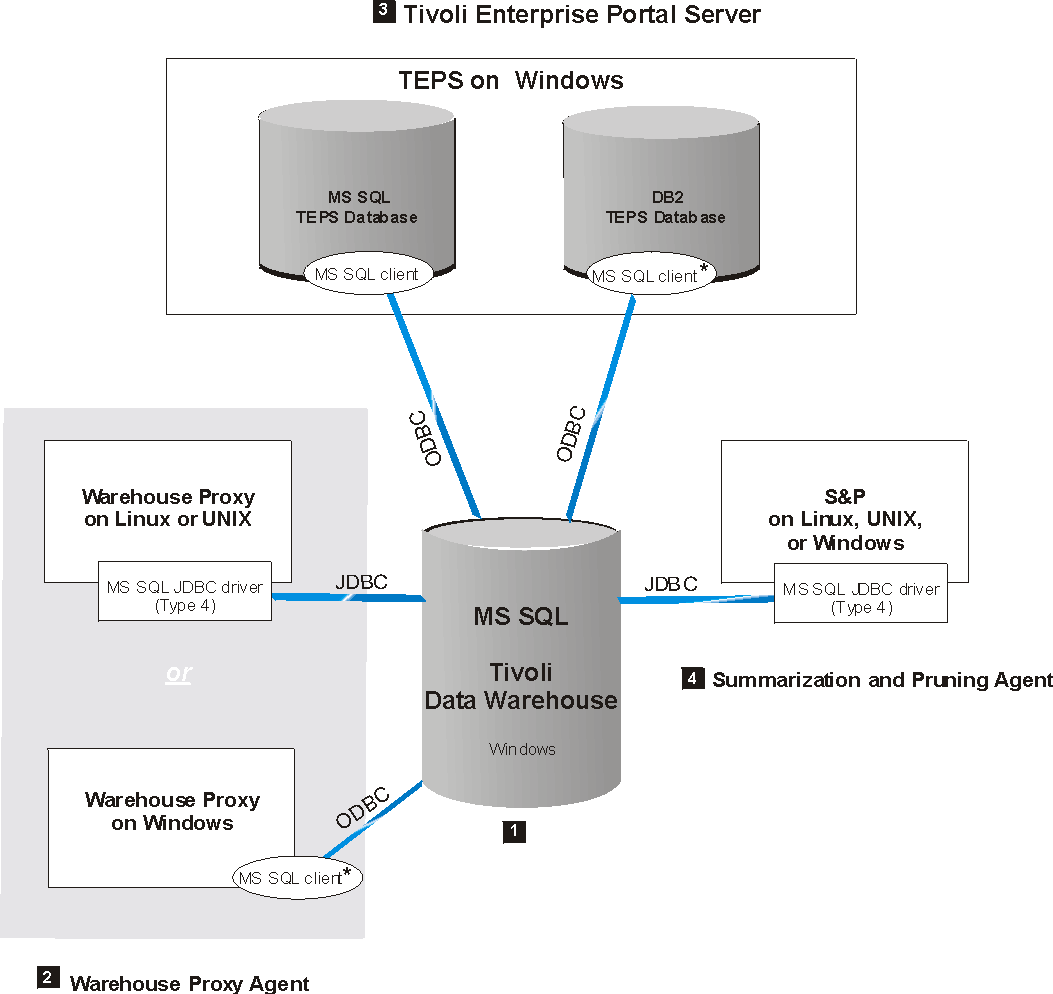
In the following discussion, numbered product components correspond to the numbers on the diagram.
 Tivoli Data Warehouse on Microsoft SQL Server
A Tivoli Data Warehouse database on Microsoft SQL Server can be installed on supported Windows platforms.
 Warehouse
Proxy Agent
Warehouse
Proxy Agent
A Warehouse Proxy Agent on Windows communicates with the warehouse database through an ODBC connection. The ODBC driver is included with the Microsoft SQL Server client. If the Tivoli Data Warehouse is located on a remote computer, install a Microsoft SQL Server client on the local computer where the Warehouse Proxy Agent is located. Also, configure a remote client connection to the Tivoli Data Warehouse.
 Tivoli
Enterprise Portal Server
Tivoli
Enterprise Portal Server
A Tivoli Enterprise Portal Server on Windows can connect to a Microsoft SQL Server data warehouse through a Microsoft SQL Server client installed on the portal server. If the portal server database (designated as TEPS database in the diagram) uses Microsoft SQL Server, the client already exists. Manually install a Microsoft SQL Server client on the portal server only if the portal server database uses DB2® for Linux, UNIX and Windows.
The portal server communicates with the warehouse database through an ODBC connection. The ODBC driver is included with the Microsoft SQL Server client. Configure a remote client connection to the Tivoli Data Warehouse.
 Summarization
and Pruning Agent
Summarization
and Pruning Agent