You can configure SNMP by completing the following procedure.
About this task
The IBM® Tivoli® Storage Manager SNMP set
up procedure is illustrated by Figure 1:
Figure 1. IBM Tivoli Storage Manager SNMP Set
Up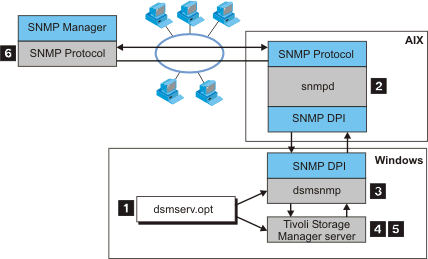
To set up Tivoli Storage
Manager monitoring
through SNMP, do the following:Procedure
- Install, configure, and
start the SNMP agent as described
in the documentation for that agent. The SNMP agent must support
the DPI Version 2.0 standard. Tivoli Storage
Manager supports
the SNMP agent that is built into the AIX operating system.
 Configure the AIX SNMP agent by customizing the
SNMP
file; the SNMP, V1 file is named: /etc/snmpd.conf, the SNMP,
V3 file is named: /etc/snmpdv3.conf. A default configuration
for SNMP, V1 might look like this:
Configure the AIX SNMP agent by customizing the
SNMP
file; the SNMP, V1 file is named: /etc/snmpd.conf, the SNMP,
V3 file is named: /etc/snmpdv3.conf. A default configuration
for SNMP, V1 might look like this:
where is the IP address of the system running the SNMP management application.logging file=/var/snmp/snmpd.log enabled logging size=0 level=0 community public community private 127.0.0.1 255.255.255.255 readWrite community system 127.0.0.1 255.255.255.255 readWrite 1.17.2 view 1.17.2 system enterprises view trap public <snmp_manager_ip_adr> 1.2.3 fe snmpd maxpacket=16000 smuxtimeout=60 smux 1.3.6.1.4.1.2.3.1.2.2.1.1.2 public Attention: The trap statement also defines
the
system to which the AIX SNMP
agent forwards traps that it receives.Before starting the agent, ensure that the dpid2 and snmpd subsystems have been started.Important: The dpid2 subsystem is started automatically through the snmpd subsystem in SNMP, V3. The dpid2 subsystem must be manually started independently of the snmpd subsystem with SNMP, V1. The snmpd and dpid2 subsystem
status can be reviewed by issuing the following commands:
The subsystems can be started by issuing the following commands:lssrc -s snmpd lssrc -s dpid2startsrc -s dpid2 startsrc -s snmpd