CICS interface to JES
CICS® provides a programming interface to JES (the Job Entry Subsystem component of MVS™) that allows CICS applications to create and retrieve spool files.
Spool files are managed by JES and are used to buffer output directed to low-speed peripheral devices (printers, punches, and plotters) between the job that creates them and actual processing by the device. Input files from card readers are also spool files and serve as buffers between the device and the jobs that use the data.
- SPOOLOPEN INPUT, which opens a file for input
- SPOOLOPEN OUTPUT, which opens a file for output
- SPOOLREAD, which retrieves the next record from an input file
- SPOOLWRITE, which adds one record to an output file
- SPOOLCLOSE, which closes the file and releases it for subsequent processing by JES
“Input” and “output” here refer to the CICS point of view here; what is spool output to one job is always spool input to another job or JES program.
These commands can be used with either the JES2 or JES3 form of JES, although some restrictions apply to each (see Spool interface restrictions). The term JES refers to both. You can support the requirements of other products to exchange files with other systems connected through a JES remote spooling communications subsystem (RSCS) network.
- Create an (output) file for printing or other processing by JES.
JES manages most of the “unit record” facilities of the operating
system, including high-speed printers, and card readers. In order
to use these facilities, you pass the data to be processed to JES
in a spool file. See Figure 1
Figure 1. Create a file and write it to the JES spool 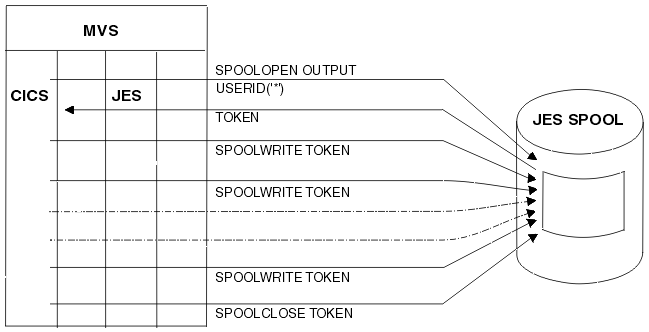
- Submit a batch job to MVS. Spool files directed to the JES “internal reader” are treated as complete jobs and executed.
- Create an (output) file to pass data to another job (outside of your CICS), that runs under MVS.
- Retrieve data passed from such a job. See Figure 2
Figure 2. Retrieve data from the JES spool 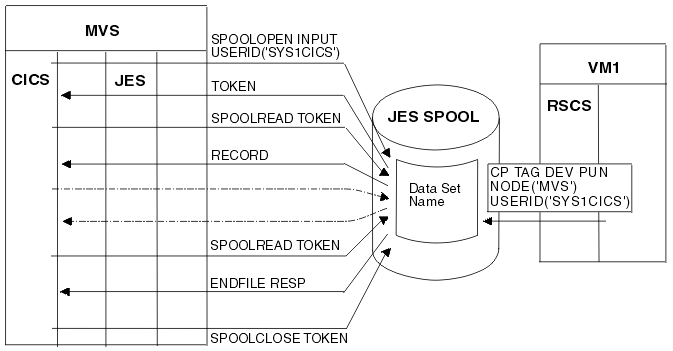
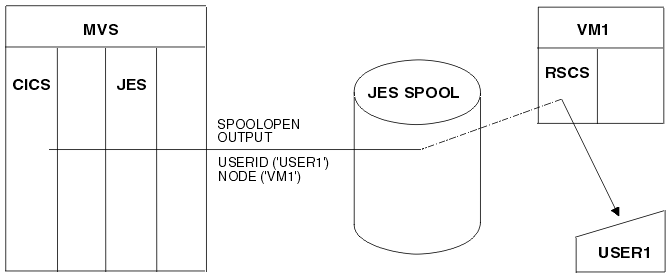
- Create a file to pass data to another operating system, such as
VM, VSE/ESA, or an MVS system other than the
one under which your CICS is executing. See Figure 3.
Figure 3. Send a written file to a remote destination