subscribe iconSubscribe to this information

xSeries 235

Learn how to install a card number 2689 machine type 1519 model 100 IXA card into an xSeries® 235 server.

The IXA card can be installed with the IBM® eServer™ i5 or eServer p5 server system power on or the system power off.
Restriction: On iSeries® systems the IXA adapter can only be installed with the iSeries server power off.

To install the card, complete the following steps. You might need to refer to your xSeries server information for some of the steps.

You must install a Remote Supervisor Adapter card (P/N 09N7585 or regional equivalent) or a Remote Supervisor Adapter II card (P/N 59P2984 or regional equivalent) in the server before installing the Integrated xSeries Adapter (IXA) card. Refer to xSeries documentation for information on installing a Remote Supervisor Adapter card. Refer to Remote Supervisor Adapter II documentation for information on installing a Remote Supervisor Adapter II.
Note: Do not install the external power supply included with either the Remote Supervisor Adapter and Remote Supervisor Adapter II.
  1. Plug the xSeries display into the video connector on the Remote Supervisor Adapter II rather than into the built-in xSeries video connector. The system BIOS and Remote Supervisor Adapter's firmware must be updated to the latest level once the Remote Supervisor Adapter has been installed. For information, go to Update the xSeries server firmware.
  2. If you want to install with the i5 or p5 server system power off, see Stop the system or logical partition for instructions on stopping the system. Then return to this step.
  3. Ensure that the xSeries server power is off.
  4. Unplug the xSeries server power cord from the electrical outlet.
    Note: This system might be equipped with a second power supply. Before continuing with this procedure, ensure that all power sources to the system have been completely disconnected.
  5. For models 11X 1AX, 21X, 2AX, 31X, 3AX, 41X, and 4AX, refer to the xSeries information to install the card in card position 4. (Install in card position 4 even though card position 5 might be specified in other documentation.)
  6. For all other models, follow these steps:
    1. Provide 3.3v standby power for the card position.
    2. Locate J42.
      J42 location
    3. Move the jumper from pins 1 and 2 to pins 2 and 3.
    4. Refer to the xSeries information to install the card in card position 5.
      Note: Two card positions are used by the card, so you might need to move an existing card to install the Integrated xSeries Adapter (IXA) card in the correct position. Also, you might need to remove the IXA card extender prior to installing the IXA card.
  7. After the card is installed, return to these instructions.
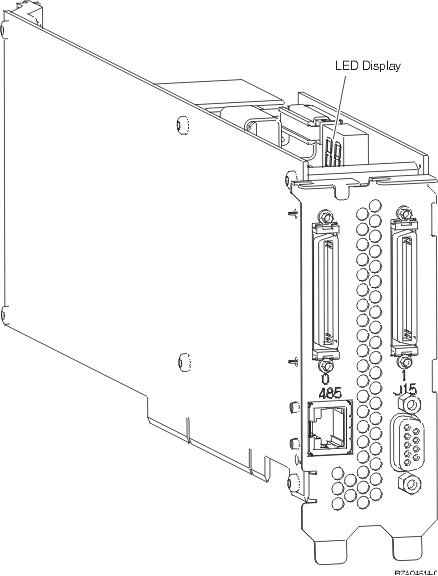
  8. Connect the SPCN Connection Block (P/N 04N2652) to the IXA card J15 position. Connect the cable to the SPCN network of your system. Ensure that the cable is routed to maintain a recommended minimum 15 centimeter (6-inch) separation from any alternating current (ac) power cord.
    J15 label
  9. Connect RS-485 shielded cable (P/N 21P4162) to the IXA card 485 label.
  10. Based on the remote supervisor adapter installed, connect the other end of the cable as follows:
    • With a Remote Supervisor Adapter installed, connect the other end of the cable to one of the two ports on the ASM (Advanced System Management) Interconnect Module (P/N 03K9315).
    • With a Remote Supervisor Adapter II installed, connect the other end of the cable to one of the two ASM RS-485 connectors on the Advanced System Management breakout cable included with the Remote Supervisor Adapter II.
  11. Connect the terminator plug, P/N 59P2951, to the unused port on either the ASM Interconnect Module or the Advanced System Management breakout cable.
  12. Based on the remote supervisor adapter installed,
    • With a Remote Supervisor Adapter installed, connect the plug end of the ASM Interconnect Module to the Remote Supervisor Adapter ASM interconnect port, 485 label.
      ASM Interconnect Module
    • With a Remote Supervisor Adapter II installed, connect the plug end of the Advanced System Management breakout cable to the ASM connector on the Remote Supervisor Adapter II (if not already installed). For more information, see the documentation for the Remote Supervisor Adapter II.
  13. Connect any high-speed link (HSL) cables that you ordered to the card 0 and 1 label. For more information, see High-speed link (HSL) information in the IBM Systems Hardware Information Center
  14. Plug the xSeries server into an electrical outlet.
  15. Go to Expansion units in the Installing hardware topic to complete setup for the xSeries server. Then return to this step.
  16. If the i5 or p5 server system power is off, or on System i® servers start the system. For instructions on starting the system, see Start the system or logical partition. Then return to this step.
    Important: Do not turn on the xSeries server using the xSeries power switch. Do not turn on the xSeries server using hardware service manager.
  17. Wait for the system to detect that the IXA card is installed and to turn on the xSeries server.
    Note: Power-on might take several minutes because the IXA card's SPCN firmware might require automatic update to complete.
  18. Verify that the IXA card is functional. For instructions, see Verify the installed part and select the appropriate procedure. Then return to this step.
  19. To complete the installation, go to Windows® environment on iSeries in the iSeries Information Center.

Send feedback | Rate this page

Last updated: Fri, Oct 30, 2009