TCP and SSL proxy junctions
You can create WebSEAL junctions that allow communication to traverse network topologies that use HTTP or HTTPS proxy servers. You can configure the junction to handle requests as standard TCP communication or protected SSL communication.
The create command
requires one of the following
arguments to the type option to establish either
a TCP-based or SSL-based junction through a proxy server:
- –t tcpproxy
- –t sslproxy
Both create and add commands require the following options and arguments to identify the proxy server and the target Web server:
| Options | Description |
|---|---|
| –H host-name | The DNS host name or IP address of the proxy server. |
| –P port | The TCP port of the proxy server. |
| –h host-name | The DNS host name or IP address of the target Web server. |
| –p port | The TCP port of target Web server. Default is 80 for TCP junctions; 443 for SSL junctions. |
Example TCP
proxy junction (entered as one line):
pdadmin> server task web1-webseald-cruz create -t tcpproxy
-H clipper -P 8081 -h www.ibm.com -p 80 /ibm
Example
SSL proxy junction (entered as one line):
pdadmin> server task web1-webseald-cruz create -t sslproxy
-H clipper -P 8081 -h www.ibm.com -p 443 /ibm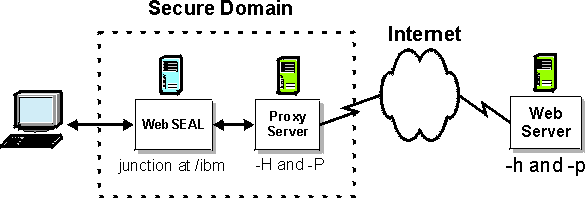
TCP and SSL proxy virtual host junctions are also supported.