The Update operation updates a document or folder properties
in the CMIS server based
on the request from the SCA component.
Document Types
All documents in the
CMIS server have
a unique
Object ID and a
Document Path associated
with it. The adapter uses the value set in the unique Object ID to
search for the document in the specified
Content Management Repository.
If the Object ID is not provided in the request business object, the
adapter tries to use the value set in the Document Path. The adapter
throws an error when both the Object ID and the Document Path are
not provided in the request business object.
Note: When both Object
ID and document path are provided as input to the operation, the Object
ID takes a precedence over the document path value to perform the operation.
After the adapter receives the update request from the SCA application
along with the unique Object ID or the Document Path of the document,
the adapter processes the request and makes the specified updates
to the document.
Every Document Type has a set of named, but
not explicitly ordered properties, which are added in a separate Business
Object. The name of this business object would be the Document
Type in Camel-case followed by the word Properties.
The incoming request business object can contain updates for the document
itself or one or more of its Properties.
For example, the structure of a request Document type is modeled
as the below business object:
Figure 1. Structure
of a request business object
By default, the adapter updates only those items in the document
(content and Properties) that have valid data in the corresponding
business object fields. During an Update operation, if the value of
a Property field on the business object is explicitly set to null,
the adapter updates the document by removing the item from the document.
The content of the Document is handled in a separate business object
titled DocumentContent.
LocalPath and Bytes are
options for filling up the content that must go into the document. If
you want to refer to a file in the local file system from which content
is to be updated, provide the absolute file name in the LocalPath Business
Object field. If you want to provide the content as hexBinary bytes,
provide the content in hexBinary form in the Bytes Business
Object field.
The Bytes field takes precedence over the LocalPath field. Therefore,
if you provide values for both the Bytes and the LocalPath fields,
the adapter takes the value provided in the Bytes field and continue
the process.
After the document is updated, it is sent back to the calling component
to indicate that the document was updated successfully.
Note: The document content is not appended when it is updated
as the version of the document is maintained.
The response sent back to the calling component contains just the
Properties business object. The response also has attributes that
include the Object ID and information about the result of the operation.
Figure 2. Structure of a response business object
Folders
All folders in the
CMIS server have
a unique
Object ID -
cmisU58objectId field
in the Properties Business Object and a
Path -
cmisU58path field
in the Properties business object, associated with it. The adapter
uses the value set in the unique Object ID to search for the folder
in the specified
Content Management Repository.
If the Object ID is not provided in the request business object, the
adapter tries to use the value set in the Folder Path. The adapter
throws an error when both the Object ID and the Folder Path are not
provided in the request business object.
Note: When both Object
ID and Folder Path are provided as
input to the operation, the Object ID takes a
precedence over the Folder Path value to perform the operation.
After the adapter receives the update request from the SCA application
along with the unique
Object ID or the
Folder
Path of the folder, the adapter processes the request and
makes the specified property updates to the folder.
Figure 3. Structure of a request business object for Folders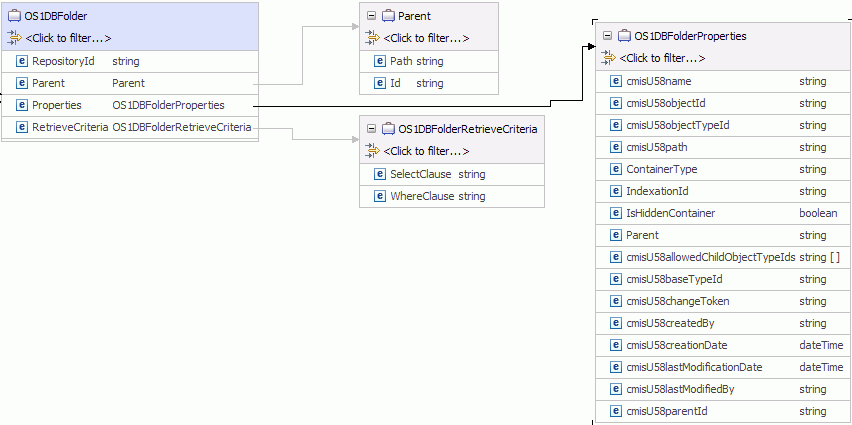
After the Folder properties are updated, the Properties business
object is sent back to the calling component as a response to indicate
that the Folder properties were successfully updated.
Figure 4. Structure of a response business object for
Folders
The Update operation might throw the:
- MissingDataFault, the InvalidRequestFault,
or the DocumentNonUpdatabilityFault faults for Document
Types
- MissingDataFault, or the InvalidRequestFault faults
for Folders
depending upon the processing error. For more information about
business faults, see
Fault business objects.


