The Delete operation deletes a document or folder in the Content Management Repository based on the request from the SCA component.
Document Types
The adapter receives the delete request along with the unique immutable
Object Identity (ID) or the unique path to the document on the Content Management Repository.
The adapter processes the request and removes the document from the Content Management Repository.
Note:
- Every document in the Content Management Repository has a unique immutable Object Identity (ID). The adapter uses the value set in the ID field or the unique path to the Document on the file on the Content Management Repository, to search for the document.
- When both Object ID and document path are provided as input to the operation, the Object ID takes a precedence over the document path value to perform the operation.
For example, the structure of a request and response Document type
is modeled as the below business object.
Figure 1. Structure
of a delete business object
Every Document Type has a set of named, but not explicitly ordered, Properties that are added as a separate business object. The name of this business object would be the Document Type in Camel-case followed by the word Properties.
After the document is deleted, the top-level business object is sent back to the calling component as a response to indicate that the document was deleted successfully.
Folders
The adapter receives the delete request along with the unique immutable Object
Identity (ID) - field cmisU58ObjectId in
the Properties business object, or the Unique Path to
the folder on the Content Management Repository -
field cmisU58Path in the Properties business object.
The adapter processes the request and removes the folder from the Content Management Repository.
Note:
- Every folder in the Content Management Repository has a unique immutable Object Identity (ID). The adapter uses the value set in the ID field or the unique path to the folder on the file on the Content Management Repository, to search for the folder.
- When both Object ID and Folder Path are provided as input to the operation, the Object ID takes a precedence over the folder path value to perform the operation.
For example, the structure of a request Folder type is modeled
as the below business object.
Figure 2. Structure
of a request business object for Folders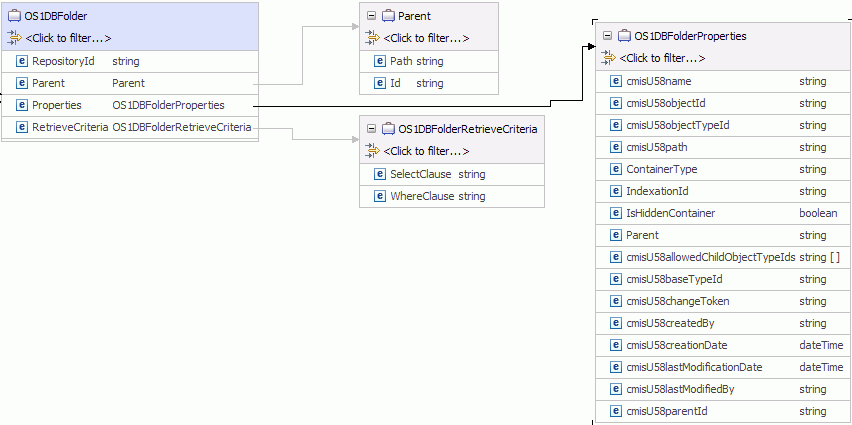
After the folder is deleted, the top-level business object is sent
back to the calling component as a response to indicate that the folder
was deleted successfully.
Figure 3. Structure of
a response business object for Folders
The adapter allows you to determine how the fileable objects inside
the current folder should be handled for the Delete operation. You
can choose to either -
- Delete all the fileable objects, documents and folders, inside the folder selected for deletion.
- If all the parent folders for an object are inside the current folder tree, that is, a document has multiple parent folders, then delete the document. Or else, just unfile the document from the current folder tree.
- Unfile all the fileable objects, that is, remove all the reference from the fileable object to the parent folder.
The adapter also allows you to configure whether the adapter must continue the delete operation, if the delete operation on any of the folder/documents fail. By default, this is false.
During runtime, if data is not entered for either
- The RepositoryID field in the case of Document Types, or
- The unique immutable Object Identity (ID) - field cmisU58ObjectId in the Properties business object, or the Unique Path to the folder on the Content Management Repository - field cmisU58Path in the Properties business object in the case of Folders,