Configuring secure connections
You can configure secure connections for IBM® Control Center. These connections can be configured in either a high availability environment or a non-high availability environment.
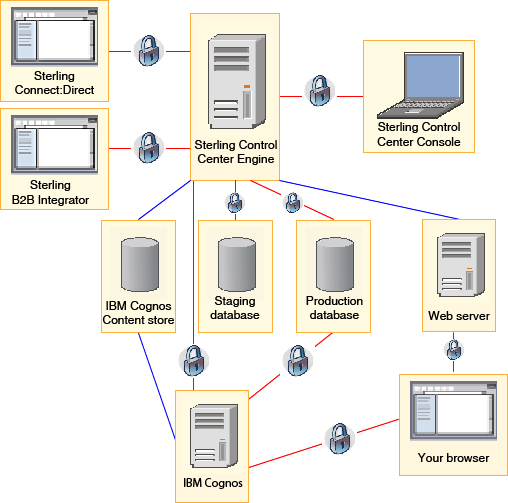
The following secure connections can be configured for use with IBM Control Center in either a high availability or non-high availability environment:
- A secure connection between the IBM Control Center engine and an IBM Control Center console. This secure connection uses Secure Sockets Layer (SSL) or Transport Layer Security (TLS).
- A secure connection between the browser and the IBM Control Center web server that is used to display the launch page and the web console. This secure connection uses SSL or TLS.
- A secure connection between the browser and the Cognos® Business Intelligence server that is used to display reports.
- A secure connection between the IBM Control
Center engine
and production and staging instances of the database server and between Cognos Business
Intelligence and
the production instance of the database server. This secure connection
uses SSL or TLS.Important: The Cognos connection to the Cognos Report Content Store cannot be secured. However, the Cognos connection to the IBM Control Center production database can be secured.
- A secure connection between the IBM Control Center engine and a managed Sterling Connect:Direct® server or Sterling B2B Integrator SOA SSL Server Adapter. This secure connection uses SSL or TLS.
The IBM Control Center engine uses the same keystore and truststore files for all of these secure connections. The Cognos Business Intelligence server generates its own keystore for securing connections with the IBM Control Center engine and with browsers when displaying reports. This secure connection uses SSL or TLS.
In a high availability environment, every event processor's keystore certificate must be trusted by your other event processors in the cluster. In every event processor's truststore, you must include the certificate. You can use the same keystore and truststore files for every event processor in your high availability environment. You might receive a browser security warning when you access the web console on an event processor where the common name does not match the host name that you are connecting to.