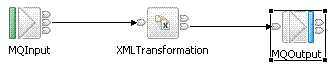
XSL Transform 样本显示如何通过使用 XSLTransform 节点和 XSL 样式表变换 XML 消息。
可以通过若干方式指定用于 XML 变换的样式表的位置:
此样本中所用样式表如以下示例所示:
<?xml version="1.0" encoding="ISO-8859-1"?>
<xsl:stylesheet version="1.0" xmlns:xsl="http://www.w3.org/1999/XSL/Transform">
	<xsl:template match="/">
	<SaleEnvelope>
		<xsl:for-each select="/SaleEnvelope/SaleList">
			<SaleList>
			<xsl:for-each select="Invoice">
				<xsl:if test="not(contains(Surname,'Shop'))">
					<Statement>
						<xsl:attribute name="Type">Monthly</xsl:attribute>
						<xsl:attribute name="Style">Full</xsl:attribute>
						<Customer>
							<Initials>
								<xsl:for-each select="Initial">
									<xsl:value-of select="."/>
								</xsl:for-each>
							</Initials>
							<Name><xsl:value-of select="Surname"/></Name>
							<Balance><xsl:value-of select="Balance"/></Balance>
						</Customer>
						<Purchases>
							<xsl:for-each select="Item">

                  <Article>
									<Desc><xsl:value-of select="Description"/></Desc>
									<Cost><xsl:value-of select='format-number((number(Price)*1.6),"####.##")'/></Cost>
									<Qty><xsl:value-of select="Quantity"/></Qty>
								</Article>

                </xsl:for-each>
						</Purchases>
						<Amount>
							<xsl:attribute name="Currency">
								<xsl:value-of select="Currency" />
							</xsl:attribute>
							<xsl:call-template name="sumSales">
								<xsl:with-param name="list" select="Item"/>
							</xsl:call-template>
						</Amount>
					</Statement>
				</xsl:if>
			</xsl:for-each>
			</SaleList>
		</xsl:for-each>
	</SaleEnvelope>
	</xsl:template>

	    <xsl:template name="sumSales">
		<xsl:param name="list" />
		<xsl:param name="result"  select="0"/>

		      <xsl:choose>
			<xsl:when test="$list">
				<xsl:call-template name="sumSales">
					<xsl:with-param name="list"
						select="$list[position()!=1]"/>
					<xsl:with-param name="result"
						select="$result + number($list[1]/Price)*number($list[1]/Quantity)*1.6"/>
				</xsl:call-template>
			</xsl:when>
			<xsl:otherwise>
				<xsl:value-of select='format-number(number($result),"####.##")'/>
			</xsl:otherwise>
		</xsl:choose>
	</xsl:template>

</xsl:stylesheet>
此样式表用于变换以下 XML 消息(样本中以 XMLT_sample_msg.mbtest 提供):
<SaleEnvelope>
 <Header>
  <SaleListCount>1</SaleListCount>
 </Header>
 <SaleList>
  <Invoice>
   <Initial>K</Initial>
   <Initial>A</Initial>
   <Surname>Braithwaite</Surname>
   <Item>
    <Code>00</Code>
    <Code>01</Code>
    <Code>02</Code>
    <Description>Twister</Description>
    <Category>Games</Category>
    <Price>00.30</Price>
    <Quantity>01</Quantity>
   </Item>
   <Item>
    <Code>02</Code>
    <Code>03</Code>
    <Code>01</Code>
    <Description>The Times Newspaper</Description>
    <Category>Books and Media</Category>
    <Price>00.20</Price>
    <Quantity>01</Quantity>
   </Item>
   <Balance>00.50</Balance>
   <Currency>Sterling</Currency>
  </Invoice>
  <Invoice>
   <Initial>T</Initial>
   <Initial>J</Initial>
   <Surname>Dunnwin</Surname>
   <Item>
    <Code>04</Code>
    <Code>05</Code>
    <Code>01</Code>
    <Description>The Origin of Species</Description>
    <Category>Books and Media</Category>
    <Price>22.34</Price>
    <Quantity>02</Quantity>
   </Item>
   <Item>
    <Code>06</Code>
    <Code>07</Code>
    <Code>01</Code>
    <Description>Microscope</Description>
    <Category>Miscellaneous</Category>
    <Price>36.20</Price>
    <Quantity>01</Quantity>
   </Item>
   <Balance>81.84</Balance>
   <Currency>Euros</Currency>
  </Invoice>
 </SaleList>
 <Trailer>
  <CompletionTime>12.00.00</CompletionTime>
 </Trailer>
</SaleEnvelope>
下图显示用于变换 XML 消息的消息流。有关更多详细信息,请在“消息流”编辑器中打开 XMLT_Sample_flow.msgflow 并检查各节点。