 AWS Lambda 原生追蹤 Python
這個頁面涵蓋以 Python撰寫之 AWS Lambda 函數的 Instana AWS Lambda 追蹤 設定。
支援的執行時期
python3.9python3.8python3.7
已淘汰的執行時期
python3.7
附註: 從 2023 年 11 月 27 日開始, AWS Lambda 不再將安全修補程式及其他更新項目套用至 Lambda 函數使用的 Python 3.7 執行時期。 使用 Python 3.7 的函數不再適用於技術支援,客戶也不再能夠建立使用 Python 3.7 執行時期的 Lambda 函數。
安裝
附註: 本文件說明如何設定 Python Lambda 函數的追蹤。 請確定您也已執行 AWS 代理程式以進行 Lambda 監視 的設定,以確保收集 Instana 無法從 AWS Lambda 執行時期內部收集之版本及部分執行時期度量的必要資訊。
若要啟用 Python Lambda 函數的追蹤,請執行下列步驟:
將 Instana Lambda 層新增至您的函數。
- 在 Lambda 函數的配置頁面中,按一下
Layers方框,然後按一下Add a layer。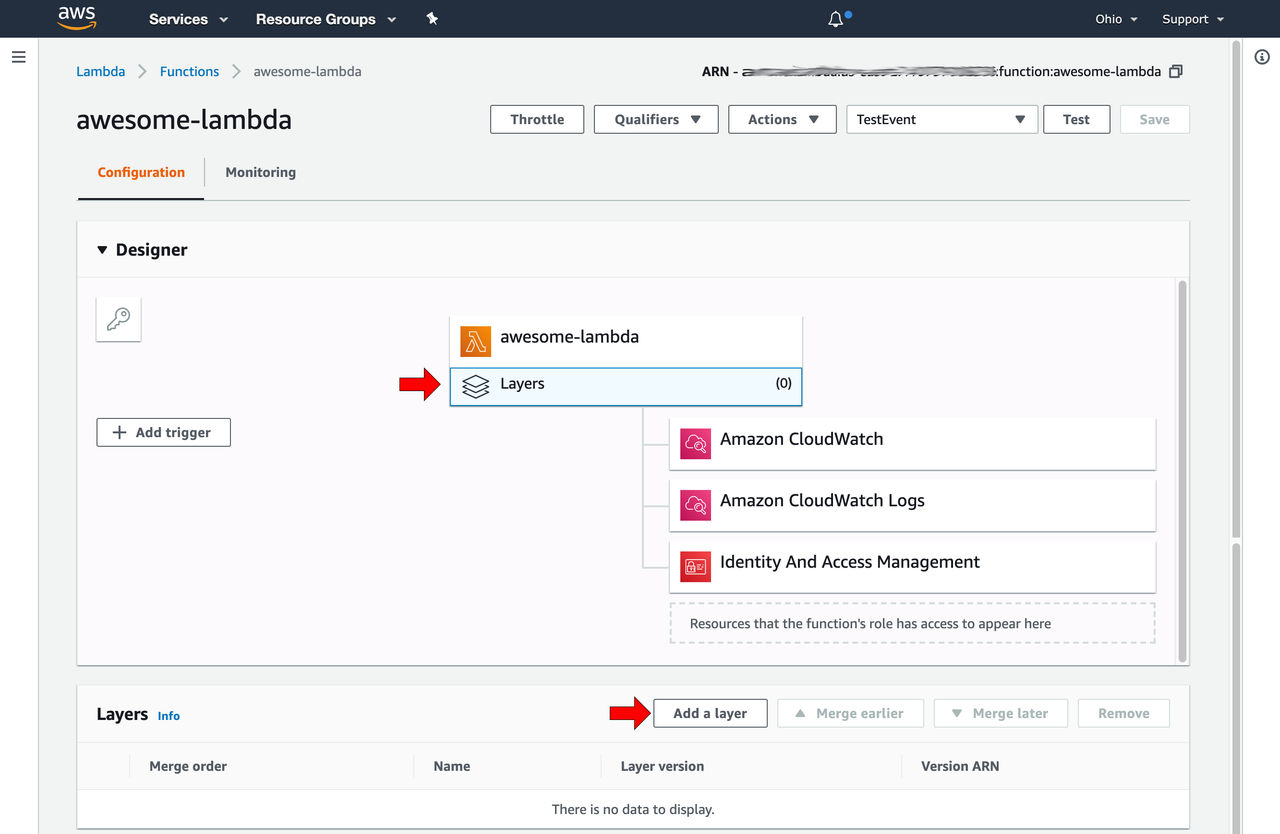
- 在開啟的蹦現畫面中,選取「提供層版本 ARN」,然後複製並貼上符合您地區之 Instana Lambda 層的 ARN; 您可以在 Instana Lambda 層 區段中找到 Instana Lambda 層的右側 ARN。
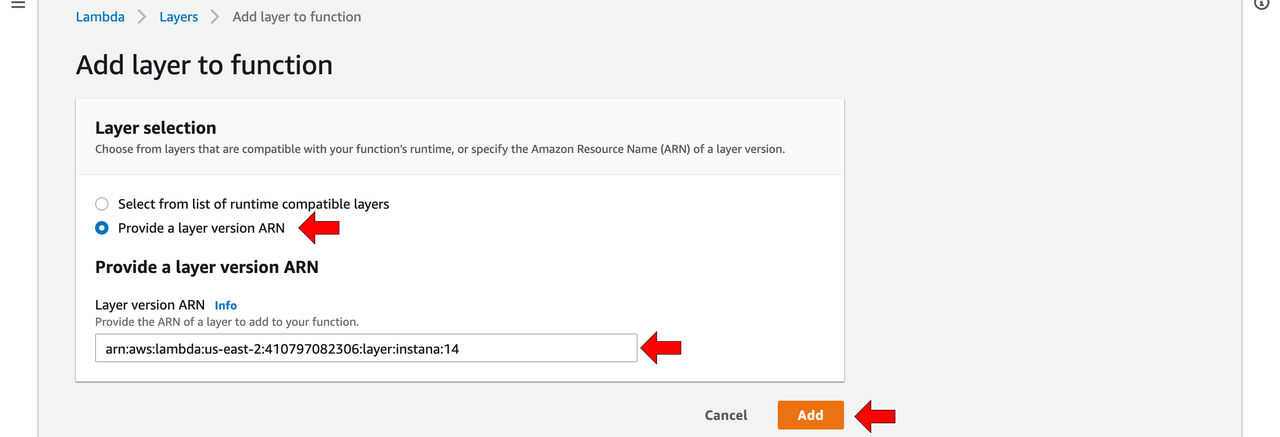
- 在 Lambda 函數的配置頁面中,按一下
配置 Lambda 處理程式。 將處理程式設為
instana.lambda_handler。 Instana Lambda 層會自動觸發預設 Python 執行時期處理程式:lambda_function.lambda_handler。若要變更 Lambda 處理程式的設定,請在配置頁面上尋找「基本設定」區段。
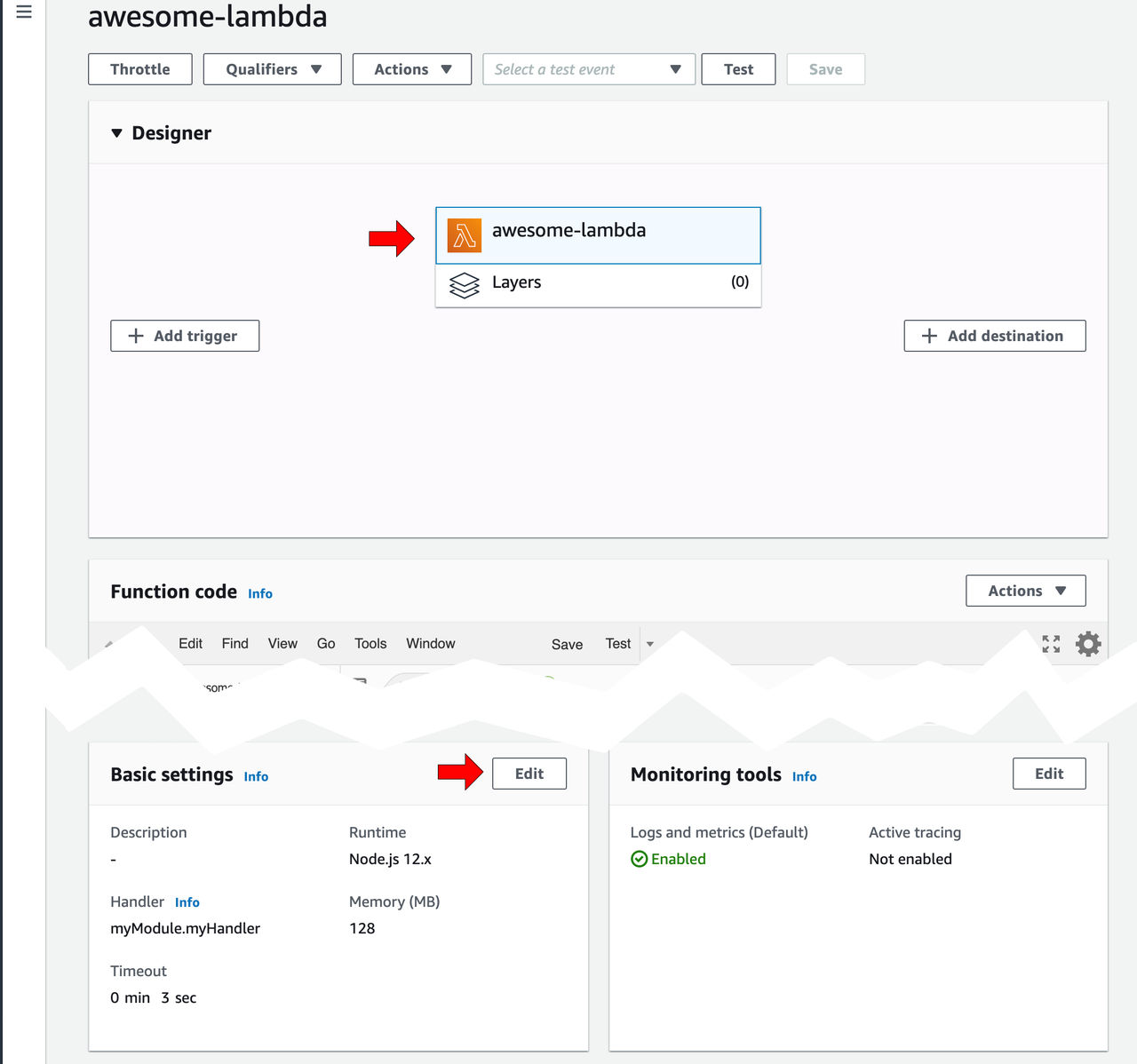
按一下編輯,並將
instana.lambda_handler插入標籤為「處理程式」的欄位。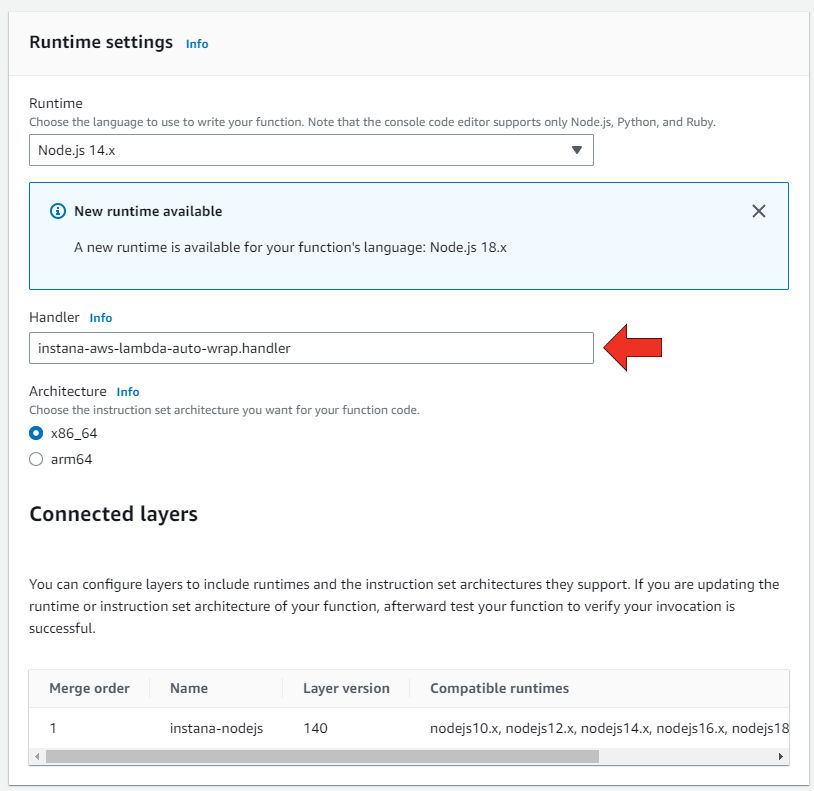
如果您使用自訂處理程式值 (相對於執行時期的預設處理程式,請參閱上述) ,請在環境變數
LAMBDA_HANDLER中指定處理程式,以通知 Instana Lambda 層。 也就是說,如果您的處理程式是myModule.myHandler,請將環境變數LAMBDA_HANDLER設為myModule.myHandler。 請參閱下一節,以取得需要設定的其他環境變數。附註 :Lambda 配置頁面可能會顯示類似
Lambda can't find the file instana.lambda_handler.的警告。 稍後回到配置頁面時也可能會顯示此畫面。 不要讓這個警告讓你分心。 處理程式包含在 Instana Lambda 層中,但 AWS Lambda 配置頁面不會將此納入考量。配置環境變數。 新增下列環境變數:
INSTANA_ENDPOINT_URL: 這是您的 無伺服器監視端點。 請務必對以https://serverless-開頭的地區使用正確的值。INSTANA_AGENT_KEY: 您的 代理程式金鑰。
您也可以移至 Instana 安裝架構,按一下「...」,以取得這些環境變數的正確值。 其他 "->" 代理程式 "->" 安裝 Instana 代理程式 "-> 平台:"AWS"-> 技術:"AWS Lambda "。
儲存 Lambda 函數定義。
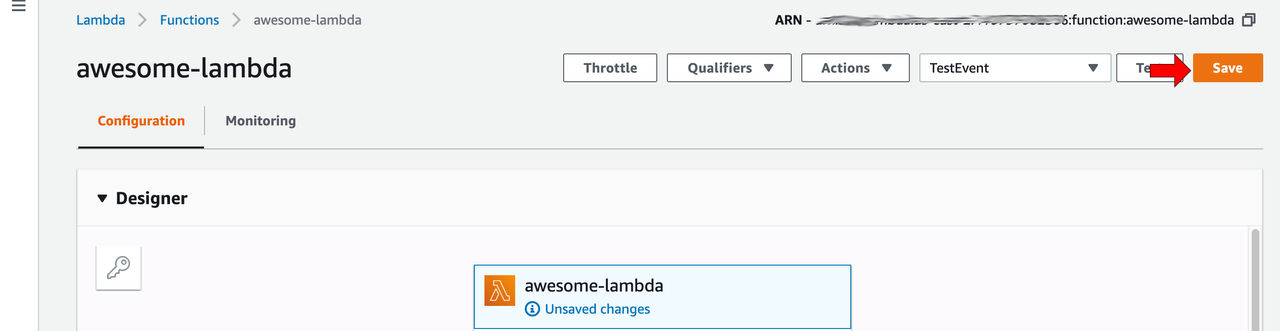
上述所有步驟都可以透過 AWS Web 主控台或任何一般 AWS 管理工具來完成,例如:
以下是範例 aws CLI 指令,如果您想要自動化 AWS Lambdas 的 Instana 整合,則可以作為起點:
# Do not copy and paste this verbatim!
# It will overwrite any previously defined collection of layers and
# environment variables.
aws --region $YOUR_REGION lambda update-function-configuration \
  --function-name $YOUR_LAMBDA_FUNCTION_NAME \
  --layers $INSTANA_LAYER_ARN \
  --handler instana.lambda_handler \
  --environment ""Variables={INSTANA_ENDPOINT_URL=... , INSTANA_AGENT_KEY=... , ...}""
Instana Lambda 圖層
每個地區的 Python 最新版本 AWS Lambda 層的 ARN 如下:
| 地區 | ARN |
|---|---|
af-south-1 |
arn:aws:lambda:af-south-1:410797082306:layer:instana-python:51 |
ap-east-1 |
arn:aws:lambda:ap-east-1:410797082306:layer:instana-python:51 |
ap-northeast-1 |
arn:aws:lambda:ap-northeast-1:410797082306:layer:instana-python:51 |
ap-northeast-2 |
arn:aws:lambda:ap-northeast-2:410797082306:layer:instana-python:51 |
ap-south-1 |
arn:aws:lambda:ap-south-1:410797082306:layer:instana-python:51 |
ap-south-2 |
arn:aws:lambda:ap-south-2:410797082306:layer:instana-python:51 |
ap-southeast-1 |
arn:aws:lambda:ap-southeast-1:410797082306:layer:instana-python:51 |
ap-southeast-2 |
arn:aws:lambda:ap-southeast-2:410797082306:layer:instana-python:51 |
ap-southeast-3 |
arn:aws:lambda:ap-southeast-3:410797082306:layer:instana-python:51 |
ap-southeast-4 |
arn:aws:lambda:ap-southeast-4:410797082306:layer:instana-python:51 |
ca-central-1 |
arn:aws:lambda:ca-central-1:410797082306:layer:instana-python:51 |
cn-north-1 |
arn:aws-cn:lambda:cn-north-1:107998019096:layer:instana-python:51 |
cn-northwest-1 |
arn:aws-cn:lambda:cn-northwest-1:107998019096:layer:instana-python:51 |
eu-central-1 |
arn:aws:lambda:eu-central-1:410797082306:layer:instana-python:51 |
eu-central-2 |
arn:aws:lambda:eu-central-2:410797082306:layer:instana-python:51 |
eu-north-1 |
arn:aws:lambda:eu-north-1:410797082306:layer:instana-python:51 |
eu-south-1 |
arn:aws:lambda:eu-south-1:410797082306:layer:instana-python:51 |
eu-south-2 |
arn:aws:lambda:eu-south-2:410797082306:layer:instana-python:51 |
eu-west-1 |
arn:aws:lambda:eu-west-1:410797082306:layer:instana-python:51 |
eu-west-2 |
arn:aws:lambda:eu-west-2:410797082306:layer:instana-python:51 |
eu-west-3 |
arn:aws:lambda:eu-west-3:410797082306:layer:instana-python:51 |
il-central-1 |
arn:aws:lambda:il-central-3:410797082306:layer:instana-python:null |
me-central-1 |
arn:aws:lambda:me-central-1:410797082306:layer:instana-python:51 |
me-south-1 |
arn:aws:lambda:me-south-1:410797082306:layer:instana-python:51 |
sa-east-1 |
arn:aws:lambda:sa-east-1:410797082306:layer:instana-python:51 |
us-east-1 |
arn:aws:lambda:us-east-1:410797082306:layer:instana-python:51 |
us-east-2 |
arn:aws:lambda:us-east-2:410797082306:layer:instana-python:51 |
us-west-1 |
arn:aws:lambda:us-west-1:410797082306:layer:instana-python:51 |
us-west-2 |
arn:aws:lambda:us-west-2:410797082306:layer:instana-python:51 |
中國區域的型樣是 arn:aws-cn:lambda:${region}:107998019096:layer:instana-python:${layer-version} ,其餘區域的型樣是 arn:aws:lambda:${region}:410797082306:layer:instana-python:${layer-version}。
請確保一律使用最新版本並定期更新您正在使用的層版本,以受益於我們在發佈新版本層時提供的新特性及修正程式。