 AWS Lambda Native Track for Go
這裡說明 AWS Lambda 追蹤 的 Go 特性。
支援的執行時期
go1.x使用 Go1.8或更新版本
安裝
附註: 本文件說明如何設定 Go Lambda 函數的追蹤。 請確定您也已設定 AWS Sensor for Lambda 監視 ,以確保收集 Instana 無法從 AWS Lambda 執行時期內部收集之版本及執行時期度量的必要資訊。
從 v1.23.0 Instana Go 程序感應器開始,會自動偵測服務正在 AWS Lambda 上執行,並切換至無伺服器模式。 處理中感應器不會將收集的追蹤資料傳送至主機代理程式,而是使用 INSTANA_AGENT_KEY中定義的代理程式金鑰,將它們直接提交至 INSTANA_ENDPOINT_URL 環境變數中指定的 Instana 無伺服器接收器端點。
若要確保您使用最新版本的 github.com/instana/go-sensor,請檢查專案中的 go.mod 檔案或執行:
go get github.com/instana/go-sensor@latest
您可以下載最新版本的 Go 處理程序感應器,並在 go.mod中更新所需的版本。
配置
如果要傳送收集的追蹤資料, AWS Lambda 函數需要提供兩個環境變數:
如果要在 AWS 主控台使用者介面中提供這些值給處理程式,請移至 Lambda 配置頁面:
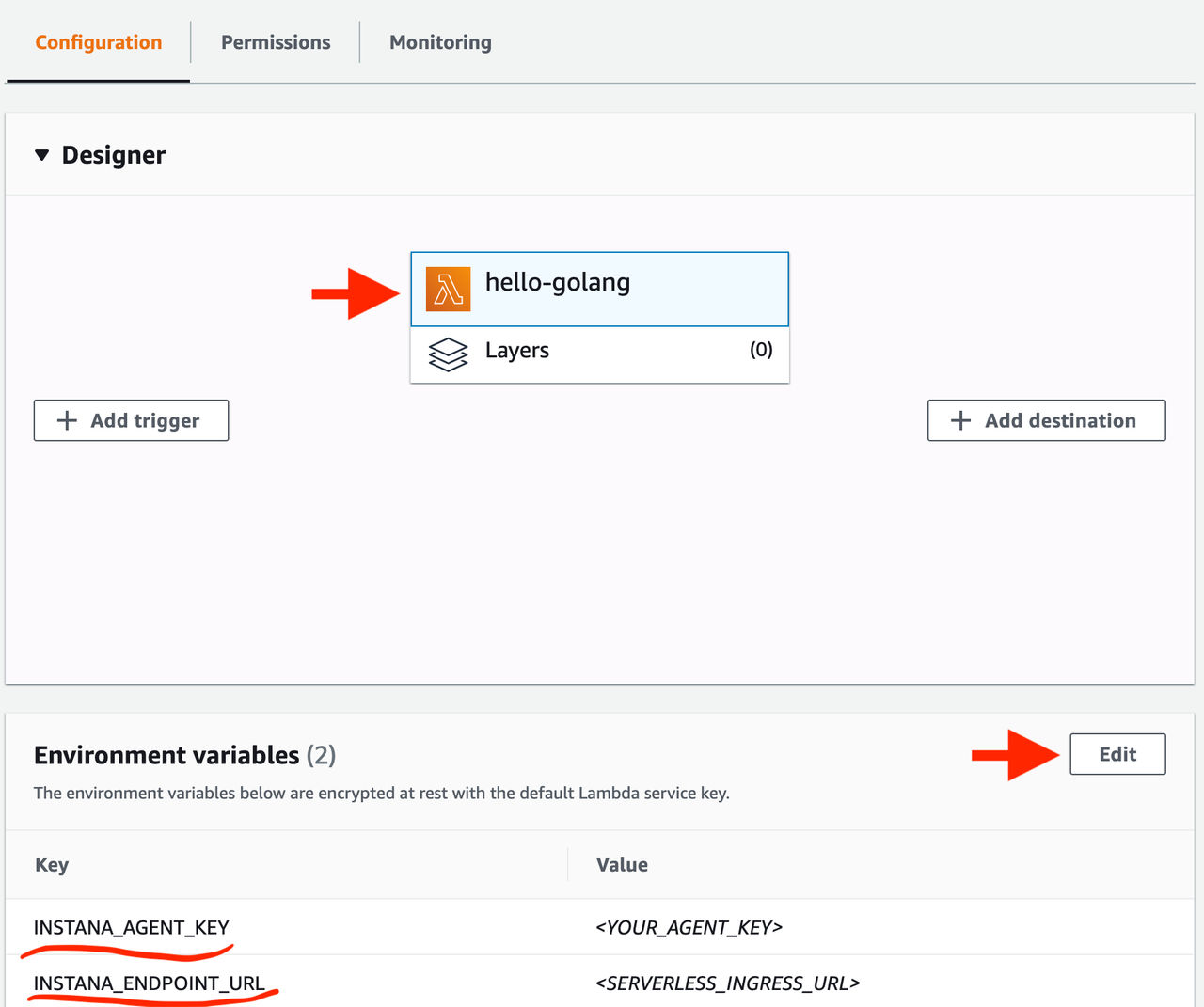
- 按一下您的 Lambda 函數框
- 在「環境變數」區段內,按一下「編輯」並新增兩個新變數
只有少數 選用環境變數 容許變更處理中感應器預設值,例如要收集的 HTTP 標頭清單或要使用的自訂服務名稱。
使用情形
AWS 提供容許在 AWS Lambda 上執行 Go 程式碼的 github.com/aws/aws-lambda-go 套件。 若要使用 Instana 以及在處理程式函數內發出的內部和外部呼叫來追蹤 Lambda 觸發事件,則需要先檢測它。 github.com/instana/go-sensor/instrumentation/instalambda 提供中介軟體封套,用來檢測處理程式程式碼。
若要將 github.com/instana/go-sensor/instrumentation/instalambda 新增至專案,請從包含 go.mod 檔案的資料夾執行:
go get github.com/instana/go-sensor/instrumentation/instalambda
這會將檢測模組新增至專案相依關係清單,以及新增至主要 github.com/instana/go-sensor 進行中感應器。
監測處理程式函數
以 Go 撰寫的一般 AWS Lambda 函數如下所示:
package main

import (
	"github.com/aws/aws-lambda-go/lambda"
)

func main() {
	lambda.Start(Handle)
}

func Handle() (string, error) {
	// handler code
}
處理程式函數最多可以採用並傳回兩個參數,但 限制 為如果處理程式函數採用兩個參數,則第一個必須實作 context.Context。
若要檢測處理程式函數,請先使用 instalambda.NewHandler() 從它建立已檢測的處理程式,然後傳遞至 lambda.StartHandler(),讓先前的程式碼變更為:
package main

import (
	"github.com/aws/aws-lambda-go/lambda"

	// Import the in-process sensor and instrumentation packages
	instana "github.com/instana/go-sensor"
	"github.com/instana/go-sensor/instrumentation/instalambda"
)

func main() {
	// Initialize the instana.Sensor instance
	sensor := instana.NewSensor("my-lambda-handler")

	// Create an instrumented handler from your handler function
	h := instalambda.NewHandler(Handle, sensor)

    // Pass the handler to the lambda.StartHandler() invoke loop
	lambda.StartHandler(h)
}

func Handle() (string, error) {
	// handler code
}
監測 lambda.Handler
一般實作為 lambda.Handler 的 AWS Lambda 處理程式看起來如下:
package main

import (
	"github.com/aws/aws-lambda-go/lambda"
)

func main() {
	h := &Handler{
		// handler configuration
	}

	lambda.StartHandler(h, sensor)
}

type Handler struct {
	// ...
}

func (h *Handler) Invoke(ctx context.Context, payload []byte) ([]byte, error) {
	// handler code
}
若要檢測此類處理程式,請使用 instalambda.WrapHandler() 將其包裝並傳遞至 labmda.StartHandler():
package main

import (
	"github.com/aws/aws-lambda-go/lambda"

	// Import the in-process sensor and instrumentation packages
	instana "github.com/instana/go-sensor"
	"github.com/instana/go-sensor/instrumentation/instalambda"
)

func main() {
	// Initialize the instana.Sensor instance
	sensor := instana.NewSensor("my-lambda-handler")

   	h := &Handler{
		// handler configuration
	}

    // Wrap and pass the handler to the lambda.StartHandler() invoke loop
	lambda.StartHandler(instalambda.WrapHandler(h, sensor))
}

type Handler struct {
	// ...
}

func (h *Handler) Invoke(ctx context.Context, payload []byte) ([]byte, error) {
	// handler code
}
追蹤環境定義延伸
最小檢測僅涉及 main() 函數中的一些變更,並且不需要更新處理程式程式碼。 不過,您可以考慮將 context.Context 新增至處理程式函數的引數清單。 在此情況下, instalambda 會將 Lambda 觸發事件跨距注入其中。 此跨距可以與 instana.SpanFromContext() 一起擷取,並用作母項,以追蹤在處理程式內進行的內部及外部呼叫:
func MyHandler(ctx context.Context) error {
	// Pass the handler context to a subcall to trace its execution
	subCall(ctx)

	// ...

	// Propagate the trace context within an HTTP request to another service monitored with Instana
	// using an instrumented http.Client
	req, err := http.NewRequest("GET", url, nil)
    client := &http.Client{
	    Transport: instana.RoundTripper(sensor, nil),
	}

	client.Do(req.WithContext(ctx))

	// ...
}

func subCall(ctx context.Context) {
	if parent, ok := instana.SpanFromContext(ctx); ok {
		// start a new span, using the Lambda entry span as a parent
		sp = parent.Tracer().StartSpan(/* ... */)
		defer sp.Finish()
	}

	// ...
}