許多不同的程式都可以執行 REST 指令。
如果要執行該指令,您可以對 REST 資源呼叫某種方法,並傳遞參數或 JSON 格式的要求。
註: 使用 REST 指令時所需的權限與使用 Web 介面時所需的權限相同。
如需權限的相關資訊,請參閱角色及許可權。
範例:使用 curl 執行簡式 REST 指令
Linux 程式 curl 是一種用來執行 REST 指令的簡單方式。如果要執行 REST 指令,請將其中一個 REST 資源的 URL 放置在一起,指定要使用的方法,並新增任何參數。例如,下列 curl 指令會擷取所有作用中元件的清單。該指令會呼叫 component 資源的 GET 方法,並傳遞參數 active 的值 true:curl -k -u jsmith:passw0rd
https://hostname:port/cli/component?active=true
-X GET註: 您必須在單行中輸入這個指令。這裡將其分割在不同的行是為了便於說明。
註: 這個範例使用 -k 參數來連接伺服器,但不檢查 SSL 憑證的有效性。如果要設定鑑別,請參閱進行鑑別以執行 REST 指令。
這個範例利用使用者名稱 jsmith 及密碼 passw0rd。在大多數情況下,請對要使用的 REST 指令建立專用使用者帳戶,並授與該帳戶適當的權限。
將伺服器的主機名稱及埠用於 hostname 和 port。 例如,如果主機名稱是 ucdeploy.example.org,並且埠是預設值 8443,則 curl 指令可能類似於下列範例:curl -k -u jsmith:passw0rd
https://ucdeploy.example.org:8443/cli/component?active=true
-X GET將參數傳遞至 REST 指令
許多 REST 指令都具有一個以上的參數。如果要傳遞這些參數,請將它們新增至 URL。例如,version/getLink 指令的 GET 方法採用 3 個參數:應用程式的名稱或 ID、版本的名稱或 ID 以及鏈結的名稱。如果要取得 JPetStore-APP 元件上的鏈結,該指令可能類似於下列範例:curl -k -u jsmith:passw0rd
"https://fit-vm13-108.rtp.raleigh.ibm.com:8443/cli/
version/getLink?component=JPetStore-APP
&version=1.0
&linkName=IBM%20web%20site"註: 所有參數值都必須是 URL 編碼。上述範例傳遞了值 IBM web site 作為 linkName 參數的值。
如果要將此參數包括為 URL 的一部分,必須將空格變更為 URL 編碼的值 %20。
將 JSON 字串傳遞至指令
對於更複雜的指令,您必須傳送 JSON 字串或檔案,而不傳送參數,或者除了參數之外,還傳送 JSON 字串或檔案。例如,application/create 資源的 PUT 方法會建立一個應用程式。
如果要使用此指令,您必須傳遞用於指定新應用程式之名稱、說明及部分內容的 JSON 字串。此指令的 JSON 字串必須遵循下列範本:
{
  "description": "Description",
  "enforceCompleteSnapshots": "Specify true to require
     an explicit version for each component",
  "name": "Application name or ID",
  "notificationScheme": "Notification scheme"
}例如,下列 JSON 字串代表名為 My Application 的應用程式:
{
  "description": "My new application",
  "enforceCompleteSnapshots": "false",
  "name": "My Application",
  "notificationScheme": "Default Notification Scheme"
}curl -k -u jsmith:passw0rd
https://fit-vm13-108.rtp.raleigh.ibm.com:8443/cli/application/create
-X PUT -d @newApplication.jsoncurl -k -u jsmith:passw0rd
https://fit-vm13-108.rtp.raleigh.ibm.com:8443/cli/application/create
-X PUT
-d {"description":"My new application",
"enforceCompleteSnapshots":"false",
"name":"My Application 67",
"notificationScheme":"Default Notification Scheme"}註: 您傳遞至該指令的字串必須是有效的 JSON 字串。
編寫 JSON 字串
有兩種主要方式用來取得指令的 JSON 字串範本。這些範本列在每一個指令的參考資訊中。您還可以帶 -t 選項來執行對等的指令行用戶端指令。 帶此選項執行 CLI 指令會列印 JSON 範本。
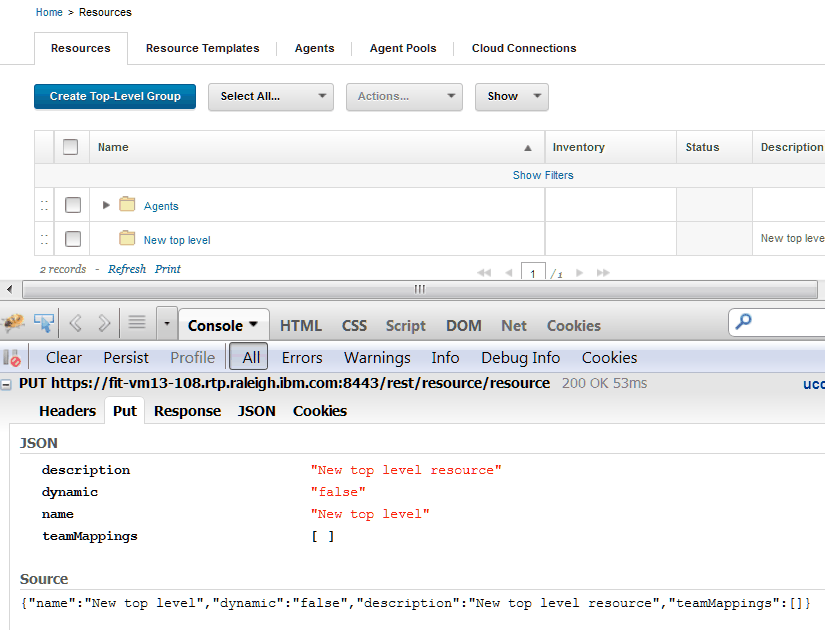
因為伺服器介面使用 REST API,所以您還可以照常登入伺服器,並監視 Web 應用程式產生的要求。您可以使用 Web 瀏覽器延伸或外部程式來監視這些要求。例如,如果要查看適用於 resource/create 資源之 PUT 方法的 JSON 字串,請照常在 Web 伺服器上建立資源,然後查看瀏覽器要求中的 JSON 字串,如下圖中所示。REST 指令的 JSON 字串與此字串相同或類似。
回應
指令成功之後,大部分指令都會傳回簡式字串值或 JSON 字串。除了指令的結果外,這些指令還傳回標準 HTTP 狀態碼。下列清單包括 REST 指令傳回的最常見狀態碼。
- 200
- 指令已成功。
- 400
- 您無權執行該指令。
- 您未指定某個必要參數。
- URL 中的資源路徑不正確。
- 404
- 您嘗試擷取的物件不存在。
- 405
- HTTP 方法名稱不正確。
- 415
- 要求標頭中的內容類型不正確。
- 500
- 伺服器遇到了錯誤。