自動化外掛程式是使用 plugin.xml 檔進行定義。
此檔案的結構由一個 header 元素及一個以上的 step-type 元素組成。header 元素識別外掛程式。每一個 step-type 元素都定義一個步驟。這些步驟可供使用者在程序編輯器中使用,並且用於建構元件程序。
宣告文件類型之後,plugin 根元素會識別所有外掛程式都使用的 XML 綱目類型 PluginXMLSchema_v1.xsd。下列程式碼範例呈現了自動化外掛程式之 plugin.xml 檔的基本結構:
<?xml version="1.0" encoding="UTF-8"?>
<plugin xmlns="http://www.urbancode.com/PluginXMLSchema_v1"
        xmlns:xsi="http://www.w3.org/2001/XMLSchema-instance">
  <header>
    <identifier id="plugin_id" version="version_number" name="Plug-in Name"/>
    <description/>
    <tag>Plugin type/Plugin subtype/Plugin name</tag>
  </header>
  <step-type name="Step_Name">
    <description/>
    <properties>
      <property name="property_name" required="true">
         <property-ui type="textBox" label="Driver Jar"
             description="The full path to the jdbc driver jar to use."
             default-value="${p:resource/sqlJdbc/jdbcJar}"/>
      </property>
    </properties>
    <post-processing>
      <![CDATA[
        if (properties.get("exitCode") != 0) {
            properties.put("Status", "Failure");
        }
        else {
            properties.put("Status", "Success");
        }
     ]]>
    </post-processing>

    <command program="${path_to_tool">
      <arg value="parameters_passed_to_tool"/>
      <arg path="${p:jdbcJar}"/>
      <arg file="command_to_run"/>
      <arg file="${PLUGIN_INPUT_PROPS}"/>
      <arg file="${PLUGIN_OUTPUT_PROPS}"/>
    </command>
  </step-type>
</plugin>
<tag> 標籤指定程序編輯器選用區中步驟的位置。例如,下列程式碼指定步驟位於 MyPlugins/PluginA 資料夾中。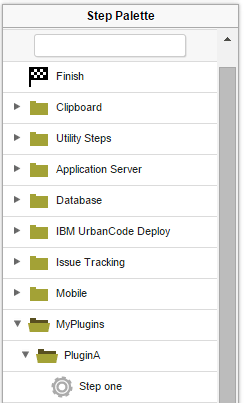 在 IBM® UrbanCode Deploy 6.1 版以及更新版本中,您可以將特定的步驟進一步組織到子資料夾中。
例如,假定 plugin.xml 檔將步驟放置在 MyPlugins/PluginA 資料夾中,如上述範例中所示。下列程式碼將步驟放置在 MyPlugins/PluginA/Subgroup1 子資料夾中:
在 IBM® UrbanCode Deploy 6.1 版以及更新版本中,您可以將特定的步驟進一步組織到子資料夾中。
例如,假定 plugin.xml 檔將步驟放置在 MyPlugins/PluginA 資料夾中,如上述範例中所示。下列程式碼將步驟放置在 MyPlugins/PluginA/Subgroup1 子資料夾中:
<tag>MyPlugins/PluginA</tag><step-type name="Step one">
<server:sub-tag>Subgroup1</server:sub-tag>如果要透過這種方式將步驟組織到子資料夾中,則您必須將名稱空間 xmlns:server="http://www.urbancode.com/PluginServerXMLSchema_v1" 新增至位於 plugin.xml 檔根目錄的 <plugin> 標籤,如下列範例中所示:
<plugin xmlns="http://www.urbancode.com/PluginXMLSchema_v1"
  xmlns:server="http://www.urbancode.com/PluginServerXMLSchema_v1"
  xmlns:xsi="http://www.w3.org/2001/XMLSchema-instance">
限制: 透過這種方式來使用子資料夾的外掛程式,只在 IBM UrbanCode Deploy 6.1 版以及更新版本中工作。
如需來源外掛程式之 plugin.xml 結構的相關資訊,請參閱建立來源外掛程式。