I want to review and/or mass-change or mass-delete user profiles. For example, change admin authority, delete a group of users, etc…
So-called batch profile management is accomplished using the “Linear Unload Sessions” function. This means that each profile session for each user will be represented as a single row of self-documenting XML-like data that can be viewed and updated either directly in the unloaded PDS member or more handily downloaded to a workstation and viewed in a spreadsheet.
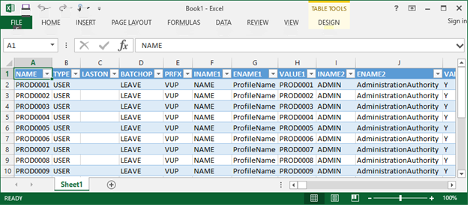
Columns of interest:
| BATCHOP: Specifies what happens when this file is reloaded. Valid options are: LEAVE, DELETE, and UPDATE. | ||
| NAME: The profile name. This cannot be changed. | ||
| LASTON: The date this user was last logged on. Useful for sorting and batch-deleting inactive users. |
Note: Depending on the utility used to edit the offloaded data, comments may or may not be
preserved. Please ensure the first two lines of the data being reloaded
contain:
<?xml version="1.0"?>
<!-- FMTV310BAS -->