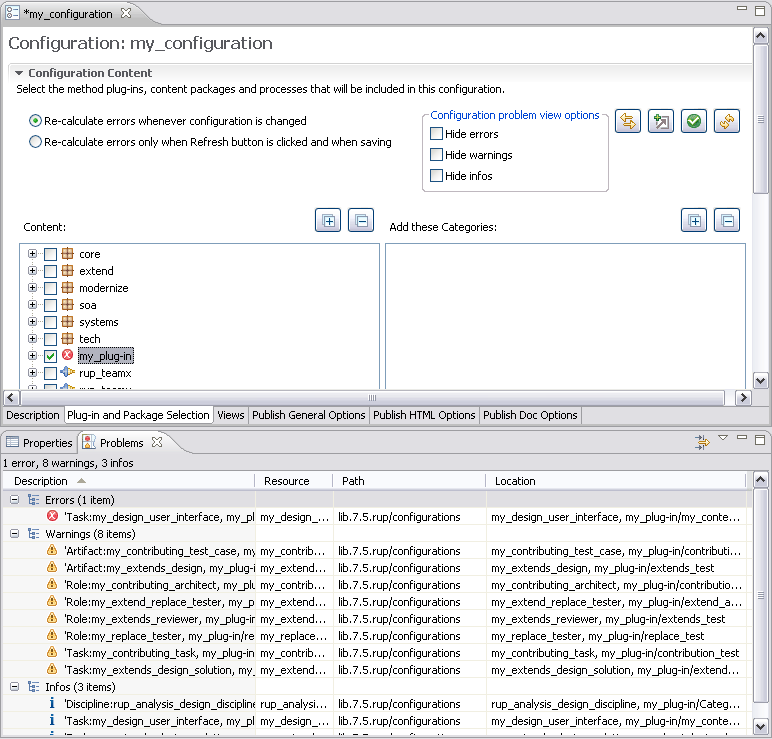
The goal of this exercise is to create a new customized method
configuration. Later in this tutorial we will publish this configuration.
Procedure
- Make sure that you are in the Authoring perspective.

- There are two ways to create a new method configuration.
- Click File > New > Method Configuration.
- In the Library view, right-click the Configurations folder
and click New > Method Configuration.
- Name the new configuration "my_configuration".
- Click the Plug-in and Package Selection tab. In the list
of plug-ins, check My Plug-in, which you created in the Create Method
Content tutorial. This method plug-in has RUP as a base and references parts of its
content and has elements that extend and replace base content. If you do not
have this method plug-in, complete the Create Method Content tutorial before
continuing.
- When you select My Plug-in, some errors and warnings are
displayed in the Problems view. To fix these problems click the Fix errors
and warnings button.

- Drill down into the content packages in the My Plug-in plug-in
by clicking the + signs. Clear the extends_test and replace_test content
packages if you have created them in earlier tutorials. Clearing these avoids
conflicts that may occur because the same base element is affected by the
method plug-ins.
- Click the Views tab.
Any custom category
can be added as a view to a configuration. You can create any number of custom
categories. They are flexible in terms of the content that you can add to
a custom category and in the order in which the content appears.
Click Add
View and add my_custom_category as a view in the configuration.
Experiment with adding other custom categories as views.
- Make my_custom_category the default view by selecting the my_custom_category tab
and clicking Make Default.
- Save the configuration by closing the configuration editor.
- In the configuration selection box at the top of the screen, click my_configuration.
The items in the configuration view change.
- Switch to the Browsing perspective.
 Explore the content
in the configuration view. You should see the content that you created in
your method plug-ins and some inherited content.
Explore the content
in the configuration view. You should see the content that you created in
your method plug-ins and some inherited content.