Criando a seção Adicionar nota no modal Agenda
Aprenda a adicionar strings de tradução personalizadas para o texto da interface do usuário e a criar a seção Adicionar nota no modal Agenda.
Procedimento
- Configure as cadeias de tradução e as configurações do ambiente.
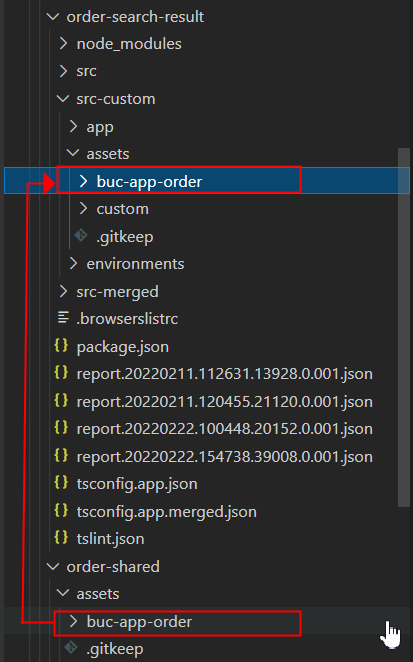
- Crie uma pasta de ativos em devtoolkit_docker/orderhub-code/buc-app-order/packages/order-search-result/src-custom.
- Copie os ativos do módulo compartilhado do pedido para a pasta de ativos que você criou.
- Abra o devtoolkit_docker/orderhub-code/buc-app-order/angular.json arquivo.
- Substitua o conteúdo atual da matriz projects > order-search-result > architect > build > configurations > merged > assets pelas seguintes entradas. O objetivo desta etapa é direcionar o módulo para usar os arquivos de recursos personalizados em vez dos arquivos de /order-shared.
{ "glob": "**", "input": "packages/order-search-result/src-merged/assets", "output": "assets" }, { "glob": "*.json", "input": "packages/order-search-result/src-merged/assets/buc-app-order", "output": "assets/order-search-result" }, { "glob": "**", "input": "node_modules/@buc/svc-angular/assets", "output": "assets" }, { "glob": "**", "input": "node_modules/@buc/common-components/assets", "output": "assets" } - Substitua também o conteúdo na matriz projects > order-search-result > architect > build > configurations > merged-prod > assets.
- Copie a pasta environments de buc-app-order/packages/order-search-result/src para buc-app-order/packages/order-search-result/src-custom.
- Vá para o buc-app-order/packages/order-search-result/src-custom/environments diretório.
- Adicione a seguinte linha ao final dos arquivos environment.tsenvrionment.prod.ts e.
environment.customization = true; - Pare e reinicie o servidor para que as alterações nos arquivos angular.jsonoverrides.json e entrem em vigor.Interrompa a tarefa no terminal. Em seguida, execute:
yarn stop-appyarn start-app - Crie uma pasta personalizada em buc-app-order/packages/order-search-result/src-custom/assets.
- Crie uma pasta i18n em buc-app-order/packages/order-search-result/src-custom/assets/custom.
- Crie um arquivo en.json em buc-app-order/packages/order-search-result/src-custom/assets/custom/i18n.O en.json arquivo inclui as strings literais em inglês a serem exibidas na interface do usuário. Você pode adicionar strings traduzidas criando outros arquivos JSON. Nomeie os arquivos com base nos códigos de idioma ISO-639. Por exemplo, fr.json para strings em francês.
- Cole o seguinte conteúdo JSON.
{
    "CUSTOM_ORDER_SEARCH_RESULT": {
        "NOTE": {
            "LABEL_ADD_NOTE": "Add Note",
            "LABEL_DATE": "Date",
            "LABEL_FIELD_REQUIRED": "Required.",
            "LABEL_USER": "User",
            "LABEL_NOTE": "Note",
            "LABEL_REASON_OPTIONAL": "Reason (optional)",
            "LABEL_CONTACT_TYPE_OPTIONAL": "Contact type (optional)",
            "LABEL_CONTACT_REFERENCE_OPTIONAL": "Contact reference (optional)",
            "MSG_SUCCESS_ADD_NOTES": "Notes added successfully.",
            "MSG_ERROR_ADD_NOTES": "Notes was not added. Try again later."
        }
    }
}
- Crie uma pasta personalizada em buc-app-order/packages/order-search-result/src-custom/app.
- Crie uma pasta de serviços de dados em buc-app-order/packages/order-search-result/src-custom/app/custom.
- Crie um arquivo de serviço add-notes-data.service.ts na pasta data-services e cole o seguinte trecho de código. Este serviço chama a API OMS do modifyFulfillmentOptions para salvar a nota.
import { Injectable } from '@angular/core'; import { BucCommOmsRestAPIService } from '@buc/svc-angular'; @Injectable({ providedIn: 'root' }) export class AddNotesDataService { constructor(private bucCommOmsRestAPIService: BucCommOmsRestAPIService) { } // Below method fetches the list of reason codes to display in 'Reason' dropdown getCommonCodeListForReasonCode(enterpriseCode: string, docType: string) { const Input = { CallingOrganizationCode: enterpriseCode, CodeType: 'NOTES_REASON', DocumentType: docType, }; return this.bucCommOmsRestAPIService.invokeOMSRESTApi('getCommonCodeList', Input, {}); } // Below method fetches the list of contact types to display in 'Contact type' dropdown getCommonCodeListForContactType(enterpriseCode: string) { const Input = { CallingOrganizationCode: enterpriseCode, CodeType: 'CONTACT_TYPE' }; return this.bucCommOmsRestAPIService.invokeOMSRESTApi('getCommonCodeList', Input, {}); } // Below method saves the notes data by calling modifyFulfillmentOptions OMS API changeOrder(order: any) { return this.bucCommOmsRestAPIService.invokeOMSRESTApi('modifyFulfillmentOptions', order, {}); } } - Crie um novo componente add-notes e sua estrutura de arquivos, depois faça as alterações nos arquivos.Para isso, primeiro crie a seguinte estrutura de arquivos:
- Crie um diretório chamado add-notes em src-custom/app/custom.
- Crie os seguintes arquivos no add-notes diretório: add-notes.component.html, e add-notes.component.scss add-notes.component.ts.
Em seguida, faça as seguintes alterações no arquivo:
- add-notes.component.html
<div class="cds--row"> <div class="cds--col-lg-16"> <buc-checkbox [checked]="isAddNoteChecked" [attr.tid]="componentId + '-add-note'" (change)="onIsAddNoteCheckedChange($event)"> {{'CUSTOM_ORDER_SEARCH_RESULT.NOTE.LABEL_ADD_NOTE' | translate}} </buc-checkbox> </div> </div> <div class="screen notes-section bx--modal-content" *ngIf="isScreenInitialized && isAddNoteChecked"> <p class="title"> {{ 'CUSTOM_ORDER_SEARCH_RESULT.NOTE.LABEL_ADD_NOTE' | translate }} </p> <div class="cds--row status"> <div class="combo-box cds--col-md-4"> <div class="d--flex-ai-flex-end"> <buc-date-picker label="{{'CUSTOM_ORDER_SEARCH_RESULT.NOTE.LABEL_DATE' | translate}}" [placeholder]="i18nDatePlaceholder" [dateFormat]="flatpickrDateFormat" [language]="curLocale" [value]="contactDate" (valueChange)="onDateChange($event)"> </buc-date-picker> <div class="oms-spacer8"></div> <buc-time-picker [disabled]="false" [theme]="'light'" [time]="contactTime?.time" [period]="contactTime?.period" (valueChange)="timeChange($event)"> </buc-time-picker> </div> <div *ngIf="savePressed && isDateValid" class="d--flex buc-warning cds--form-requirement"> {{'CUSTOM_ORDER_SEARCH_RESULT.NOTE.LABEL_FIELD_REQUIRED' | translate}} </div> </div> <div class="cds--col-md-4"> <buc-label class="size--sm" [theme]="'light'" [label]="'CUSTOM_ORDER_SEARCH_RESULT.NOTE.LABEL_USER' | translate" placeholder="" [(inputValue)]="currentUserId" (inputValueChange)="onText($event, 'conUser')"> </buc-label> <div *ngIf="savePressed && !currentUserId" class="d--flex buc-warning cds--form-requirement"> {{'CUSTOM_ORDER_SEARCH_RESULT.NOTE.LABEL_FIELD_REQUIRED' | translate}} </div> </div> </div> <div class="cds--row"> <div class="combo-box cds--col-md-4"> <p class="cds--label">{{'CUSTOM_ORDER_SEARCH_RESULT.NOTE.LABEL_NOTE' | translate}}</p> </div> <div class="combo-box cds--col-md-4"> <p class="pull-right">{{ notesText.length }}/{{ 2000 }}</p> </div> </div> <div class="combo-box cds--col-md-12 status"> <textarea [(ngModel)]="notesText" (inputValueChange)="onText($event, 'notesTxt')" ibmTextArea [attr.tid]="componentId + ''" [rows]=2 class="cds--text-area" aria-label="textarea" maxlength="2000"> </textarea> <div *ngIf="savePressed && !notesText" class="d--flex buc-warning cds--form-requirement"> {{'CUSTOM_ORDER_SEARCH_RESULT.NOTE.LABEL_FIELD_REQUIRED' | translate}} </div> </div> <div class="cds--row status"> <div class="combo-box cds--col-md-4"> <buc-dropdown placeholder="" [cozy]="true" [theme]="'dark'" [disabled]="false" [label]="'CUSTOM_ORDER_SEARCH_RESULT.NOTE.LABEL_REASON_OPTIONAL' | translate" [items]="reasonCodeList" (selected)="reasonCodeOnSelection($event)"> </buc-dropdown> </div> <div class="combo-box cds--col-md-4"> <buc-dropdown placeholder="" [cozy]="true" [theme]="'dark'" [disabled]="false" [label]="'CUSTOM_ORDER_SEARCH_RESULT.NOTE.LABEL_CONTACT_TYPE_OPTIONAL' | translate" [items]="contactTypeList" (selected)="contactTypeOnSelection($event)"> </buc-dropdown> </div> </div> <div class="cds--row status"> <div class="combo-box cds--col-md-4"> <buc-label class="size--sm" [theme]="'light'" [label]="'CUSTOM_ORDER_SEARCH_RESULT.NOTE.LABEL_CONTACT_REFERENCE_OPTIONAL' | translate" placeholder="" [(inputValue)]="contactRef" (inputValueChange)="onText($event, 'conRef')"> </buc-label> </div> </div> </div> - add-notes.component.scss:
.bx--modal-content { padding-right: 1rem; } .notes-section { border-top: 1px solid grey; padding-top: 1rem; margin-top: 1rem; } .bx--modal-content { padding: 1rem 1rem 0 1rem; .title, .subtitle, .type-switch, form, .delivery-type, .status, .alert-severity, .exclusion { margin-bottom: 24px; } .status:last-child { margin-bottom: 0; } .within-text, .within-text-only { display: flex; align-items: center; } } .pull-right { text-align: right; font-size: 0.75rem; } .oms-spacer8 { padding-top: 0.5rem; padding-left: 0.1rem; background-repeat: no-repeat; } buc-time-picker { ::ng-deep ibm-timepicker .bx--time-picker { ibm-timepicker-select.bx--time-picker__select { height: 2rem; background-color: white; } } } ::ng-deep .bx--time-picker__input { height: 2rem; } - add-notes.component.ts:
import { CommonService, Constants, DocTypes, handleOMSErrors, OrderListDataService } from '@buc/order-shared';
import { BucNotificationService, getCurrentLocale, getCurrentLocaleDateFormat, getFlatPickrDateFormat } from '@buc/common-components';
import { BucSvcAngularStaticAppInfoFacadeUtil } from '@buc/svc-angular';
import moment from 'moment';
import * as momentTime from 'moment-timezone';
import flatpickr from 'flatpickr';
import { AddNotesDataService } from '../data-services/add-notes-data.service';
import { Component, EventEmitter, Inject, Input, OnChanges, OnDestroy, OnInit, Output, SimpleChange } from '@angular/core';
import { TranslateService } from '@ngx-translate/core';
import { ModalService } from 'carbon-components-angular';
import { SimpleChanges } from '@angular/core';

@Component({
    selector: 'buc-add-notes',
    templateUrl: './add-notes.component.html',
    styleUrls: ['./add-notes.component.scss']
})

export class AddNotesComponent implements OnInit, OnChanges {

    nlsMap = {
        'CUSTOM_ORDER_SEARCH_RESULT.NOTE.MSG_SUCCESS_ADD_NOTES': '',
        'CUSTOM_ORDER_SEARCH_RESULT.NOTE.MSG_ERROR_ADD_NOTES': '',
    }
    bucNotificationService: BucNotificationService;
    @Input() scheduleOrderClicked: boolean;
    @Input() componentId: boolean;
    @Input() modalData: any;
    @Output() cancel: EventEmitter<any> = new EventEmitter();
    @Output() onAddNoteCheckedChange: EventEmitter<any> = new EventEmitter();

    constructor(
        protected modalService: ModalService,
        public orderListDataService: OrderListDataService,
        public translate: TranslateService,
        public commonSvc: CommonService,
        public notesDataService: AddNotesDataService
    ) {
        this.bucNotificationService = new BucNotificationService();
    }

    isAddNoteChecked = false;
    isScreenInitialized = false;
    displayData: any;
    reasonCodeList = [];
    contactTypeList = [];
    curLocale: string;
    public i18nDatePlaceholder;
    public flatpickrDateFormat;

    reasonCodeValue: any;
    contactTypeValue: any;
    getReasonValue: any;
    getContactValue: any;
    contactRef = '';
    notesText = '';
    contactDateTime;
    contactDate;
    contactTime;
    invalidDate = false;
    currentUserId;
    savePressed = false;
    isDateValid = false;

    // To gather all the data required for notes section on opening the modal like dropdown list data, date picker placeholder
    async initializeNotesSection() {
        this.savePressed = false;
        this.currentUserId = BucSvcAngularStaticAppInfoFacadeUtil.getOmsUserLoginId();
        await this._initTranslations();
        await this.getReasonCodeList();
        await this.getContactTypeList();
        this.isScreenInitialized = true;
        this.setDate();
        this.curLocale = getCurrentLocale();
        if (this.curLocale.startsWith('zh-')) {
            this.curLocale = 'zh';
        }
        this.i18nDatePlaceholder = getCurrentLocaleDateFormat();
        this.flatpickrDateFormat = getFlatPickrDateFormat();
    }

    // To get the list of reason codes to display in 'Reason' dropdown
    async getReasonCodeList() {
        const enterpriseCode = this.displayData.enterpriseCode;
        const documentType = this.displayData.docType;
        const commonCodeList = await this.notesDataService.getCommonCodeListForReasonCode(enterpriseCode, documentType).toPromise();
        if (commonCodeList.CommonCode) {
            commonCodeList.CommonCode.forEach(element => {
                this.reasonCodeList.push({
                    content: element.CodeShortDescription ? element.CodeShortDescription :
                        element.CodeValue, value: element.CodeValue
                });
            });
        }
    }

    // To get the list of contact types to display in 'Contact type' dropdown
    async getContactTypeList() {
        const enterpriseCode = this.displayData.enterpriseCode;
        const commonCodeList = await this.notesDataService.getCommonCodeListForContactType(enterpriseCode).toPromise();
        if (commonCodeList.CommonCode) {
            commonCodeList.CommonCode.forEach(element => {
                this.contactTypeList.push({
                    content: element.CodeShortDescription ? element.CodeShortDescription :
                        element.CodeValue, value: element.CodeValue
                });
            });
        }
    }

    onIsAddNoteCheckedChange(event) {
        this.isAddNoteChecked = event.checked;
        this.onAddNoteCheckedChange.emit();
    }

    async addNotes() {
        this.savePressed = true;
        this.orderAddNotes();
    }

    // To save the notes on click of 'Schedule' button
    async orderAddNotes() {
        const convertTimestamp = new Date(this.contactDateTime);
        if (this.notesText.length > 0 && this.currentUserId.length > 0 && !this.invalidDate && this.isDateValid === false) {
            this.reasonCodeValue = this.getReasonValue ? this.reasonCodeList.find(r => r.value === this.getReasonValue).value : '';
            this.contactTypeValue = this.getContactValue ? this.contactTypeList.find(c => c.value === this.getContactValue).value : '';

            Promise.all(this.modalData.orders.map(async (element) => {
                const body: any = {
                    OrderHeaderKey: element.OrderHeaderKey,
                    Notes: {
                        Note: [
                            {
                                ContactReference: this.contactRef,
                                ContactTime: convertTimestamp,
                                ContactType: this.contactTypeValue,
                                ContactUser: this.currentUserId,
                                NoteText: this.notesText,
                                ReasonCode: this.reasonCodeValue
                            }
                        ]
                    }
                };
                if (this.displayData.hasOwnProperty('recordChanges') &&
                    this.displayData.recordChanges === false) {
                    await this.notesDataService.changeOrder(body).toPromise();
                } else {
                    if (this.displayData.docType === DocTypes.SalesOrder) {
                        const pendingChanges = { PendingChanges: { RecordPendingChanges: 'N' } };
                        Object.assign(body, pendingChanges);
                    }
                    await this.notesDataService.changeOrder(body).toPromise();
                }
            })).then(() => {
                if (this.displayData.showSuccessMsg) {
                    CommonService.notify('success', this.nlsMap['CUSTOM_ORDER_SEARCH_RESULT.NOTE.MSG_SUCCESS_ADD_NOTES']);
                }
                this.onCancel();
            }).catch(async (err) => {
                const errorMsg = this.nlsMap['CUSTOM_ORDER_SEARCH_RESULT.NOTE.MSG_ERROR_ADD_NOTES'];
                await handleOMSErrors(err, this.translate, this.bucNotificationService, errorMsg);
                this.onCancel();
            });
        }
    }

    // To set the date and time picker to current date and time
    setDate() {
        const currentDate = new Date();
        this.contactDateTime = moment(currentDate).format(Constants.DATETIME_FORMAT);
        this.contactDate = flatpickr.formatDate(moment(currentDate).toDate(), 'Z');
        this.contactTime = {
            time: momentTime(currentDate).format(Constants.TIME_FORMAT),
            period: momentTime(currentDate).format(Constants.TIME_PERIOD)
        };
    }

    // Event that triggers when user changes the date
    onDateChange(event) {
        this.isDateValid = event.length === 0;
        if (event.length) {
            const newDate = moment(event[0]).format(Constants.DATE_FORMAT);
            this.contactDateTime = this.contactDateTime.replace(this.contactDateTime.split(' ')[0], newDate);
            this.contactDate = flatpickr.formatDate(moment(this.contactDateTime).toDate(), 'Z');
        }
    }

    // Event that triggers when user changes the time
    timeChange(event) {
        const dateTime = this.contactDateTime.split(' ');

        if (this.contactTime.time && event.time) {
            let invalidTime = false;
            const tm = event.time.split(':');
            let hours = Number(tm[0]);
            const minutes = (tm[1] && Number(tm[1])) || 0;
            if (this.contactTime.period === 'PM') {
                if (hours > 12 && hours <= 24) {
                    hours = hours - 12;
                } else if (hours > 24) {
                    invalidTime = true;
                }
            }
            if (minutes && minutes > 59) {
                invalidTime = true;
            }
            if (!invalidTime) {
                const h = hours < 10 ? `0${hours}` : `${hours}`;
                const m = minutes < 10 ? `0${minutes}` : `${minutes}`;
                dateTime[1] = `${h}:${m}`;
            }
        } else if (this.contactTime.period && event.timePeriod) {
            dateTime[2] = event.timePeriod;
        }

        const tempDate = new Date(dateTime.join(' '));
        if (tempDate.toString() === 'Invalid Date') {
            this.invalidDate = true;
        } else {
            this.invalidDate = false;
            this.contactDateTime = dateTime.join(' ');
            this.contactTime = {
                time: momentTime(tempDate).format(Constants.TIME_FORMAT),
                period: momentTime(tempDate).format(Constants.TIME_PERIOD)
            };
        }
    }

    async reasonCodeOnSelection(event) {
        this.getReasonValue = event.item.value;
    }
    async contactTypeOnSelection(event) {
        this.getContactValue = event.item.value;
    }

    // Event that gets trigger on clicking cancel button
    onCancel() {
        if (this.displayData.parentPage) {
            this.displayData.parentPage.disableAdd = false;
        }
      this.cancel.emit();
    }

    async ngOnInit() {
        await this._initTranslations();
        this.initializeNotesSection();
    }

    async ngOnChanges(changes: SimpleChanges) {
        if(changes.scheduleOrderClicked?.currentValue) {
            if (this.isAddNoteChecked) {
                await this.addNotes();
            }
        }
        if (changes.modalData?.currentValue && changes.modalData.currentValue !== changes.modalData.previousValue  && Object.keys(changes.modalData.currentValue).length > 0) {
            this.displayData = {
                docType: this.modalData.orders[0].DocumentType,
                enterpriseCode: this.modalData.orders[0].enterpriseCode,
                OrderHeaderKey: this.modalData.orders[0].OrderHeaderKey,
                showSuccessMsg: true
            };
        }

    }

    protected async _initTranslations() {
        const keys = Object.keys(this.nlsMap);
        const json = await this.translate.get(keys).toPromise();
        keys.forEach(k => this.nlsMap[k] = json[k]);
    }

}
- Adicionar um serviço de extensão: buc-app-order/packages/order-search-result/src-custom/app/custom/data-services/add-notes-extension.service.ts
import { Injectable } from '@angular/core'; import { ExtensionService } from '@buc/common-components'; @Injectable() export class AddNotesExtensionService extends ExtensionService { userInputs = { scheduleOrderClicked: false, componentId: '', modalData: {} }; originalScheduleOrderFunc; constructor() { super(); } createInput() { if (!this.parentContext.scheduleOrder) { this.userInputs.scheduleOrderClicked = false; this.originalScheduleOrderFunc = null; } if (this.parentContext.componentId !== this.userInputs.componentId) { this.userInputs.componentId = this.parentContext.componentId; } if (this.parentContext.modalData !== this.userInputs.modalData) { this.userInputs.modalData = this.parentContext.modalData; } this.userInputObs$.next(this.userInputs); this.overrideMethods(); } handleOutput() { this.userOutputs = { cancel: this.onCancel.bind(this), onAddNoteCheckedChange: this.onAddNoteCheckedChange.bind(this) }; this.userOutputObs$.next(this.userOutputs); } overrideMethods() { if (!this.originalScheduleOrderFunc && this.parentContext.scheduleOrder) { this.originalScheduleOrderFunc = this.parentContext.scheduleOrder.bind(this.parentContext); this.parentContext.scheduleOrder = (event) => { this.userInputs.scheduleOrderClicked = true; this.userInputObs$.next(this.userInputs); this.originalScheduleOrderFunc(event); } } } onAddNoteCheckedChange() { this.userInputs.modalData = this.userInputs.modalData; this.userInputObs$.next(this.userInputs); } onCancel() { this.parentContext.closeModal(); } } - Registre o novo componente e o serviço de extensão em /packages/order-search-result/src-custom/app/app-customization.impl.ts:
import { ExtensionModule } from "@buc/common-components"; import { SharedExtensionConstants } from "@buc/order-shared"; import { AddNotesComponent } from "./custom/add-notes/add-notes.component"; import { AddNotesExtensionService } from "./custom/data-services/add-notes-extension.service"; export class AppCustomizationImpl { static readonly components = [AddNotesComponent]; static readonly providers = []; static readonly imports = [ ExtensionModule.forRoot([ { id: SharedExtensionConstants.SCHEDULE_MODAL_SHARED_BOTTOM, component: AddNotesComponent, service: AddNotesExtensionService } ]), ]; } - Crie uma pasta de recursos em buc-app-order/packages/order-search-result/src-custom/app.
- Na pasta de recursos, crie um arquivo ext-order.module.ts ( buc-app-order/packages/order-search-result/src-custom/app/features/ext-order.module.ts ) e cole o seguinte conteúdo.
Observe o objeto provedor no código com o token CUSTOM_ACTIONS. O Order Hub fornece dois tokens de injeção.import { NgModule } from "@angular/core"; import { CommonModule } from "@angular/common"; import { TranslateModule } from "@ngx-translate/core"; import { AddNotesDataService } from "../custom/data-services/add-notes-data.service"; @NgModule({ declarations: [], imports: [CommonModule, TranslateModule], providers: [AddNotesDataService], exports: [], }) export class ExtOrderModule {}CUSTOM_ACTIONSeCUSTOM_FEATURE_ACTIONSpara substituir ações existentes ou fornecer ações personalizadas.O valor do token de injeção é uma matriz em que cada elemento é um objeto contendo duas propriedades:
- nome - O nome da ação.
- ação - O serviço que lida com ou implementa a ação. Neste tutorial, ScheduleActionService é uma ação padrão que você precisa substituir, portanto, também é necessário adicionar o
ScheduleActionServicena mesma matriz de provedores.
O ponto de injeção precisa ser definido no ext-NNN.module.ts módulo porque garante que o
TranslateServiceque é injetado na ação tenha todos os pacotes carregados pelo módulo de recursos. Cada módulo em cada aplicação de rota tem este módulo em /src/app/features/ext-NNN.module.ts. Este arquivo não existe na sua src-custom pasta, portanto, você precisa criá-lo.Observação: a implementação da ação é separada por componente, de modo que a personalização da ação existente é limitada ao arquivo de serviço, em vez de modificar todos os componentes que despacham a ação. Ao fazer essas alterações, o aplicativo buc-app-order usa o serviço recém-adicionado sempre que a ação Schedule é despachada. - Atualize a interface do usuário do Order Hub e siga um fluxo de programação para visualizar as alterações no modal de programação de pedidos.
- Faça login no Order Hub de última geração.
- Vá para Pedidos > Saída (modo DEV).
- Pesquisar um pedido.
- Na tabela de resultados da pesquisa de pedidos, clique na caixa de seleção ao lado de um pedido e, em seguida, clique em Agendar.
- Clique em Adicionar nota para exibir os campos onde você pode adicionar informações.
- Adicione algum texto à seção Notas e modifique outras propriedades conforme necessário.
- Clique em Agenda.Uma mensagem aparece para confirmar que a nota foi adicionada com sucesso e que a ordem foi agendada.
- Clique no número do pedido que você agendou para acessar a página Detalhes do pedido.
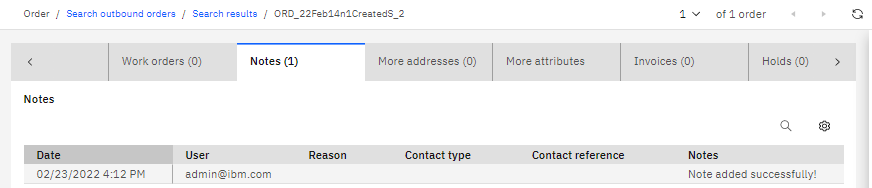
- Clique na guia Notas. Certifique-se de que a tabela de notas inclua a nota que você adicionou.
Resultados
Conclua a próxima lição para aprender como implantar as personalizações em seus ambientes para que outras pessoas possam utilizá-las. Até agora, as personalizações estão disponíveis apenas localmente.