사용자 정의 모델 작성
사용자 정의 모델을 작성하여 시간당 개인에 대한 숫자 기능을 측정하고 기준선을 설정할 수 있습니다.
시작하기 전에
각 모델 템플리트에 대한 다음 모델 세부사항을 검토하십시오.
이 태스크에 대한 정보
학습된 동작 및 사용자에 대한 실제 데이터를 검토할 수 있도록 사용자 정의 모델을 작성할 수 있습니다. 기준선 동작에서 중요한 변경사항이 발견되면 사용자의 위험성 점수가 높아진다는 경보를 받게 됩니다. 작성할 수 있는 모델의 예제에는 사용자가 다운로드하는 데이터의 양, 사용자가 실행하는 애플리케이션의 수 또는 사용자가 시간당 전송하는 이메일 수 표시 등이 포함될 수 있습니다.
주의: 설정을 구성하거나 수정한 후 데이터를 수집하고 초기 모델을 빌드하며 사용자에 대한 초기 결과를 보는 데 최소 1시간이 소요됩니다.
활성 사용자는 지속적으로 모니터링됩니다. 사용자가 28일 동안 활동이 없는 경우 사용자 및 사용자의 데이터는 모델에서 제거됩니다. 사용자가 다시 활성 상태가 되면 새 사용자로 리턴됩니다.
프로시저
- 탐색 메뉴 (
 ) 에서 관리를 클릭하십시오.
 - 다음을 클릭하십시오.
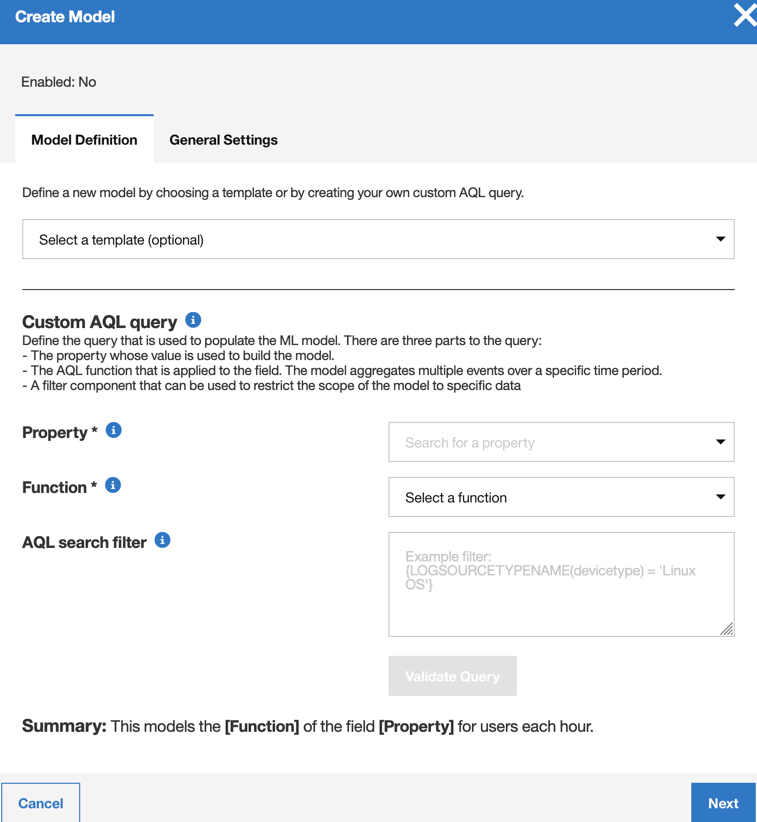
- 저장을 클릭하십시오.

애플리케이션 이벤트
프로시저
- 이벤트 이름: UBA : Custom Analytic Anomaly
- senseValue = 5
- 필수 구성: 시스템은 애플리케이션의 QRadar 상위 레벨 카테고리가 있는 이벤트를 모니터합니다.
- 로그 소스 유형: APC UPS, Apache HTTP Server, Application Security DbProtect, Array Networks SSL VPN Access Gateways, Aruba ClearPass Policy Manager, Aruba Mobility Controller, Avaya VPN Gateway, Barracuda Web Application Firewall, Barracuda Web Filter, Blue Coat Web Security Service, BlueCat Networks Adonis, CRE System, Centrify Infrastructure Services, Check Point, Cilasoft QJRN/400, Cisco Call Manager, Cisco CatOS for Catalyst Switches, Cisco FireSIGHT Management Center, Cisco IOS, Cisco Identity Services Engine, Cisco Intrusion Prevention System (IPS), Cisco IronPort, Cisco Meraki, Cisco Nexus, Cisco PIX Firewall, Cisco Stealthwatch, Cisco Umbrella, Cisco Wireless Services Module (WiSM), Citrix Access Gateway, Citrix NetScaler, Custom Rule Engine, Cyber-Ark Vault, DG Technology MEAS, EMC VMWare, Event CRE Injected, Extreme Matrix K/N/S Series Switch, Extreme Stackable and Standalone Switches, F5 Networks BIG-IP AFM, F5 Networks BIG-IP ASM, F5 Networks BIG-IP LTM, Fidelis XPS, FireEye, Flow Classification Engine, Flow Device Type, Forcepoint Sidewinder, Forcepoint V Series, Fortinet FortiGate Security Gateway, FreeRADIUS, H3C Comware Platform, Huawei S Series Switch, HyTrust CloudControl, IBM AIX Audit, IBM AIX Server, IBM DB2, IBM DataPower, IBM Lotus Domino, IBM Proventia Network Intrusion Prevention System (IPS), IBM Resource Access Control Facility (RACF), IBM Security Directory Server, IBM Tivoli Access Manager for e-business, IBM i, IBM z/OS, ISC BIND, Imperva SecureSphere, Infoblox NIOS, Juniper Junos OS Platform, Juniper MX Series Ethernet Services Router, Juniper Networks AVT, Juniper Networks Firewall and VPN, Juniper Networks Intrusion Detection and Prevention (IDP), Juniper WirelessLAN, Kisco Information Systems SafeNet/i, Linux DHCP Server, McAfee Network Security Platform, McAfee Web Gateway, Metainfo MetaIP, Microsoft DHCP Server, Microsoft DNS Debug, Microsoft Exchange Server, Microsoft IIS, Microsoft Office 365, Microsoft Operations Manager, Microsoft Windows Security Event Log, Motorola SymbolAP, NGINX HTTP Server, Nortel Contivity VPN Switch, Nortel VPN Gateway, OS Services Qidmap, OSSEC, ObserveIT, Okta, Open LDAP Software, OpenBSD OS, Oracle BEA WebLogic, Oracle Database Listener, PostFix MailTransferAgent, ProFTPD Server, Proofpoint Enterprise Protection/Enterprise Privacy, Pulse Secure Pulse Connect Secure, RSA Authentication Manager, Radware DefensePro, SSH CryptoAuditor, Skyhigh Networks Cloud Security Platform, Solaris Operating System Authentication Messages, Solaris Operating System DHCP Logs, SonicWALL SonicOS, Sophos Astaro Security Gateway, Sophos Web Security Appliance, Squid Web Proxy, Starent Networks Home Agent (HA), Stonesoft Management Center, Sun ONE LDAP, Symantec Critical System Protection, Symantec Encryption Management Server, Symantec Endpoint Protection, TippingPoint Intrusion Prevention System (IPS), Top Layer IPS, Trend InterScan VirusWall, Trend Micro Deep Security, Universal DSM, Venustech Venusense Security Platform, Verdasys Digital Guardian, WatchGuard Fireware OS, genua genugate, iT-CUBE agileSI
SourceIP
프로시저
- 이벤트 이름: UBA : Custom Analytic Anomaly
- sensevalue: 5
- 로그 소스 유형: 이벤트의 소스 IP 및 사용자 이름을 포함하는 로그 소스
대상 포트
프로시저
- 이벤트 이름: UBA : Custom Analytic Anomaly
- sensevalue: 5
- 로그 소스 유형: 이벤트의 대상 포트 및 사용자 이름을 포함하는 로그 소스
Office 파일 액세스
프로시저
- 이벤트 이름: UBA : Custom Analytic Anomaly
- sensevalue: 5
- 필수 구성: 시스템은 QRadar 이벤트 이름에 단어 "file"이 포함된 이벤트를 모니터합니다.
- 로그 소스 유형: Microsoft Office 365
AWS 액세스
프로시저
- 이벤트 이름: UBA : Custom Analytic Anomaly
- sensevalue: 5
- 필수 구성: 시스템은 QRadar 이벤트 이름에 단어 "bucket"이 포함된 이벤트를 모니터합니다.
- 로그 소스 유형: Amazon AWS Cloudtrail
프로세스
프로시저
- 이벤트 이름: UBA : Custom Analytic Anomaly
- sensevalue: 5
- 필수 구성: 사용자 정의 이벤트 특성 'Process'가 원하는 로그 소스 유형에 있어야 합니다.
- 로그 소스 유형: Microsoft Windows Security Event Log; Linux OS
웹 사이트
프로시저
- 이벤트 이름: UBA : Custom Analytic Anomaly
- sensevalue: 5
- 지원 룰: 'UBA : Browsed to Entertainment Website', 'UBA : Browsed to LifeStyle Website', 'UBA : Browsed to Business/Service Website', 'UBA : Browsed to Communications Website'
- 필수 구성: 사용자 정의 이벤트 특성 'Web Category'가 원하는 로그 소스 유형에 있어야 합니다.
- 로그 소스 유형: Blue Coat SG Appliance, Cisco IronPort, McAfee Web Gateway, Check Point, Squid Web Proxy, Palo Alto PA Series; Forcepoint V Series, Fortinet FortiGate Security Gateway
위험 IP
프로시저
- 이벤트 이름: UBA : Custom Analytic Anomaly
- sensevalue: 5
- 필수 구성: 에서 " X-Force Threat Intelligence 피드 사용" 을 예로 설정하십시오.
- 로그 소스 유형: 사용자 이름이 있는 이벤트의 로그 소스.