Scenario: Federated outbound trusted connections
A federated outbound trusted connection establishes a trusted environment between the federated server and a remote Db2® database server. Because this connection does not require authentication, you can eliminate the need to store and maintain user passwords.
- The attributes of the inbound connection request do not match the attributes of any trusted context object on the federated server.
- The federation server does not specify a trusted context for the server from which the connection request comes. All users get non-trusted inbound connections.
Trusted context, server definition, and user mapping requirements
When you create the trusted context on the remote data source server, you must specify WITH USE FOR PUBLIC WITHOUT AUTHENTICATION. Then all users who use the same user ID on the federated server and on the database server can use the outbound trusted context without authenticating.
To create a federated outbound trusted connection, you specify the FED_PROXY_USER option in the server definition for the remote database data source server. This option identifies the authorization ID of the user who originates the outbound trusted connection. In addition, you create a user mapping for the federated proxy user. This user mapping must specify both the REMOTE_AUTHID and REMOTE_PASSWORD options because the trusted context on data source requires that the connection originator authenticate.
Only a user who has SECADM authority can create and alter a server definition that has the FED_PROXY_USER option defined. In addition, the SET SERVER OPTION statement is not valid for the FED_PROXY_USER server option.
There might be situations when you want to configure different sets of users to connect through different proxy users. For example, you may want to configure different roles for different users. To facilitate this, in each user mapping that does not use the default federated proxy user, you specify the FED_PROXY_USER option, and set the USE_TRUSTED_CONTEXT option to 'Y'. When the FED_PROXY_USER option is specified in both the server definition and the user mapping, the value in the user mapping overrides the value in the server definition.
Only a user who has SECADM authority can add, drop, or set the FED_PROXY_USER option and create or drop a user mapping that includes the FED_PROXY_USER option.
The scenario
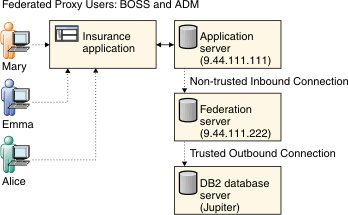
- BOSS, who is the default federated proxy user, has a user mapping.
- ADM, who is a federated proxy user, has a user mapping.
- Mary, who uses the insurance application, does not have a user mapping.
- Emma and Alice, each of whom use the insurance application, have user mappings.
- The application server, which hosts the insurance application and has the IP address 9.44.111.111. This scenario shows an application server, but any client can be used.
- The federation server, which has the IP address 9.44.111.222.
- The remote database server, which is cataloged on the federated server as JUPITER.
- On the remote database server, create these trusted context objects:
CREATE TRUSTED CONTEXT MY_DB2_TXC

BASED UPON CONNECTION USING

SYSTEM AUTHID BOSS

ATTRIBUTES (ADDRESS '9.44.111.222')

WITH USE FOR PUBLIC WITHOUT AUTHENTICATION

ENABLE
This trusted context specifies that BOSS is the connection originator and that the request for the outbound trusted connection must come from the federated server that has the IP address 9.44.111.222. After the trusted outbound connection is established, any user can reuse the connection without authenticating.
CREATE TRUSTED CONTEXT MY_DB2_TXC_ALICE

BASED UPON CONNECTION USING

SYSTEM AUTHID ADM

ATTRIBUTES (ADDRESS '9.44.111.222')

WITH USE FOR PUBLIC WITHOUT AUTHENTICATION ROLE Manager

ENABLE
This trusted context specifies that ADM is the connection originator and that the request for the outbound trusted connection must come from the federated server that has the IP address 9.44.111.222. After the trusted outbound connection is established, Alice can reuse the connection without authenticating, and she gains the role of Manager within the scope of the trusted connection.
- On the federation server, create this server definition:
CREATE SERVER JUPITER TYPE db2/udb

VERSION 9.5 WRAPPER drda...

OPTIONS(DBNAME 'remotedb',FED_PROXY_USER 'BOSS');
This server definition contains the information that the federated server requires to connect to the remote Db2 database named remotedb. The definition specifies that if the inbound connection to the federated server is not trusted, then BOSS, the default federated proxy user, establishes the outbound trusted connection.
- On the federation server, create user mappings for the federated
proxy users:
CREATE USER MAPPING FOR BOSS SERVER JUPITER OPTIONS(REMOTE_AUTHID 'BOSS',REMOTE_PASSWORD 'MYPASS'); CREATE USER MAPPING FOR ADM SERVER JUPITER OPTIONS(REMOTE_AUTHID 'ADM', REMOTE_PASSWORD 'PWD'); - On the federated server, create these trusted user mappings for
Emma and Alice.
CREATE USER MAPPING FOR EMMA SERVER JUPITER

OPTIONS(REMOTE_ AUTHID 'EGREENE', USE_TRUSTED_CONTEXT 'Y')

CREATE USER MAPPING FOR ALICE SERVER JUPITER

OPTIONS (USE_TRUSTED_CONTEXT 'Y',FED_PROXY_USER 'ADM');
- Emma requires a user mapping because she does not use the same user ID on the federated server and on the database server. Therefore, her user mapping specifies the REMOTE_AUTHID option.
- Alice requires a user mapping because the trusted context specifies that she uses ADM as the federated proxy user. Therefore, her user mapping specifies the FED_PROXY_USER option.
In this scenario, Mary does not require a user mapping. The user mappings for Emma and Alice do not store the remote password; therefore, those user mappings do not require constant updates to keep the remote password up-to-date.
The scenario, step-by-step
- The application creates a non-trusted inbound connection to the
federated server:
CONNECT TO FEDSVR USER MARY USING '****' - The first federated request that accesses the server JUPITER creates
an outbound connection to JUPITER:
SELECT * FROM JUPITER_NN01 CONNECT RESET - Because JUPITER specifies FED_PROXY_USER=BOSS, and Mary's user mapping does not specify a federated proxy user, the outbound connection is created for BOSS and then immediately switched to the current inbound user, who, in this case, is Mary.
- Mary's federated request is completed and recorded in the audit log under the name MARY. Then the connection is reset:
- Create a non-trusted inbound connection to the federated server
for Emma:
CONNECT TO FEDSVR USER EMMA USING '****' - The first federated request in the current connection that accesses
JUPITER creates a federated outbound connection to JUPITER.
SELECT * FROM JUPITER_NN01 CONNECT RESET - The outbound connection is created using BOSS and then is immediately switched to the current inbound user, Emma, whose ID is mapped to EGREENE.
- Emma's federated request is completed and recorded in the audit log under the name EGREENE. Then the connection is reset:
- Create a non-trusted inbound connection to the federated server
for Alice:
CONNECT TO FEDSVR USER ALICE USING '****' - The first federated request in the current connection that accesses
JUPITER creates a federated outbound connection to JUPITER. Because
Alice's trusted user mapping specifies that she use federated proxy
user ADM rather than the default federated proxy user BOSS, the outbound
connection is created using ADM and then is immediately switched to
Alice, who is the current inbound user.
SELECT * FROM JUPITER_NN01 CONNECT RESET - Alice's federated request is completed and can be recorded in the audit log. Then the connection is reset: