Creación de la sección «Añadir nota» en el modal «Calendario»
Aprenda a añadir cadenas de traducción personalizadas para el texto de la interfaz de usuario y a crear la sección Añadir nota en el modal Programación.
Procedimiento
- Configurar cadenas de traducción y configuraciones de entorno.
- Cree una carpeta de activos en devtoolkit_docker/orderhub-code/buc-app-order/packages/order-search-result/src-custom.
- Copia los activos del módulo compartido del pedido a la carpeta de activos que has creado.
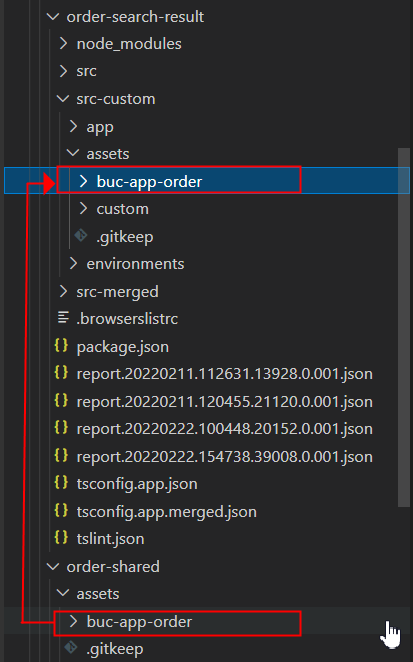
- Abre el devtoolkit_docker/orderhub-code/buc-app-order/angular.json archivo.
- Reemplaza el contenido actual de la matriz projects > order-search-result > architect > build > configurations > merged > assets con las siguientes entradas. El objetivo de este paso es indicar al módulo que utilice los archivos de recursos personalizados en lugar de los archivos de /order-shared.
{ "glob": "**", "input": "packages/order-search-result/src-merged/assets", "output": "assets" }, { "glob": "*.json", "input": "packages/order-search-result/src-merged/assets/buc-app-order", "output": "assets/order-search-result" }, { "glob": "**", "input": "node_modules/@buc/svc-angular/assets", "output": "assets" }, { "glob": "**", "input": "node_modules/@buc/common-components/assets", "output": "assets" } - Reemplaza también el contenido de la matriz projects > order-search-result > architect > build > configurations > merged-prod > assets.
- Copie la carpeta environments de buc-app-order/packages/order-search-result/src a buc-app-order/packages/order-search-result/src-custom.
- Ve al buc-app-order/packages/order-search-result/src-custom/environments directorio.
- Añade la siguiente línea al final de los archivos environment.ts envrionment.prod.ts y.
environment.customization = true; - Detenga y reinicie el servidor para que los cambios en los archivos angular.json overrides.json y surta efecto.Detenga el trabajo en la terminal. A continuación, ejecute:
yarn stop-appyarn start-app - Crea una carpeta personalizada en buc-app-order/packages/order-search-result/src-custom/assets.
- Cree una carpeta « i18n » en buc-app-order/packages/order-search-result/src-custom/assets/custom.
- Cree un archivo en.json en buc-app-order/packages/order-search-result/src-custom/assets/custom/i18n.El en.json archivo incluye las cadenas literales en inglés que se mostrarán en la interfaz de usuario. Puedes añadir cadenas traducidas creando otros archivos JSON. Nombra los archivos según los códigos de idioma ISO-639. Por ejemplo, fr.json para cadenas en francés.
- Pega el siguiente contenido JSON.
{
    "CUSTOM_ORDER_SEARCH_RESULT": {
        "NOTE": {
            "LABEL_ADD_NOTE": "Add Note",
            "LABEL_DATE": "Date",
            "LABEL_FIELD_REQUIRED": "Required.",
            "LABEL_USER": "User",
            "LABEL_NOTE": "Note",
            "LABEL_REASON_OPTIONAL": "Reason (optional)",
            "LABEL_CONTACT_TYPE_OPTIONAL": "Contact type (optional)",
            "LABEL_CONTACT_REFERENCE_OPTIONAL": "Contact reference (optional)",
            "MSG_SUCCESS_ADD_NOTES": "Notes added successfully.",
            "MSG_ERROR_ADD_NOTES": "Notes was not added. Try again later."
        }
    }
}
- Crea una carpeta personalizada en buc-app-order/packages/order-search-result/src-custom/app.
- Cree una carpeta de servicios de datos en buc-app-order/packages/order-search-result/src-custom/app/custom.
- Cree un archivo de servicio add-notes-data.service.ts en la carpeta data-services y pegue el siguiente fragmento de código. Este servicio llama a la API OMS de modifyFulfillmentOptions para guardar la nota.
import { Injectable } from '@angular/core'; import { BucCommOmsRestAPIService } from '@buc/svc-angular'; @Injectable({ providedIn: 'root' }) export class AddNotesDataService { constructor(private bucCommOmsRestAPIService: BucCommOmsRestAPIService) { } // Below method fetches the list of reason codes to display in 'Reason' dropdown getCommonCodeListForReasonCode(enterpriseCode: string, docType: string) { const Input = { CallingOrganizationCode: enterpriseCode, CodeType: 'NOTES_REASON', DocumentType: docType, }; return this.bucCommOmsRestAPIService.invokeOMSRESTApi('getCommonCodeList', Input, {}); } // Below method fetches the list of contact types to display in 'Contact type' dropdown getCommonCodeListForContactType(enterpriseCode: string) { const Input = { CallingOrganizationCode: enterpriseCode, CodeType: 'CONTACT_TYPE' }; return this.bucCommOmsRestAPIService.invokeOMSRESTApi('getCommonCodeList', Input, {}); } // Below method saves the notes data by calling modifyFulfillmentOptions OMS API changeOrder(order: any) { return this.bucCommOmsRestAPIService.invokeOMSRESTApi('modifyFulfillmentOptions', order, {}); } } - Crea un nuevo componente para añadir notas y su estructura de archivos, y luego realiza los cambios en los archivos.Para ello, primero cree la siguiente estructura de archivos:
- Crea un directorio llamado add-notes en src-custom/app/custom.
- Cree los siguientes archivos en el add-notes directorio: add-notes.component.html, add-notes.component.scss, y add-notes.component.ts.
A continuación, realice los siguientes cambios en el archivo:
- add-notes.component.html
<div class="cds--row"> <div class="cds--col-lg-16"> <buc-checkbox [checked]="isAddNoteChecked" [attr.tid]="componentId + '-add-note'" (change)="onIsAddNoteCheckedChange($event)"> {{'CUSTOM_ORDER_SEARCH_RESULT.NOTE.LABEL_ADD_NOTE' | translate}} </buc-checkbox> </div> </div> <div class="screen notes-section bx--modal-content" *ngIf="isScreenInitialized && isAddNoteChecked"> <p class="title"> {{ 'CUSTOM_ORDER_SEARCH_RESULT.NOTE.LABEL_ADD_NOTE' | translate }} </p> <div class="cds--row status"> <div class="combo-box cds--col-md-4"> <div class="d--flex-ai-flex-end"> <buc-date-picker label="{{'CUSTOM_ORDER_SEARCH_RESULT.NOTE.LABEL_DATE' | translate}}" [placeholder]="i18nDatePlaceholder" [dateFormat]="flatpickrDateFormat" [language]="curLocale" [value]="contactDate" (valueChange)="onDateChange($event)"> </buc-date-picker> <div class="oms-spacer8"></div> <buc-time-picker [disabled]="false" [theme]="'light'" [time]="contactTime?.time" [period]="contactTime?.period" (valueChange)="timeChange($event)"> </buc-time-picker> </div> <div *ngIf="savePressed && isDateValid" class="d--flex buc-warning cds--form-requirement"> {{'CUSTOM_ORDER_SEARCH_RESULT.NOTE.LABEL_FIELD_REQUIRED' | translate}} </div> </div> <div class="cds--col-md-4"> <buc-label class="size--sm" [theme]="'light'" [label]="'CUSTOM_ORDER_SEARCH_RESULT.NOTE.LABEL_USER' | translate" placeholder="" [(inputValue)]="currentUserId" (inputValueChange)="onText($event, 'conUser')"> </buc-label> <div *ngIf="savePressed && !currentUserId" class="d--flex buc-warning cds--form-requirement"> {{'CUSTOM_ORDER_SEARCH_RESULT.NOTE.LABEL_FIELD_REQUIRED' | translate}} </div> </div> </div> <div class="cds--row"> <div class="combo-box cds--col-md-4"> <p class="cds--label">{{'CUSTOM_ORDER_SEARCH_RESULT.NOTE.LABEL_NOTE' | translate}}</p> </div> <div class="combo-box cds--col-md-4"> <p class="pull-right">{{ notesText.length }}/{{ 2000 }}</p> </div> </div> <div class="combo-box cds--col-md-12 status"> <textarea [(ngModel)]="notesText" (inputValueChange)="onText($event, 'notesTxt')" ibmTextArea [attr.tid]="componentId + ''" [rows]=2 class="cds--text-area" aria-label="textarea" maxlength="2000"> </textarea> <div *ngIf="savePressed && !notesText" class="d--flex buc-warning cds--form-requirement"> {{'CUSTOM_ORDER_SEARCH_RESULT.NOTE.LABEL_FIELD_REQUIRED' | translate}} </div> </div> <div class="cds--row status"> <div class="combo-box cds--col-md-4"> <buc-dropdown placeholder="" [cozy]="true" [theme]="'dark'" [disabled]="false" [label]="'CUSTOM_ORDER_SEARCH_RESULT.NOTE.LABEL_REASON_OPTIONAL' | translate" [items]="reasonCodeList" (selected)="reasonCodeOnSelection($event)"> </buc-dropdown> </div> <div class="combo-box cds--col-md-4"> <buc-dropdown placeholder="" [cozy]="true" [theme]="'dark'" [disabled]="false" [label]="'CUSTOM_ORDER_SEARCH_RESULT.NOTE.LABEL_CONTACT_TYPE_OPTIONAL' | translate" [items]="contactTypeList" (selected)="contactTypeOnSelection($event)"> </buc-dropdown> </div> </div> <div class="cds--row status"> <div class="combo-box cds--col-md-4"> <buc-label class="size--sm" [theme]="'light'" [label]="'CUSTOM_ORDER_SEARCH_RESULT.NOTE.LABEL_CONTACT_REFERENCE_OPTIONAL' | translate" placeholder="" [(inputValue)]="contactRef" (inputValueChange)="onText($event, 'conRef')"> </buc-label> </div> </div> </div> - add-notes.component.scss:
.bx--modal-content { padding-right: 1rem; } .notes-section { border-top: 1px solid grey; padding-top: 1rem; margin-top: 1rem; } .bx--modal-content { padding: 1rem 1rem 0 1rem; .title, .subtitle, .type-switch, form, .delivery-type, .status, .alert-severity, .exclusion { margin-bottom: 24px; } .status:last-child { margin-bottom: 0; } .within-text, .within-text-only { display: flex; align-items: center; } } .pull-right { text-align: right; font-size: 0.75rem; } .oms-spacer8 { padding-top: 0.5rem; padding-left: 0.1rem; background-repeat: no-repeat; } buc-time-picker { ::ng-deep ibm-timepicker .bx--time-picker { ibm-timepicker-select.bx--time-picker__select { height: 2rem; background-color: white; } } } ::ng-deep .bx--time-picker__input { height: 2rem; } - add-notes.component.ts:
import { CommonService, Constants, DocTypes, handleOMSErrors, OrderListDataService } from '@buc/order-shared';
import { BucNotificationService, getCurrentLocale, getCurrentLocaleDateFormat, getFlatPickrDateFormat } from '@buc/common-components';
import { BucSvcAngularStaticAppInfoFacadeUtil } from '@buc/svc-angular';
import moment from 'moment';
import * as momentTime from 'moment-timezone';
import flatpickr from 'flatpickr';
import { AddNotesDataService } from '../data-services/add-notes-data.service';
import { Component, EventEmitter, Inject, Input, OnChanges, OnDestroy, OnInit, Output, SimpleChange } from '@angular/core';
import { TranslateService } from '@ngx-translate/core';
import { ModalService } from 'carbon-components-angular';
import { SimpleChanges } from '@angular/core';

@Component({
    selector: 'buc-add-notes',
    templateUrl: './add-notes.component.html',
    styleUrls: ['./add-notes.component.scss']
})

export class AddNotesComponent implements OnInit, OnChanges {

    nlsMap = {
        'CUSTOM_ORDER_SEARCH_RESULT.NOTE.MSG_SUCCESS_ADD_NOTES': '',
        'CUSTOM_ORDER_SEARCH_RESULT.NOTE.MSG_ERROR_ADD_NOTES': '',
    }
    bucNotificationService: BucNotificationService;
    @Input() scheduleOrderClicked: boolean;
    @Input() componentId: boolean;
    @Input() modalData: any;
    @Output() cancel: EventEmitter<any> = new EventEmitter();
    @Output() onAddNoteCheckedChange: EventEmitter<any> = new EventEmitter();

    constructor(
        protected modalService: ModalService,
        public orderListDataService: OrderListDataService,
        public translate: TranslateService,
        public commonSvc: CommonService,
        public notesDataService: AddNotesDataService
    ) {
        this.bucNotificationService = new BucNotificationService();
    }

    isAddNoteChecked = false;
    isScreenInitialized = false;
    displayData: any;
    reasonCodeList = [];
    contactTypeList = [];
    curLocale: string;
    public i18nDatePlaceholder;
    public flatpickrDateFormat;

    reasonCodeValue: any;
    contactTypeValue: any;
    getReasonValue: any;
    getContactValue: any;
    contactRef = '';
    notesText = '';
    contactDateTime;
    contactDate;
    contactTime;
    invalidDate = false;
    currentUserId;
    savePressed = false;
    isDateValid = false;

    // To gather all the data required for notes section on opening the modal like dropdown list data, date picker placeholder
    async initializeNotesSection() {
        this.savePressed = false;
        this.currentUserId = BucSvcAngularStaticAppInfoFacadeUtil.getOmsUserLoginId();
        await this._initTranslations();
        await this.getReasonCodeList();
        await this.getContactTypeList();
        this.isScreenInitialized = true;
        this.setDate();
        this.curLocale = getCurrentLocale();
        if (this.curLocale.startsWith('zh-')) {
            this.curLocale = 'zh';
        }
        this.i18nDatePlaceholder = getCurrentLocaleDateFormat();
        this.flatpickrDateFormat = getFlatPickrDateFormat();
    }

    // To get the list of reason codes to display in 'Reason' dropdown
    async getReasonCodeList() {
        const enterpriseCode = this.displayData.enterpriseCode;
        const documentType = this.displayData.docType;
        const commonCodeList = await this.notesDataService.getCommonCodeListForReasonCode(enterpriseCode, documentType).toPromise();
        if (commonCodeList.CommonCode) {
            commonCodeList.CommonCode.forEach(element => {
                this.reasonCodeList.push({
                    content: element.CodeShortDescription ? element.CodeShortDescription :
                        element.CodeValue, value: element.CodeValue
                });
            });
        }
    }

    // To get the list of contact types to display in 'Contact type' dropdown
    async getContactTypeList() {
        const enterpriseCode = this.displayData.enterpriseCode;
        const commonCodeList = await this.notesDataService.getCommonCodeListForContactType(enterpriseCode).toPromise();
        if (commonCodeList.CommonCode) {
            commonCodeList.CommonCode.forEach(element => {
                this.contactTypeList.push({
                    content: element.CodeShortDescription ? element.CodeShortDescription :
                        element.CodeValue, value: element.CodeValue
                });
            });
        }
    }

    onIsAddNoteCheckedChange(event) {
        this.isAddNoteChecked = event.checked;
        this.onAddNoteCheckedChange.emit();
    }

    async addNotes() {
        this.savePressed = true;
        this.orderAddNotes();
    }

    // To save the notes on click of 'Schedule' button
    async orderAddNotes() {
        const convertTimestamp = new Date(this.contactDateTime);
        if (this.notesText.length > 0 && this.currentUserId.length > 0 && !this.invalidDate && this.isDateValid === false) {
            this.reasonCodeValue = this.getReasonValue ? this.reasonCodeList.find(r => r.value === this.getReasonValue).value : '';
            this.contactTypeValue = this.getContactValue ? this.contactTypeList.find(c => c.value === this.getContactValue).value : '';

            Promise.all(this.modalData.orders.map(async (element) => {
                const body: any = {
                    OrderHeaderKey: element.OrderHeaderKey,
                    Notes: {
                        Note: [
                            {
                                ContactReference: this.contactRef,
                                ContactTime: convertTimestamp,
                                ContactType: this.contactTypeValue,
                                ContactUser: this.currentUserId,
                                NoteText: this.notesText,
                                ReasonCode: this.reasonCodeValue
                            }
                        ]
                    }
                };
                if (this.displayData.hasOwnProperty('recordChanges') &&
                    this.displayData.recordChanges === false) {
                    await this.notesDataService.changeOrder(body).toPromise();
                } else {
                    if (this.displayData.docType === DocTypes.SalesOrder) {
                        const pendingChanges = { PendingChanges: { RecordPendingChanges: 'N' } };
                        Object.assign(body, pendingChanges);
                    }
                    await this.notesDataService.changeOrder(body).toPromise();
                }
            })).then(() => {
                if (this.displayData.showSuccessMsg) {
                    CommonService.notify('success', this.nlsMap['CUSTOM_ORDER_SEARCH_RESULT.NOTE.MSG_SUCCESS_ADD_NOTES']);
                }
                this.onCancel();
            }).catch(async (err) => {
                const errorMsg = this.nlsMap['CUSTOM_ORDER_SEARCH_RESULT.NOTE.MSG_ERROR_ADD_NOTES'];
                await handleOMSErrors(err, this.translate, this.bucNotificationService, errorMsg);
                this.onCancel();
            });
        }
    }

    // To set the date and time picker to current date and time
    setDate() {
        const currentDate = new Date();
        this.contactDateTime = moment(currentDate).format(Constants.DATETIME_FORMAT);
        this.contactDate = flatpickr.formatDate(moment(currentDate).toDate(), 'Z');
        this.contactTime = {
            time: momentTime(currentDate).format(Constants.TIME_FORMAT),
            period: momentTime(currentDate).format(Constants.TIME_PERIOD)
        };
    }

    // Event that triggers when user changes the date
    onDateChange(event) {
        this.isDateValid = event.length === 0;
        if (event.length) {
            const newDate = moment(event[0]).format(Constants.DATE_FORMAT);
            this.contactDateTime = this.contactDateTime.replace(this.contactDateTime.split(' ')[0], newDate);
            this.contactDate = flatpickr.formatDate(moment(this.contactDateTime).toDate(), 'Z');
        }
    }

    // Event that triggers when user changes the time
    timeChange(event) {
        const dateTime = this.contactDateTime.split(' ');

        if (this.contactTime.time && event.time) {
            let invalidTime = false;
            const tm = event.time.split(':');
            let hours = Number(tm[0]);
            const minutes = (tm[1] && Number(tm[1])) || 0;
            if (this.contactTime.period === 'PM') {
                if (hours > 12 && hours <= 24) {
                    hours = hours - 12;
                } else if (hours > 24) {
                    invalidTime = true;
                }
            }
            if (minutes && minutes > 59) {
                invalidTime = true;
            }
            if (!invalidTime) {
                const h = hours < 10 ? `0${hours}` : `${hours}`;
                const m = minutes < 10 ? `0${minutes}` : `${minutes}`;
                dateTime[1] = `${h}:${m}`;
            }
        } else if (this.contactTime.period && event.timePeriod) {
            dateTime[2] = event.timePeriod;
        }

        const tempDate = new Date(dateTime.join(' '));
        if (tempDate.toString() === 'Invalid Date') {
            this.invalidDate = true;
        } else {
            this.invalidDate = false;
            this.contactDateTime = dateTime.join(' ');
            this.contactTime = {
                time: momentTime(tempDate).format(Constants.TIME_FORMAT),
                period: momentTime(tempDate).format(Constants.TIME_PERIOD)
            };
        }
    }

    async reasonCodeOnSelection(event) {
        this.getReasonValue = event.item.value;
    }
    async contactTypeOnSelection(event) {
        this.getContactValue = event.item.value;
    }

    // Event that gets trigger on clicking cancel button
    onCancel() {
        if (this.displayData.parentPage) {
            this.displayData.parentPage.disableAdd = false;
        }
      this.cancel.emit();
    }

    async ngOnInit() {
        await this._initTranslations();
        this.initializeNotesSection();
    }

    async ngOnChanges(changes: SimpleChanges) {
        if(changes.scheduleOrderClicked?.currentValue) {
            if (this.isAddNoteChecked) {
                await this.addNotes();
            }
        }
        if (changes.modalData?.currentValue && changes.modalData.currentValue !== changes.modalData.previousValue  && Object.keys(changes.modalData.currentValue).length > 0) {
            this.displayData = {
                docType: this.modalData.orders[0].DocumentType,
                enterpriseCode: this.modalData.orders[0].enterpriseCode,
                OrderHeaderKey: this.modalData.orders[0].OrderHeaderKey,
                showSuccessMsg: true
            };
        }

    }

    protected async _initTranslations() {
        const keys = Object.keys(this.nlsMap);
        const json = await this.translate.get(keys).toPromise();
        keys.forEach(k => this.nlsMap[k] = json[k]);
    }

}
- Añadir un servicio de extensión: buc-app-order/packages/order-search-result/src-custom/app/custom/data-services/add-notes-extension.service.ts
import { Injectable } from '@angular/core'; import { ExtensionService } from '@buc/common-components'; @Injectable() export class AddNotesExtensionService extends ExtensionService { userInputs = { scheduleOrderClicked: false, componentId: '', modalData: {} }; originalScheduleOrderFunc; constructor() { super(); } createInput() { if (!this.parentContext.scheduleOrder) { this.userInputs.scheduleOrderClicked = false; this.originalScheduleOrderFunc = null; } if (this.parentContext.componentId !== this.userInputs.componentId) { this.userInputs.componentId = this.parentContext.componentId; } if (this.parentContext.modalData !== this.userInputs.modalData) { this.userInputs.modalData = this.parentContext.modalData; } this.userInputObs$.next(this.userInputs); this.overrideMethods(); } handleOutput() { this.userOutputs = { cancel: this.onCancel.bind(this), onAddNoteCheckedChange: this.onAddNoteCheckedChange.bind(this) }; this.userOutputObs$.next(this.userOutputs); } overrideMethods() { if (!this.originalScheduleOrderFunc && this.parentContext.scheduleOrder) { this.originalScheduleOrderFunc = this.parentContext.scheduleOrder.bind(this.parentContext); this.parentContext.scheduleOrder = (event) => { this.userInputs.scheduleOrderClicked = true; this.userInputObs$.next(this.userInputs); this.originalScheduleOrderFunc(event); } } } onAddNoteCheckedChange() { this.userInputs.modalData = this.userInputs.modalData; this.userInputObs$.next(this.userInputs); } onCancel() { this.parentContext.closeModal(); } } - Registre el nuevo componente y el servicio de extensión en /packages/order-search-result/src-custom/app/app-customization.impl.ts:
import { ExtensionModule } from "@buc/common-components"; import { SharedExtensionConstants } from "@buc/order-shared"; import { AddNotesComponent } from "./custom/add-notes/add-notes.component"; import { AddNotesExtensionService } from "./custom/data-services/add-notes-extension.service"; export class AppCustomizationImpl { static readonly components = [AddNotesComponent]; static readonly providers = []; static readonly imports = [ ExtensionModule.forRoot([ { id: SharedExtensionConstants.SCHEDULE_MODAL_SHARED_BOTTOM, component: AddNotesComponent, service: AddNotesExtensionService } ]), ]; } - Crea una carpeta de características en buc-app-order/packages/order-search-result/src-custom/app.
- En la carpeta features, cree un archivo ext-order.module.ts ( buc-app-order/packages/order-search-result/src-custom/app/features/ext-order.module.ts ) y pegue el siguiente contenido.
Observe el objeto proveedor en el código con el token CUSTOM_ACTIONS. Order Hub proporciona dos tokens de inyección.import { NgModule } from "@angular/core"; import { CommonModule } from "@angular/common"; import { TranslateModule } from "@ngx-translate/core"; import { AddNotesDataService } from "../custom/data-services/add-notes-data.service"; @NgModule({ declarations: [], imports: [CommonModule, TranslateModule], providers: [AddNotesDataService], exports: [], }) export class ExtOrderModule {}CUSTOM_ACTIONSyCUSTOM_FEATURE_ACTIONSpara anular acciones existentes o proporcionar acciones personalizadas.El valor del token de inyección es una matriz en la que cada elemento es un objeto que contiene dos propiedades:
- nombre: el nombre de la acción.
- acción: el servicio que gestiona o implementa la acción. En este tutorial, ScheduleActionService es una acción predeterminada que debes anular, por lo que también debes añadir
ScheduleActionServiceen la misma matriz de proveedores.
El punto de inyección debe definirse en el ext-NNN.module.ts módulo, ya que garantiza que el
TranslateServiceque se inyecta en la acción tenga todos los paquetes cargados por el módulo de características. Todos los módulos de todas las aplicaciones de rutas tienen este módulo en /src/app/features/ext-NNN.module.ts. Este archivo no existe en su src-custom carpeta, por lo que debe crearlo.Nota: La implementación de la acción se separa por componentes, de modo que la personalización de la acción existente se limita al archivo de servicio, en lugar de modificar todos los componentes que envían la acción. Al realizar estos cambios, la aplicación buc-app-order utiliza el servicio recién añadido cada vez que se envía la acción Schedule. - Actualice la interfaz de usuario del Centro de pedidos y siga un flujo de programación para ver los cambios en el modal de programación de pedidos.
- Inicie sesión en el centro de pedidos de última generación.
- Vaya a Pedidos > Salientes (modo DEV).
- Buscar un pedido.
- En la tabla de resultados de búsqueda de pedidos, haga clic en la casilla de verificación situada junto a un pedido y, a continuación, haga clic en Programar.
- Haga clic en Añadir nota para mostrar los campos en los que puede añadir información.
- Añade texto a la sección Notas y modifica otras propiedades según sea necesario.
- Haga clic en «Programar ».Aparece un mensaje para confirmar que la nota se ha añadido correctamente y que el pedido se ha programado.
- Haga clic en el número de pedido que ha programado para ir a la página de detalles del pedido.
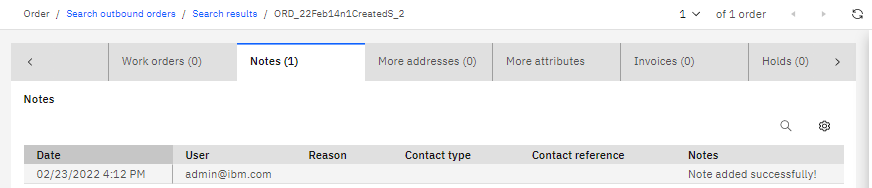
- Haga clic en la pestaña Notas. Asegúrate de que la tabla de notas incluye la nota que has añadido.
Resultados
Complete la siguiente lección para aprender a implementar las personalizaciones en sus entornos, de modo que otros puedan utilizarlas. Hasta ahora, las personalizaciones solo están disponibles para usted a nivel local.