High-level overview of task flow

This process presents a suggested order of tasks for installing and deploying IBM Sterling Order Management by using IBM UrbanCode Deploy. You may want to bookmark this page so that you can return to it for reference.

About this task

The following illustration and steps provide a high-level overview of the tasks you would perform to install and deploy Sterling Order Management.
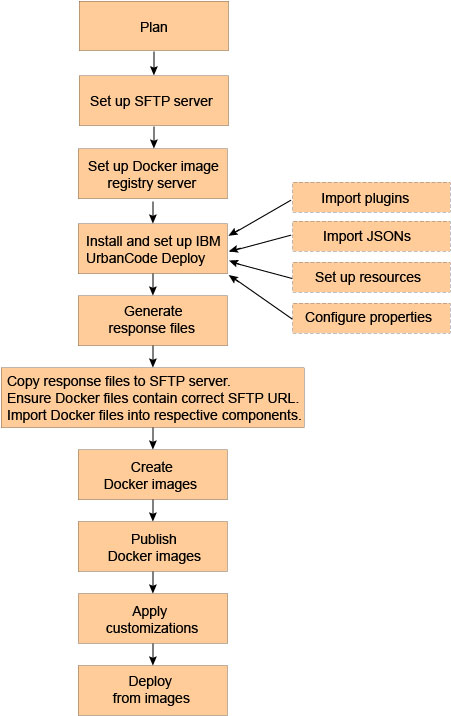
Diagram showing a high-level overview of the installation and deployment process.

Procedure

  1. Plan - Ensure that you understand the installation and deployment process, evaluate your system requirements, and anticipate your security and performance needs.
  2. Set up a Secure File Transfer Protocol (SFTP) server repository.
  3. Set up a private Docker image registry server.
  4. Install and set up UrbanCode Deploy, as follows:
    1. Install UrbanCode Deploy.
    2. Import plugins into UrbanCode Deploy.
    3. Import application JSONs into UrbanCode Deploy.
    4. Set up resources in UrbanCode Deploy.
    5. Configure properties in UrbanCode Deploy.
  5. Generate response files for the Sterling Order Management product and all middleware components by accepting the license agreement.
  6. Copy the response files to the SFTP server that you configured in step 1, ensure that the Docker files contain the correct File Transfer Protocol (FTP) URL for these response files, and import the Docker files into each respective component. The default setting for each component is to use the file system importer.
  7. Run the Dockerize-v9.5-Images process to create Docker images.
  8. Run the Publish Images process to tag and publish the images to the registry server.
  9. Run the Build Customized Runtime process to apply customizations to the Runtime image.
  10. Run the deployment application process to deploy your applications by pulling the tagged images from the registry server.