Creating and retrieving retrievable secrets

You can submit retrievable secrets to the ultravisor, and retrieve them on the guest for which they where intended.

Before you begin

An IBM Secure Execution guest on an IBM z17 is required. The ultravisor and the uv device must support the secret-store extension including retrieving secrets. The pvsecret command must support the new secret types and the retrieval function. However, you can create the add-secret request on either z/Architecture or x86, assuming that the pvsecret command is installed.

About this task

Retrievable secrets are defined by a 32-byte ID and have a type. The type can be plaintext or a protected key type.

You set the secret type through a flag, for example: pvsecret [..] retrievable -aes <key>. The size or curve is determined automatically by the command. Unsupported sizes and curves are rejected.

With pvsecret create retrievable you can use the following types of secret:
  • AES 128, 192, and 256
  • AES XTS 128 and 256
  • HMAC SHA256 and SHA512
  • EC secp256k1, secp384r1, secp521r1, ed25519, and ed448

To retrieve a secret, you use pvsecret retrieve <secret>.yaml. The yaml file is the one generated during pvsecret create. If a secret is not retrievable, that is, if it is an association secret, or the secret was not added before, the command issues an error message.

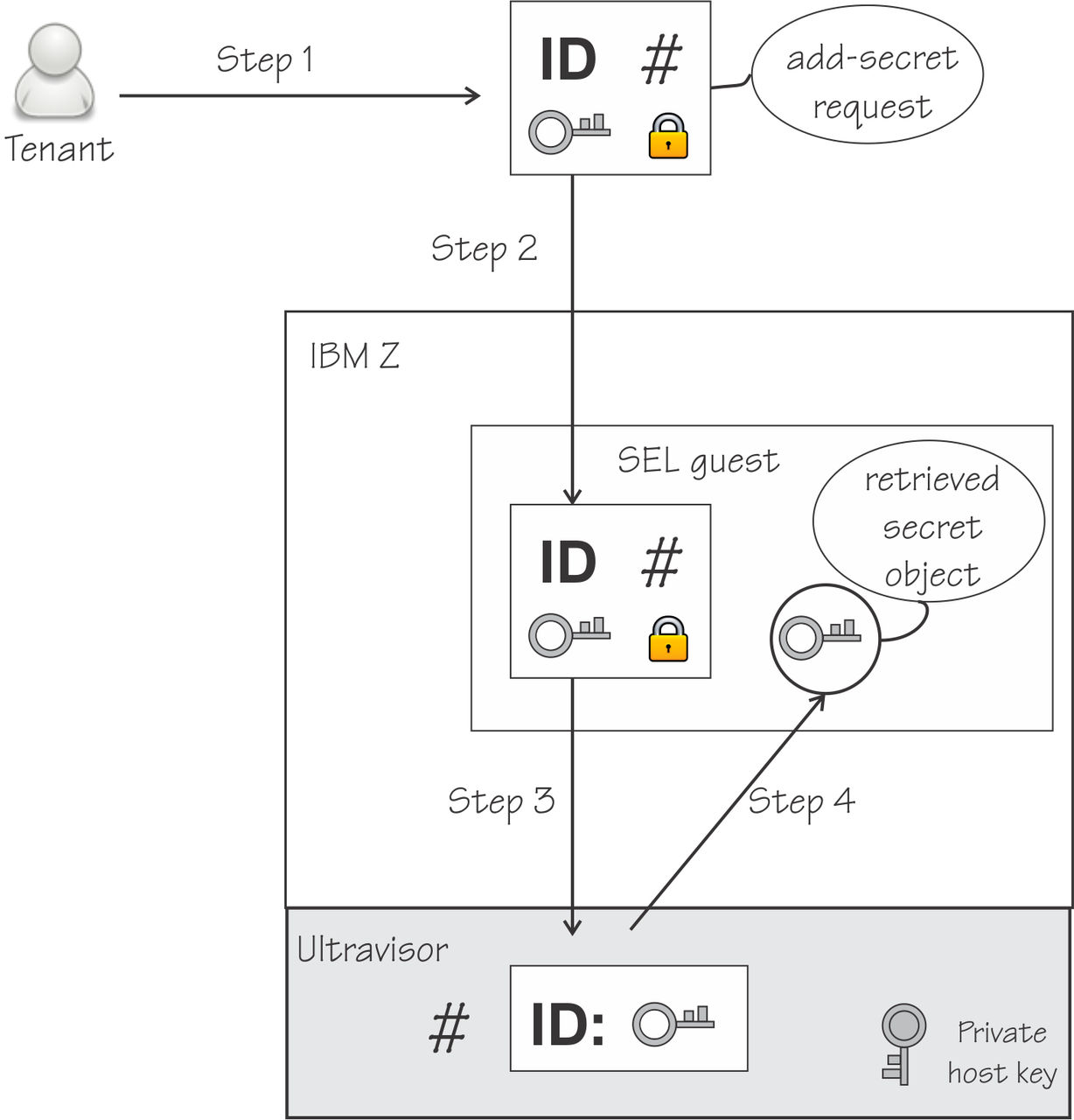
The example, illustrated in Figure 1, creates a retrievable secret with a name of MyRetrSecret.

Procedure

  1. Create an add-secret request for a retrievable secret. Issue a command of the following form on one line:
    [trusted]# pvsecret create retr -k <host_key_document> --hdr <SEL_header> 
    -o <request_file> -C <CA_certificate> -C <IBM_signing_certificate> 
    --secret <secret_file> --type <type> 
    --extension-secret <ext_secret> <name> 
    where:
    • retr specifies that the add-secret request is for a retrievable secret.
    • -k <host_key_document> specifies the host key document.
    • --hdr <SEL_header> specifies the header of the KVM guest.
    • -o <request_file> specifies the file that contains the generated add-secret request.
    • -C <CA_certificate> specifies the certificate that is used to establish a chain of trust for the verification of the host key documents. Specify this option twice to specify the IBM Z signing-key certificate and the intermediate CA certificate (signed by the root CA).
    • --secret <secret_file> uses the contents of <secret_file> as the retrievable secret.
    • --type <type> specifies the type of the retrievable secret. Valid types are:
      • plain defines a plaintext secret. Can be any file up to 8190 bytes long..
      • aes defines an AES key. Must be a plain byte file 128, 192, or 256 bit long.
      • aes-xts defines an AES-XTS key. Must be a plain byte file 256, or 512 bit long.
      • hmac-sha defines a HMAC-SHA key. Must be a plain byte file 512, or 1024 bit long. Special care is required when creating HMAC-SHA keys, see the man page for details.
      • ec defines an elliptic curve private key. Must be a PEM or DER file.
    • --extension-secret <ext_secret> is optional but enhances the security of the add-secret request. The option uses the contents of the input file as extension secret. The file must be exactly 32 bytes long. If this request is the first, all subsequent requests must have the same extension secret. If no extension secret is specified with either the --extension-secret option or the --cck option, a string consisting of 32 zeroes is used.
    • <name> identifies the retrievable secret. The SHA-256 hash of the name is used as the secret ID and is saved in a YAML file with the naming convention <name>.yaml. Any white spaces are mapped to dashes (-).
    Example:
    [trusted]# pvsecret create retr -k z16.crt --hdr se.hdr -o addRetrSecretReq 
    -C DigiCertCA.crt -C ibm-sign.crt 
    --secret MyRetrSecret_in --type aes --extension-secret MyExtSecret MyRetrSecret
    where:
    • z16.crt is the host key document.
    • se.hdr is the header file of the KVM guest.
    • addRetrSecretReq is the resulting add-secret request file.
    • DigiCertCA.crt is the CA certificate.
    • ibm-sign.crt is the IBM Z signing certificate.
    • MyRetrSecret_in contains the retrievable secret.
    • aes specifies a type of AES.
    • MyExtSecret is the extension secret.
    • MyRetrSecret is the name of the retrievable secret. The SHA-256 hash is the ID, and is saved in MyRetrSecret.yaml.
    For more information about the pvsecret create retr command, see pvsecret create retrievable.
  2. Copy the add-secret request to the SEL guest.
  3. On the SEL guest, add the secret to the secret store.
    Issue a command of the form:
    [se_guest]# pvsecret add <request_file>
    where <request_file> contains the request with the retrievable secret to be added to the store.
    For example:
    [se_guest]# pvsecret add addRetrSecretReq
    were addRetrSecretReq is the add-secret request file created with pvsecret create retr.

    For more information about the pvsecret add command, see pvsecret add.

  4. Retrieve the secret from the secret store.
    Issue a command of the form:
    # pvsecret retr <name>.yaml 
    where
    • retr tells the command to retrieve a secret.
    • <name>.yaml contains the ID of the secret.
    The command finds the secret with the specified ID, and writes it to the current directory as a PEM file.
    For example, to retrieve a secret with the ID file MyRetrSecret.yaml, issue:
    # pvsecret retrieve MyRetrSecret.yaml 

    For more information about the pvsecret retrieve command, see pvsecret retrieve.

Example

Figure 1. Creation and retrieval of a retrievable secret

The retrievable secret is shown as first being included in an add-secret request, then sent to be stored by the ultravisor, then retrieved by the guest.