Understanding the sizing charts
When the system resources are managed by cpuplugd the amount of CPUs and memory varies over time. The tables list the average memory sizes allocated at the time when the system's CPU load reaches a steady state.
To show the dynamic behavior, the charts depict the individual values over times of interest. However, these charts are not always clear. Figure 1, as an example, shows the number of CPUs over time assigned to all guests.
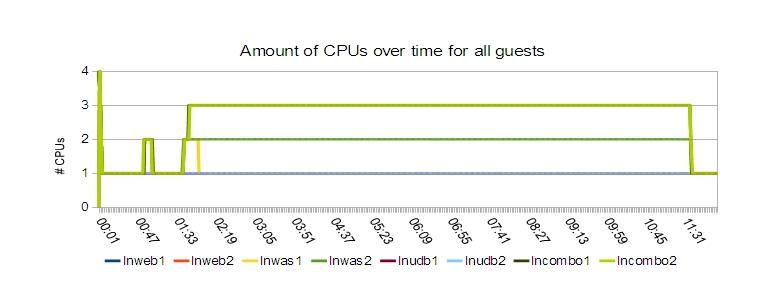
- All systems which are expected never to exceed the load of 1 CPU are withdrawn. In the example, these are lnweb1, lnweb2, lnudb1 and lnudb2.
- The combo systems are expected to behave the same, therefore only lncombo1 is shown.
The result is shown in Figure 2.
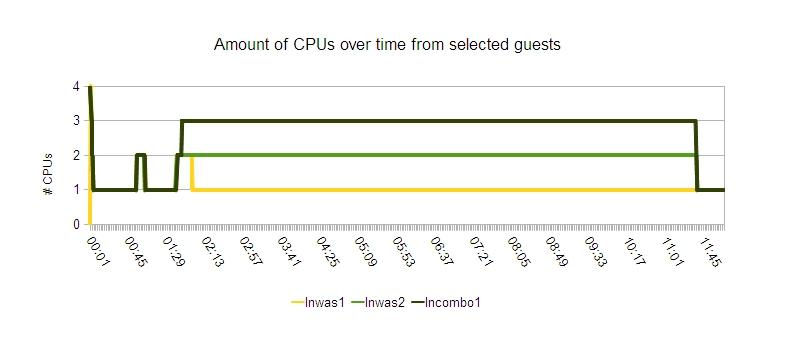
| 00:00 | cpuplugd gets started, the number of CPUs is quickly reduced to 1 |
| 00:29 | The middleware is started, causing a short load increase to 2 CPUs. |
| 01:41 | The workload starts, after a ramp-up phase the number of CPUs assigned to lnwas1 is reduced |
| 11:41 | The workload stops, and the number of CPUs assigned to all servers is reduced to one |
The charts for memory sizing are optimized in a similar fashion.
The optimization rules are explained for each scenario. The memory
size considered is the difference of the defined guest size, (5 GB
per guest) and the size of the CMM pool, which is reported in /proc/sys/vm/cmm_pages (in
pages). Mostly only the size of the CMM pool is shown; but a large
pool signifies a small system memory size. The target is to be close
to the manually sized setup. If the remaining memory size is smaller
than the manually sized setup, it is likely that the performance is
negatively impacted.