Scaling the size of the DynaCache
This is a series of test cases that compare the various dynamic cache sizes.
These tests were run with the Trade caching option set to Distributed Map. The dynamic cache size was varied from 2000 to 20000 statements. The values used were 2000, 5000, 10000, 15000, and 20000. These runs were done using the WebSphere® Proxy Server and bypassing the Apache Web server.
These tests were run with workload clients starting at 25 and increasing by 5 until a total of 60 clients.
| DynaCache size | Caching mode | Servlet caching | Replication domain | Replication type |
|---|---|---|---|---|
| 2000, 5000, 10000, 20000 | Distributed map | Disabled | Entire domain | Not shared |
Observations
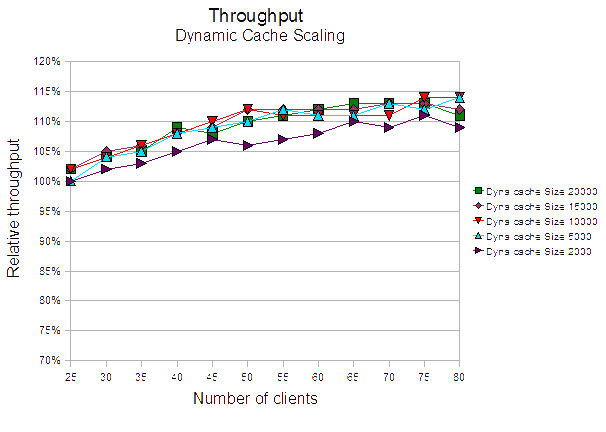
A dynamic cache size of 2000 (the default) had the lowest throughput. Dynamic cache sizes, 5000, 10000, 20000 are very close, where the throughput with a cache size of 5000 statements is mostly the lowest from these.
Conclusions
The default cache size is not the best for this environment. Any cache size above 10000 seems to be suitable for this environment.
Observations
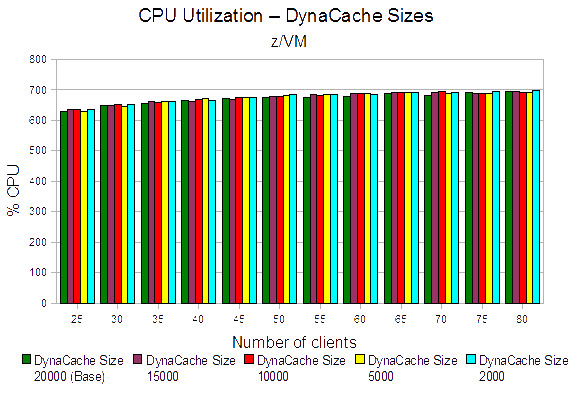
The total CPU utilization results for the various DynaCache sizes are all within 2 % of each other. The DynaCache size of 2000 has a higher WebSphere CPU utilization and corresponding lower throughput. This would seem logical because there is a smaller amount of memory available to hold cached data and would require more WebSphere processing to satisfy the cache misses.
Conclusion
Reducing DynaCache sizes from 20,000 statements to smaller values for this environment did not produce any significant change in either CPU utilization or throughput.