OSA card versus HiperSockets
The purpose of these test runs was to see the impact of using HiperSockets™ for the connection between WebSphere® Application Server and the database instead of using an OSA card.
WebSphere Application Server 6.1 (31-bit)
Observations
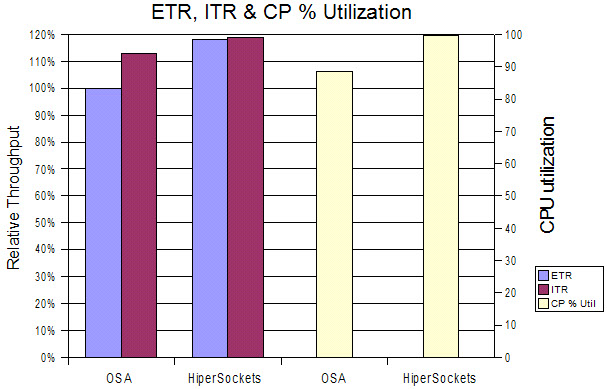
Use of HiperSockets with the 31-bit WebSphere Application Server environment results in a throughput improvement of nearly 20% as well as a fully utilized system.
Conclusion
The use of HiperSockets can be highly recommended. By using HiperSockets, we were able to fully utilize the WebSphere Application Server, which, unfortunately, limits the improvement. The fact that it is possible to increase the transaction throughput by modifying the network connection type indicates that the network connection between the WebSphere Application Server and the database needs a very high bandwidth. The WebSphere Application Server itself is not a bottleneck.
WebSphere Application Server 6.1 (64-bit)
Observations
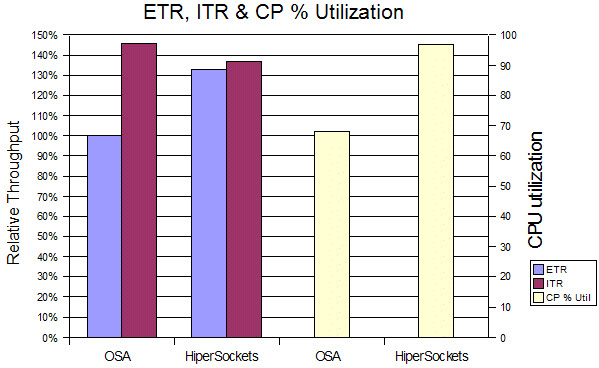
The use of HiperSockets as a connection type between the WebSphere Application Server and the database leads to a large improvement of 33% in throughput and the CPU load increases by 43%, which leads to a decreasing ITR and a highly utilized system.
Conclusion
These results confirm that the connection between the WebSphere Application Server and the database requires a high bandwidth, which can only be delivered by HiperSockets.
Overall conclusion for OSA card versus HiperSockets
In general, the use of HiperSockets can be highly recommended. HiperSockets has much lower latencies because it is implemented in memory. This results in much higher network throughput, but it is completely driven by the CPs. This means it is also related to higher CPU cost because no work can be delegated to the OSA Express card. Systems running with fully utilized CPUs might not benefit from this change.
Overall view - DB2® database on z/OS®
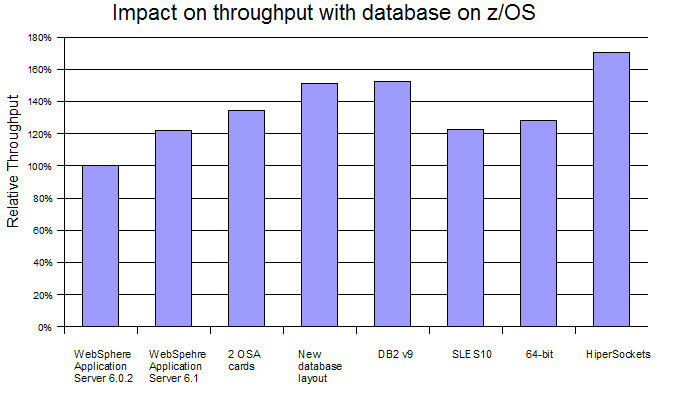
Figure 3 shows the impact of the various changes for the environment with the database on z/OS. The changes are cumulative to the right, meaning that the scenario labeled DB2 v9 also uses WebSphere Application Server 6.1, two OSA cards, and the new database layout.
- Used WebSphere Application Server 6.1
- Divided the network streams from the WebSphere Application Server to the client and to the database
- Optimized the database layout
- Introduced HiperSockets connections to the database server
Overall, we reached an improvement of about 70% even with the decrease in throughput seen with SLES10.
DB2 database on Linux®
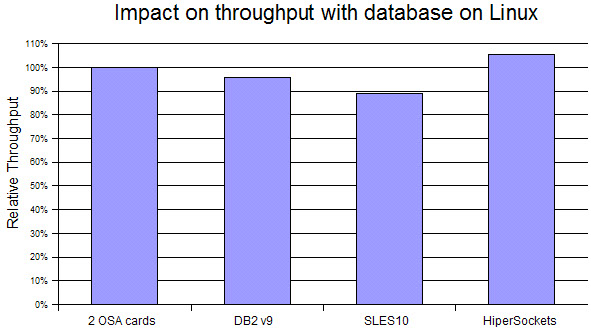
Figure 4 shows the impact of the various changes for the environment with the database on Linux. The changes are cumulative to the right, meaning that the scenario labeled DB2 v9 also uses two OSA cards. All scenarios use WebSphere Application Server 6.1.
Here we have less data points because we did not perform all runs with the database on Linux. The overall improvement here is much lower because the entry point reaches a CPU utilization of 92% on the WebSphere Application server, which limits further improvements.
The ITR is stable. Even with the change to SLES, the ITR only decreases slightly. The change to HiperSockets connections could not improve the throughput as impressively as with the database on z/OS because the WebSphere Application Server was CPU constrained.