Creating a mediated device with AP queues
About this task
In the steps that follow, a mediated device is first created, then adapters and domains are configured for the device. After the mediated device is included in a KVM virtual server configuration, these AP queues become available to the guest that runs in the virtual server.
Procedure
-
Create the mediated device.
To create a persistent mediated device, use the virsh nodedev-define command and a node-device XML file. Persistent AP VFIO mediated devices build on AP queues that are persistently under control of the vfio-ap device driver, see Free AP queues for use by KVM guests.
For a transient mediated device, use the virsh nodedev-create command and a node-device XML file, or use general Linux® commands.
- Follow these steps to create a persistent mediated device from a description in node-device XML format.
- Use the following template for your node-device XML file:
<device> <parent>ap_matrix</parent> <capability type="mdev"> <type id="vfio_ap-passthrough"/> <uuid>UUIDSPEC</uuid> </capability> </device> - Replace UUIDSPEC with the UUID that you obtained in step 1. Remove the uuid element if you want libvirt to generate a UUID for you.
- Configure adapters by specifying attr elements as child elements of the capability element.
For <adapter_id>, specify the adapter ID as two hexadecimal digits with prefix 0x.attr name attribute: assign_adapter attr value attribute: <adapter_id> - Configure domains by specifying attr elements as child elements of the capability element.
For <domain_id>, specify the domain ID as four hexadecimal digits with prefix 0x.attr name attribute: assign_domain attr value attribute: <domain_id> - Create the mediated device by issuing a virsh nodedev-define command with the node-device XML file as a command argument.
In libvirt, the mediated device is represented with a prefix,
mdev_, followed by a string that corresponds to the UUID with underscore characters (_) instead of hyphens (-), followed by a_matrixsuffix. - Add the device to the autostart configuration with the virsh nodedev-autostart command, so that the device is automatically activated after a host reboot.
- Activate the mediated device on the running KVM host with a virsh nodedev-start command.
- Optional: Confirm your settings for the mediated device with virsh nodedev-info and virsh nodedev-dumpxml.
Example: This example uses a device configuration-XML file my_ap_mdev.xml to create a mediated device.With a UUID
4b0518fd-9237-493f-93c8-c5597f8006a3, the command results in a device mdev_4b0518fd_9237_493f_93c8_c5597f8006a3_matrix in libvirt and in a directory /sys/devices/vfio_ap/matrix/4b0518fd-9237-493f-93c8-c5597f8006a3 that represents the device in sysfs.The example assumes that 11 out of a matrix of 12 AP queues for 3 adapters,00,01, and0a, and four domains,0001,0002,0004, and001b, are available for KVM guests. The exception is AP queue01.001bwhich is assumed to be used by the KVM host.Figure 1. Assigning a matrix of AP queues to a mediated device 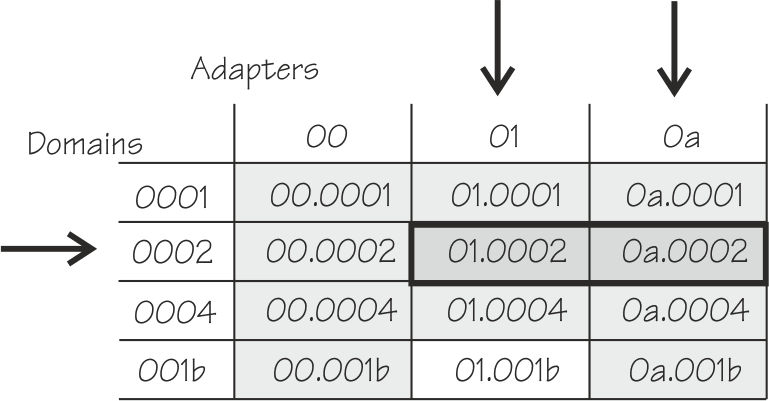
The device configuration-XML file of the example specifies domain
0002and adapters01and0ato configure AP queues01.0002and0a.0002for the mediated device.
The following commands confirm that the device and its settings are as intended.# cat my_ap_mdev.xml <device> <parent>ap_matrix</parent> <capability type="mdev"> <type id="vfio_ap-passthrough"/> <attr name="assign_adapter" value="0x01"/> <attr name="assign_adapter" value="0x0a"/> <attr name="assign_domain" value="0x0002"/> <uuid>4b0518fd-9237-493f-93c8-c5597f8006a3</uuid> </capability> </device> # virsh nodedev-define my_ap_mdev.xml Node device 'mdev_4b0518fd_9237_493f_93c8_c5597f8006a3_matrix' defined from my_ap_mdev.xml # virsh nodedev-autostart mdev_4b0518fd_9237_493f_93c8_c5597f8006a3_matrix # virsh nodedev-start mdev_4b0518fd_9237_493f_93c8_c5597f8006a3_matrix Device mdev_4b0518fd_9237_493f_93c8_c5597f8006a3_matrix started# virsh nodedev-info mdev_4b0518fd_9237_493f_93c8_c5597f8006a3_matrix Name: mdev_4b0518fd_9237_493f_93c8_c5597f8006a3_matrix Parent: ap_matrix Active: yes Persistent: yes Autostart: yes # virsh nodedev-dumpxml mdev_4b0518fd_9237_493f_93c8_c5597f8006a3_matrix <device> <name>mdev_4b0518fd_9237_493f_93c8_c5597f8006a3_matrix</name> <parent>ap_matrix</parent> <capability type='mdev'> <type id='vfio_ap-passthrough'/> <uuid>4b0518fd_9237_493f_93c8_c5597f8006a3</uuid> <parent_addr>matrix</parent_addr> <iommuGroup number='0'/> <attr name="assign_adapter" value="0x01"/> <attr name="assign_adapter" value="0x0a"/> <attr name="assign_domain" value="0x0002"/> </capability> </device>For more information about managing mediated devices with virsh commands and about creating a transient mediated device by using the virsh nodedev-create command, see Managing mediated devices with libvirt.
- Use the following template for your node-device XML file:
- As an alternative to using virsh commands, follow these steps to create a transient mediated device by using general Linux commands.
- Create the device by writing the UUID of step 1 to /sys/devices/vfio_ap/matrix/mdev_supported_types/vfio_ap-passthrough/create
Example:
# echo 4b0518fd-9237-493f-93c8-c5597f8006a3 \
> /sys/devices/vfio_ap/matrix/mdev_supported_types/vfio_ap-passthrough/create
This command creates a mediated device that is represented by a sysfs directory /sys/devices/vfio_ap/matrix/<uuid>, where
<uuid>is the UUID that was used to create the device. - Assign an adapter to the mediated device by writing the adapter ID, as two hexadecimal digits with a
0xprefix, to the device's assign_adapter sysfs attribute. Repeat this step to assign multiple adapters.Example: To assign adapters01and0a:# echo 0x01 > /sys/devices/vfio_ap/matrix/4b0518fd-9237-493f-93c8-c5597f8006a3/assign_adapter # echo 0x0a > /sys/devices/vfio_ap/matrix/4b0518fd-9237-493f-93c8-c5597f8006a3/assign_adapter
- Assign a domain to the mediated device by writing the domain ID, as four hexadecimal digits with a
0xprefix, to /sys/devices/vfio_ap/matrix/<device_id>/assign_domain. Repeat this step to assign multiple domains.Example: To assign domain0002:# echo 0x0002 > /sys/devices/vfio_ap/matrix/4b0518fd-9237-493f-93c8-c5597f8006a3/assign_domain
- For each domain that you assigned in the previous step, assign a control domain, so you can manage your domains from the guest that uses the mediated device.
Other than for z/VM® guests, usage domains on KVM guests are not automatically also control domains.
Example: To assign domain0002as a control domain:# echo 0x0002 > /sys/devices/vfio_ap/matrix/4b0518fd-9237-493f-93c8-c5597f8006a3/assign_control_domain
- Create the device by writing the UUID of step 1 to /sys/devices/vfio_ap/matrix/mdev_supported_types/vfio_ap-passthrough/create
- Follow these steps to create a persistent mediated device from a description in node-device XML format.
What to do next
ls -1 /sys/devices/vfio_ap/matrix/<device_id>
assign_adapter
assign_control_domain
assign_domain
control_domains
driver
iommu_group
matrix
mdev_type
power
remove
subsystem
uevent
unassign_adapter
unassign_control_domain
unassign_domain
In particular, you can write to the
assign_* and unassign_* attributes to modify the mediated device, and you can use the remove attribute to remove the mediated device. For more details about these attributes, see the VFIO section in Device Drivers, Features, and
Commands.
You can now use the mediated device to configure the AP queues for a KVM guest. See Configuring cryptographic adapter resources.