The terminal server environment
A terminal server environment includes a terminal server and multiple target systems.
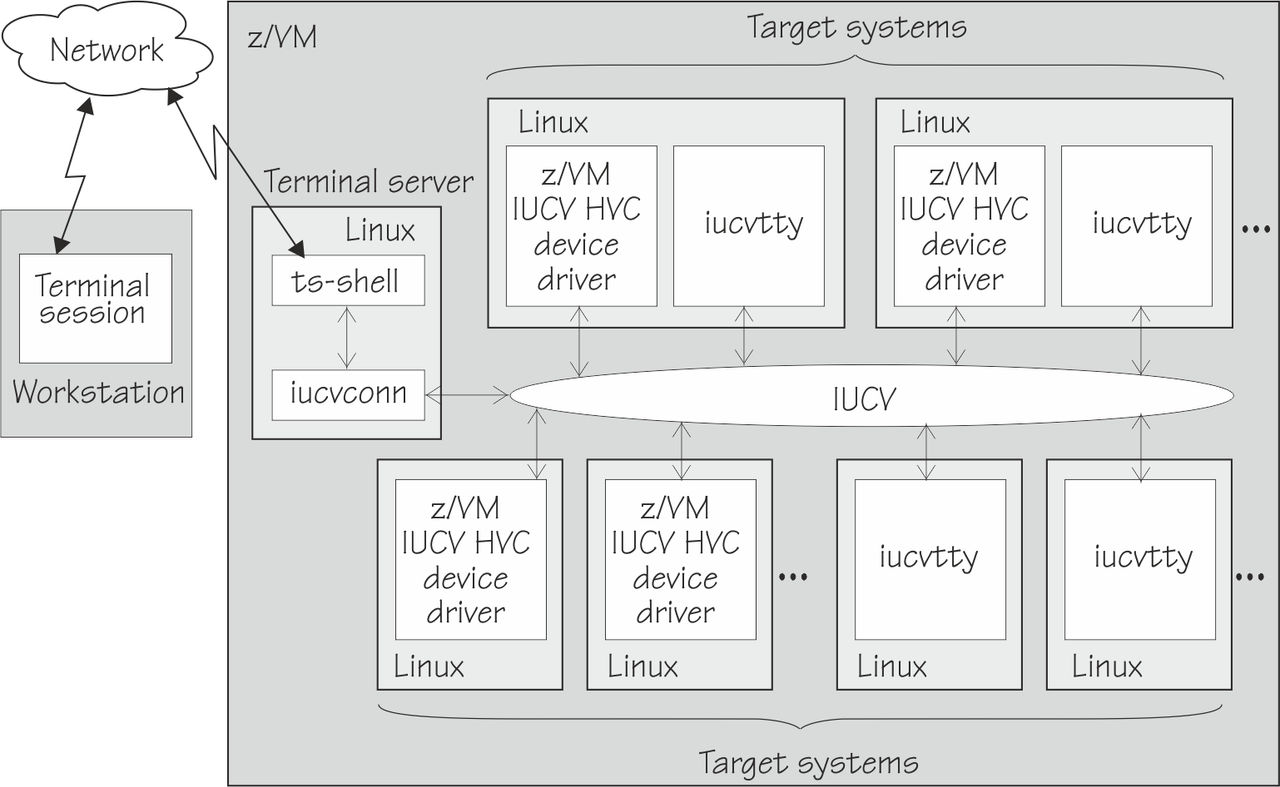
To access a terminal device on a target system, administrators first open a terminal session on a workstation. They then log in to a special terminal server shell, the ts-shell, on the terminal server. The terminal shell uses the iucvconn program that can access terminal devices on target systems through z/VM® IUCV connections.
Linux™ on z Systems™ supports two
types of terminal devices that can be accessed through z/VM IUCV.
- Terminal devices that are provided by the iucvtty program.
For simplicity, these terminal devices are referred to as iucvtty instances in this document.
- Terminal devices that are provided by the z/VM IUCV hypervisor console (HVC) device driver.
For simplicity, these terminal devices are referred to as HVC terminal devices in this document.