Locate a failing component by using the Unit Identification (UID) LED
UID (Unit Identification) LEDs are blue LEDs that assist users and service personnel to find a library or a library component in a large collection of IT equipment. UID LEDs are in 3 places:
- On each library base module front panel. See Table 1.
Table 1. Front panel LEDs LEDs Color Descriptions Ready Green Steady when power is on, flashing with tape Ready drive or library robotic activity. Unit Identification (UID) Blue when activated The UID LEDs are controlled by the user through the GUI function. The UIDs on the Operator Panel and base module back panel are activated and deactivated together. In addition, UIDs on drives and expansion module back panels can be activated separately. The UIDs are helpful for locating components of the library in a data center. Clean Amber On, when a tape drive-cleaning operation is recommended. Attention Amber Flashing if the library detected a condition for which user attention is necessary, but the library can still complete most operations. Error Amber On, if an unrecoverable tape drive or library error occurs. A corresponding error message is displayed on the LCD screen. User intervention is required as the library is not capable of completing some operations. - On the back of each module (base and expansion), on the module controller See Figure 1 and Table 2.
Figure 1. Rear panel 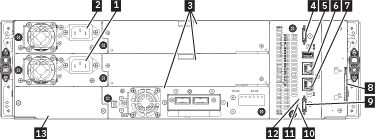
Table 2. Rear panel descriptions Number Item Comments 1 Power supply 1 Standard on Base Module
Optional on Expansion Module (required
if drives are present)2 Power supply 2 Optional on Base Module and Expansion Modules 3 Tape drive bays Full high drives take up 2 bays and can only be installed in the lower two drive bays. 4 Upper Expansion Module connection port 5 USB port Base Module only 6 Ethernet port B Base Module only (secondary port for service usage) 7 Ethernet port A Base Module only 8 Module alignment mechanism 9 Lower Expansion Module connection port 10 Unit Identifier LED, Blue 11 Controller Error LED, Yellow 12 Controller Health Status LED, Green 13 Product Serial Number, Tag location - On the back of each tape drive. See Figure 2 and Table 3.
Figure 2. Drive sled indicators 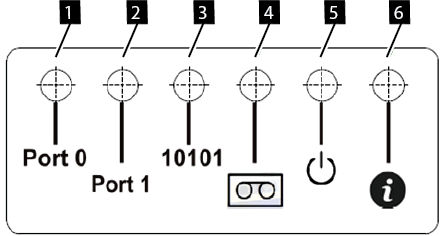
Table 3. Drive sled indicators Number Description 1 Port 0 activity 2 Port 1 activity 3 Library communication 4 Cartridge present 5 Power 6 Beacon /UID
Note: The Library Front Panel UID and the base module LCC UID are linked. They turn on and off together.
The Front Panel UID helps a user find the library in the front of a rack. The UID on the controllers and Drives in the rear of the library help identify a component within a library. When a component experiences an error, a user with superuser, service, or administer privileges can turn on the UID for that component. The UID helps to physically locate the components in a complex assortment of IT equipment. UID menus are in the actions button at the top of the library dashboard. See the help pages for instructions on turning on and off the Unit Identifier LEDs.