Half height drive: Tape spooled off supply reel
Before you begin
Attention: DO NOT TOUCH THE OUTER GUIDE RAIL
(2). THIS RAIL IS DELICATE AND EASILY
DAMAGED.
About this task
Note: If the cartridge in the drive is an INPUT tape that contains ACTIVE or 'ONLY COPY'
data (there is no backup), eject commands that are issued at the host fail to unload the tape, and
power-cycling the drive fails to eject the cartridge, make no further attempts to unload this
tape. Call Technical Support and open a PMR if one is not already
open, to initiate the process of sending the drive with the loaded cartridge in for recovery.
Procedure
- Turn the supply reel (4) clockwise,
allowing the moistened tape to adhere to the hub as it winds around
the supply reel (inside the cartridge).
Figure 1. Rewinding tape into cartridge 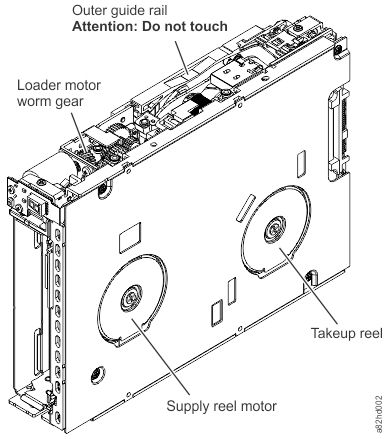
1 Loader motor worm gear 3 Takeup reel motor 2 Outer guide rail (WARNING: Do Not Touch) 4 Supply reel motor