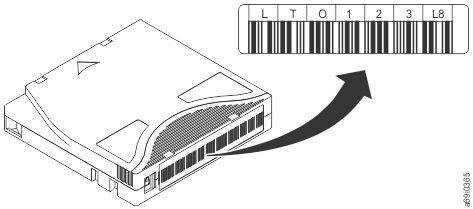
Bar code label
Data cartridges can have bar code labels for identification..
A bar code label contains:
- A volume serial number (VOLSER) that is human-readable.
- A bar code that the library can read.
Note: The LTO Ultrium 9 tape drives do not require bar code labels, but you might choose to use labels for tape cartridge identification purposes. LTO tape drives do not require tape cartridges to have bar code labels. However, IBM libraries require tape cartridges to have bar code labeled on them for automation and human readability.
| Ultrium Tape Drive/Library | Bar Code Label Requirements |
|---|---|
| 5544 | Required |
| 3555 | Required |
| 3573 | Required |
| 3576 | Required |
| 3580 | Not required |
| 3581 | Required with optional Bar Code Reader |
| 3582 | Required |
| 3583 | Required |
| 3584 | Required |
When read by a library's bar code reader, the bar code identifies the cartridge's VOLSER to the library. The bar code also tells the library whether the cartridge is a data cartridge or cleaning cartridge. In addition, the bar code includes the two-character media-type identifier, see Table 2.
Figure 1 shows a sample bar code label for the LTO Ultrium Tape Cartridge.
Tape cartridges are ordered with the labels included or with custom labels. To order tape cartridges and bar code labels, see the section on ordering media supplies. The bar code for usage in IBM® tape libraries must meet predefined specifications. They include (but are not limited to):
To determine the complete specifications of the bar code and the bar code label, visit the web at http://www.ibm.com/ and enter "IBM LTO Ultrium Cartridge Label Specification" in the search box. Or contact your IBM sales representative.
- Eight uppercase alphanumeric characters, where the last 2 characters refer to the cartridge generation and WORM capability. See Table 2.
- Label and printing to be non-glossy.
- Nominal narrow line or space width of 0.423 mm (0.017 in.)
- Wide to narrow ratio of 2.75:1.
- Minimum bar length of 11.1 mm (0.44 in.)
| Cartridges | VOLSER |
|---|---|
| Ultrium 10 Data Cartridge | xxxxxxPA |
| Ultrium 10 Data Cartridge | xxxxxxLA |
| Ultrium 10 WORM Cartridge | xxxxxxLH |
| Ultrium 9 Data Cartridge | xxxxxxL9 |
| Ultrium 9 WORM Cartridge | xxxxxxLZ |
| Ultrium 8 Data Cartridge | xxxxxxL8 |
| Ultrium 8 WORM Cartridge | xxxxxxLY |
| LTO M8 Cartridge | xxxxxxM8 |
| Ultrium 7 Data Cartridge | xxxxxxL7 |
| Ultrium 7 WORM Cartridge | xxxxxxLX |
| Ultrium 6 Data Cartridge | xxxxxxL6 |
| Ultrium 6 WORM Cartridge | xxxxxxLW |
| LTO Ultrium Cleaning Cartridge | CLNxxxLx |
| *An Ultrium 3 Tape Drive must have a minimum firmware level of 54xx for it to be compatible with the WORM cartridge. | |
When a bar code label is attached to a tape cartridge, place the label only in the recessed label area (see 5 in LTO media). A label that extends outside of the recessed area can cause loading problems in the drive.
Attention: Do not place any type of mark on the white space at either end of the bar code. A mark in this area might prevent the library from reading the label.