Preparing top and bottom modules
Use these steps to prepare the top and bottom modules for installation.
Skip this step if you are installing a Base Module only without an Expansion Module.
The Base Module has a removable top and bottom covers.
Installing Expansion Modules above the Base Module
If you are installing one or more Expansion Modules above the Base Module, move the top cover from the Base Module to the Expansion Module that is installed at the top of the library.
To move the library top cover plate from the Base Module to an Expansion Module
- Remove the library top cover plate from the Base Module. See Step 5 in Unpacking the Base Module and Expansion Modules.
- Install the top cover on the Expansion Module that is installed on the top of the library.
- Place the Expansion Module on a work table.
- With the front of the top cover raised approximately 12 cm, engage the rear of the cover at the Expansion Module pivot point at the back of the opening.
- Lower the front of the top cover until the latches engage on both sides.
Figure 1. Lowering the front of the top cover 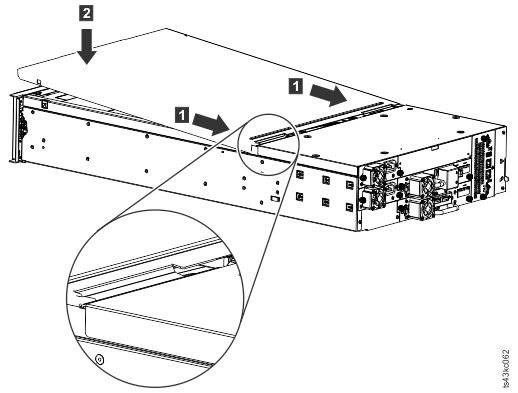
Installing Expansion Modules below the Base Module
If you are installing one or more Expansion Modules below the Base Module, move the bottom cover from the Base Module to the Expansion Module that is installed at the bottom of the library
To move the library bottom cover plate from the Base Module to an Expansion Module
- Remove the library bottom cover plate from the Base Module.
- Place the Base Module on a work table.
- Lift the unit front end by about 16 cm (use unit rear as a pivot edge).
- Support the bottom cover with one hand. Insert a small flathead screwdriver or Torx screwdriver
into the hole and slide about 4 mm sidewards to the left to unlock the spring loaded lock. See Figure 2.Important: Do NOT turn the module upside-down to complete this step.
Figure 2. Unlocking the spring loaded lock 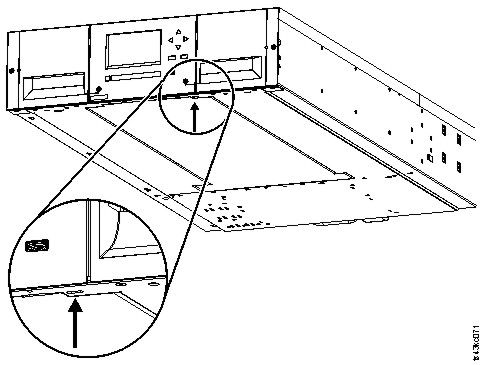
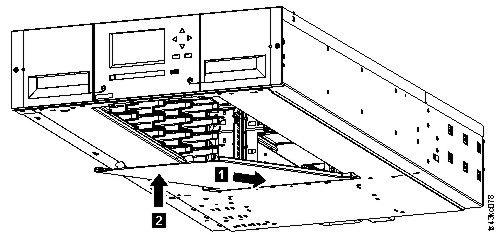
- Lower the cover front end by about 10 cm (1) and pull gently
forward (2) to disengage from the pivot point at the unit center.
Figure 3. Removing the cover 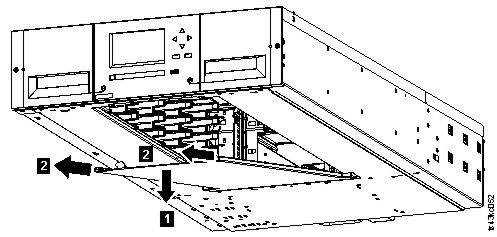
- Install the library bottom cover plate to an Expansion Module.
- Place the Expansion Module on a work table.
- Lift the unit front end by about 16 cm (use unit rear as a pivot edge).
- Insert the bottom cover at the center
- Lift the cover front edge until hard stop and it locks in at the unit front. The bottom cover
fits only one way.
Figure 4. Lifting the cover and locking it