Danger and Caution notices
Danger notices
A danger notice calls attention to a situation that is potentially lethal or extremely hazardous to people. A lightning bolt symbol always accompanies a danger notice to represent a dangerous electrical condition.
  |
To prevent a possible shock from touching two surfaces with different protective ground(earth), use one hand, when possible, to connect or disconnect signal cables. (D001) |
| Overloading a branch circuit is potentially a fire hazard and a shock hazard under certain conditions. To avoid these hazards, ensure that your system electrical requirements do not exceed branch circuit protection requirements. Refer to the information that is provided with your device or the power rating label for electrical specifications. (D002) | |
| If the receptacle has a metal shell, do not touch the shell until you have completed the voltage and grounding checks. Improper wiring or grounding could place dangerous voltage on themetal shell. If any of the conditions are not as described, STOP. Ensure the improper voltage or impedance conditions are corrected before proceeding.(D003) | |
| An electrical outlet that is not correctly wired could place hazardous voltage on the metal parts of the system or the devices that attach to the system. It is the responsibility of the customer to ensure that the outlet is correctly wired and grounded to prevent an electrical shock.(D004) | |
| When working on or around the system, observe the following
precautions: Electrical voltage and current from power, telephone, and communication cables are
hazardous. To avoid a shock hazard:
|
|
|
|
|
To disconnect:
To connect:
|
|
| Heavy equipment - personal injury or equipment damage might result if mishandled. (D006) | |
|
|
Uninterruptible power supply (UPS) units contain specific
hazardous materials. Observe the following precautions if your product contains a UPS:
|
| Professional movers are to be used for all relocation activities. Serious injury or death might occur if systems are handled and moved incorrectly. (D008) | |
| Ensure that your DC mains supply is earthed at the point of generation per IEC 60950-1and ITU-T Recommendation K.27. (D009) | |
| Serious injury or death can occur if loaded lift tool falls over or if a heavy load falls off the lift tool. Always completely lower the lift tool load plate and properly secure the load on the lift tool before moving or using the lift tool to lift or move an object. (D010) | |
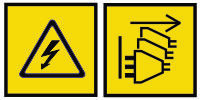 |
DANGER: Multiple power cords. The product might be equipped with multiple AC power cords
or multiple DC power cables. To remove all hazardous voltages, disconnect all power cords and power
cables. (L003)
|
Caution notices
A caution notice calls attention to a situation that is potentially hazardous to people because of some existing condition, or to a potentially dangerous situation that might develop because of some unsafe practice.
|
|
The doors and covers to the product are to be closed at all times except for service by trained service personnel. All covers must be replaced and doors closed at the conclusion of the service operation. (C013) |
| This product is equipped with a 3-wire (two conductors and ground) power cable and plug. Use this power cable with a properly grounded electrical outlet to avoid electrical shock. (C018) | |
| This assembly contains mechanical moving parts. Use care when servicing this assembly. (C025) |
A caution notice can be accompanied by one of several symbols:
| If the symbol is... | It means... |
|---|---|
|
|
A generally hazardous condition not represented by other safety symbols. |
 |
A hazardous condition due to the use of a laser in the product. Laser symbols are always accompanied by the classification of the laser as defined by the U. S. Department of Health and Human Services (for example, Class I, Class II, and so forth). |
  |
Risk of hand pinching, can trap hands, fingers and cause serious injury. Keep hands clear during operation (L012). |
 |
Caution: moving parts. (L037) |
 |
The weight of this part or unit is between 18 and 32 kg (39.7 and 70.5 lb). It takes two persons to safely lift this part or unit. (C009) |
 |
The weight of this part or unit is between 32 and 55 kg (70.5 and 121.2 lb). It takes three persons to safely lift this part or unit. (C010) |
 |
A hazardous condition due to the unit's susceptibility to electrostatic discharge. |