Service package deployment and removal process
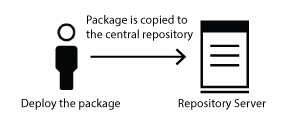
The package deployment process has two phases: First, service packages are copied to the central repository on the repository server, the host on which the rs service is running. Then, when workload comes in, the service package is copied to compute hosts and uncompressed.
Package removal also has two phases: When a request to remove a package is made, service packages are removed from the central repository. Then, when a new instance group is deployed and existing packages on the compute hosts are no longer needed, packages are removed from compute hosts. For existing instance group, when an existing package is updated, the packages that exist on compute hosts are overwritten when workload comes in.
The package deployment process
- You deploy the service package using the cluster management console, the egodeploy add command, or the RESTful API. With the cluster management console, you use the Add/Remove Applications wizard or the global action Add package to repository under .
- The package is copied to the repository server host:
- As workload comes in,
IBM® Spectrum
Conductor checks whether the required service package is already on the compute host.If the service package is not already on the compute host, the repository service copies the service package from the repository server to the compute host, and decompresses it, ready to be used.

The package removal process
- You request to remove the service package using the cluster management console, the egodeploy remove command, or the RESTful API; or you update an existing package through the cluster management console, the egodeploy add command, or the RESTful API.
- The package is removed from the repository server host:

- Whenever a new package is deployed on to the host, the removed package is deleted. Whenever an updated package is deployed on to the host, the existing package is overwritten with the updated package.
