The Datacap Application Copy Tool is enhanced to provide the functionality to create an
application package that includes Datacap Desktop Custom Panel, ICN Custom Panel, and Custom
Actions. The application package can then be deployed along with the custom application files into a
remote environment.
Following are the salient features of the Datacap Application Deployment Tool:
Creation of Application package which is environment neutral, for deploying on target server
without logging into the target server.
Creation of multiple environment specific configuration file. At the time of deployment, you can
select the appropriate configuration file for that environment.
Encryption of sensitive information such as password in the configuration file.
Registration and deployment of custom actions, RRX files, and other dependencies on all nodes
such as Rulerunner, Datacap Web Services web servers, Datacap Taskmaster Server.
Deployment of Datacap Navigator and Datacap Desktop custom panels.
End-to-end remote deployment on Datacap Taskmaster Server, Rulerunner, and Datacap Web Services
web servers which includes starting and stopping the servers.
Option to choose specific actions or tasks during deployment.
Detailed log files for all tasks throughout the deployment process.
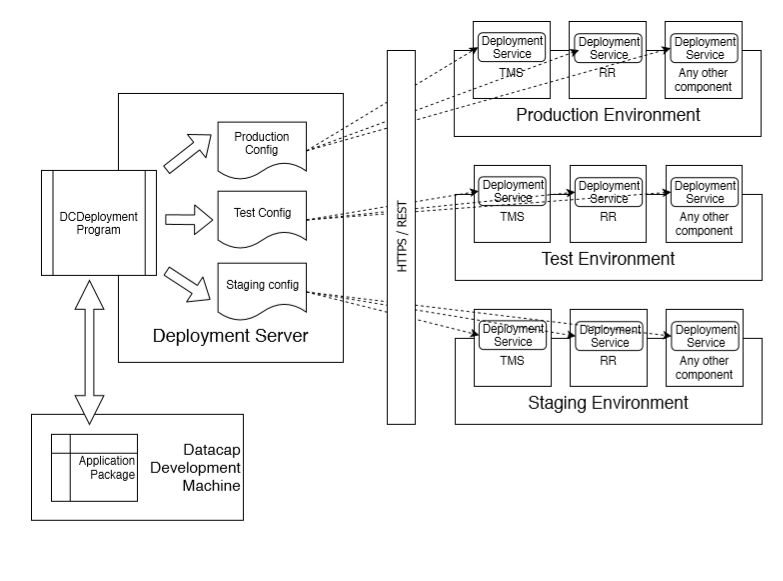
The following figure depicts the architecture of deployment process. Figure 1. Deployment process architecture
The following figure depicts the overview of the process to deploy a custom application.Figure 2. Process flow overview