Task 3: Making decisions for families of cases
In practice, listing all possible cases is often impractical. Even in simple scenarios, going through every case and determining its outcome becomes laborious.
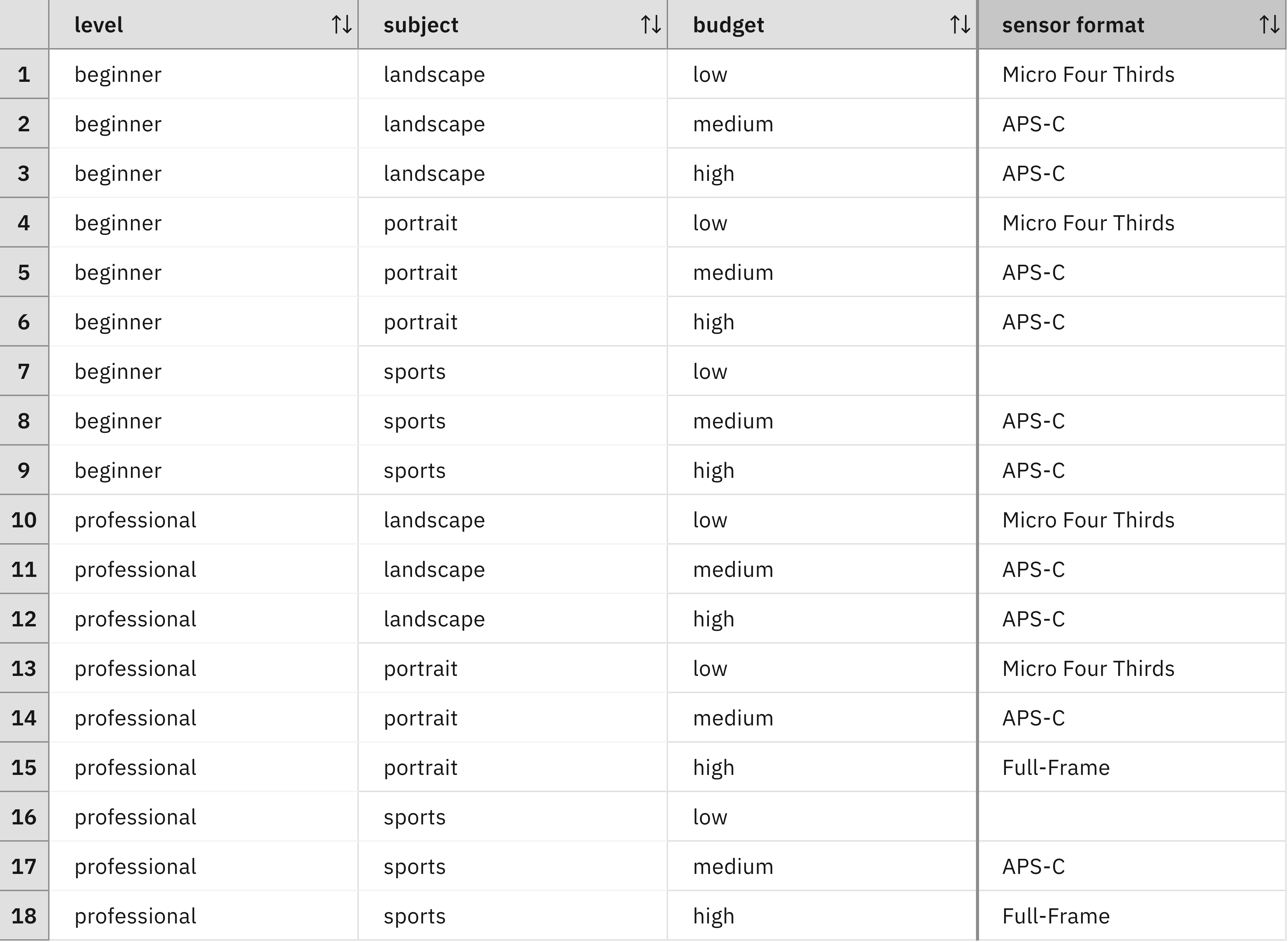
Consider modeling budget as quantitative values instead of qualitative levels (low, medium, high):
- Low budget (0-499) requires 500 duplicate rows.
- Medium budget (500-1499) requires 1,000 duplicate rows.
- High budget (1500+) requires infinite duplicate rows.
This quantitative approach creates an explosion of cases that makes exhaustive enumeration impossible.
Fortunately, similar cases often share the same decision. By identifying decision boundaries, analysts can group cases into families and describe them using intervals.
For example, you can consider all cases where a beginner wants to do landscape photography and has a budget between 500 and 1500. By identifying thresholds, analysts can describe case families by using logical conditions:
'level' is beginner
and 'subject' is landscape
and 'budget' is at least 500 and less than 1500
This family of cases maps to a decision:
set decision to APS-CThe complete decision logic combines the condition and action:
if
    'level' is beginner
    and 'subject' is landscape
    and 'budget' is at least 500 and less than 1500
then
    set decision to APS-C
Each decision table row corresponds to an if-then rule. Rules enable richer condition expressions and shorter textual representations. The complete decision logic consists of all rules and decision tables that determine outcomes for cases.
Exercise 1: Implementing quantitative budgets
Modify your decision table to use quantitative budget values:
- In the decision model, change the budget node type to
integer. - Reopen the decision table and redefine the budget column from
budget is <a budget>tobudget is at least <min> and less than <max>. - Replace the qualitative budget values with the following intervals:
low:[0, 500)medium:[500, 1500)high:>= 1500
[500,
1500)
) who is interested in landscape photography:
Exercise 2: Reducing rows through merging
You consolidate rows that share the same decision, level, subject, and have adjacent or overlapping budget intervals.
You can try to reduce the number of rows by merging rows that have the same decision, the same level and photographic subject, or joint intervals. For example:
| Condition | Decision | Action |
|---|---|---|
| Budget in [500, 1500) | APS-C | Merge all rows with this budget range |
| Budget ≥ 1500 AND level = beginner | APS-C | Merge all rows matching both conditions |
| Subject = landscape AND budget [0, 500) | Micro Four Thirds | Merge all rows matching both conditions |
| Subject = portrait AND budget [0, 500) | Micro Four Thirds | Merge all rows matching both conditions |
Can you transform the decision table into an equivalent one with fewer than 10 rows?
Lessons learned
The same row may participate in multiple merging steps, resulting in overlapping rows where some cases match multiple entries. This is acceptable when all matching rows produce the same decision.
Limitations
While the decision table effectively suggests sensor formats, real-world camera selection involves extra complexity:
- Multiple camera models in catalogs.
- Numerous technical characteristics (color, tilt screen, viewfinder, weight).
- Customer-specific requirements that constrain feasible options.
Each new condition column potentially duplicates existing rows for every possible value, causing exponential growth in table size relative to the number of columns.