NextGen engine for IBM Process Mining
NextGen is a new engine that is used in IBM Process Mining starting from version 1.15.0. It is based on a highly performant relational database, which allows much bigger volumes of data to be analyzed quicker. Most of the core algorithms of IBM Process Mining are already running on IBM Process Mining NextGen.
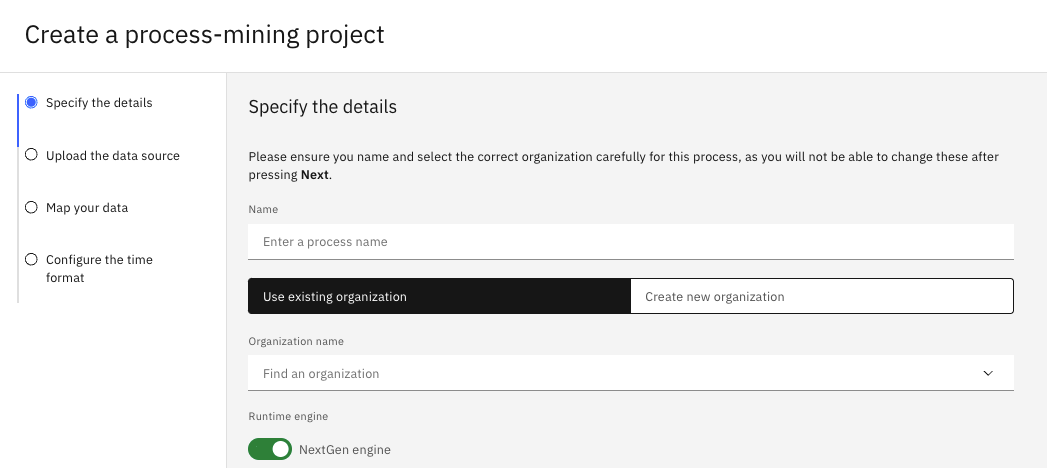
Both Legacy and NextGen engines are available in IBM Process Mining 1.15.0. You can specify whether you want to use Legacy or NextGen engine when you create a new project. However, IBM Process Mining Legacy will be phased out in future releases.
Project snapshots
In IBM Process Mining NextGen, projects snapshots are not created anymore. All users work on the same version of the project to make sure data and configurations are consistent.
You are still able to separate roles by using authorizations from the Admin tab and create private versions of dashboards and filters.
Decoupling IBM Process Mining filters from Analytics filters
In IBM Process Mining Legacy, when filters are applied on the process, they are also applied on the dashboard.
In IBM Process Mining NextGen, filters can be applied separately on the process model and dashboards.
Transition to asynchronous computations
In the Legacy engine, most algorithms were run synchronously; every time you opened a dashboard, the computing started.
In the NextGen engine, most algorithms are run asynchronously; most statistics and functions are preloaded before you
open a project. For example, if you apply a filter on a dashboard, you can still use the product while the filter is being applied in the background.
Business hours in Analytics and Custom metrics
When you enable business hours, 4 more parameters become available in the Analytics section and Custom metrics:
LEADTIME_WORKEDPATHTIME_WORKEDSERVICETIME_WORKEDWAITTIME_WORKED
In IBM Process Mining Legacy, enabling business hours influences the process mining model. However, in IBM Process Mining NextGen, enabling business hours does not change the process model in any way and does not affect the process model duration times. You can use these parameters only in the Analytics section and in Custom metrics.
For more information on how to enable business hours, see Editing computation hours.
Main functional improvements
To improve the performance of IBM Process Mining, the following functions were modified:
- Custom KPIs can now be saved and reused.
- Filters and changes now load in the background, which allows the user to continue their work seamlessly.
- Only statistics that are used often are computed while the algorithms are run. Unusual statistics are not computed unless it is requested by the user, which reduces the processing time.
Migrating IBM Process Mining Legacy projects to IBM Process Mining NextGen
You can migrate your IBM Process Mining Legacy projects to IBM Process Mining NextGen manually to harness the benefits of the new engine.
To migrate projects from IBM Process Mining Legacy to IBM Process Mining NextGen do the following steps:
-
Click the Manage tab in the top bar of the project you want to back up.
-
Click the Backup & History section. For more information, see Backup and History for IBM Process Mining Legacy.
-
Create a backup by choosing the settings and data that you want to migrate to IBM Process Mining NextGen.
Some settings and widgets cannot be migrated to IBM Process Mining NextGen because they are not compatible. For example, custom metrics are based on SQL in IBM Process Mining NextGen and on JavaScript in IBM Process Mining Legacy so they will not be imported. For more information, see Custom metrics.
-
Download the backup.
-
Create a new IBM Process Mining NextGen project. For more information, see Creating a process-mining project.
When creating a project with a CSV file, you might get the following error message: Empty line required at the end of the CSV file. To fix the problem, enter a carriage return (empty line) after the last record of your file.
- In the Backup & History section in your IBM Process Mining NextGen project, click on the Upload backup button to migrate your IBM Process Mining Legacy to IBM Process Mining NextGen.
Unsupported features in IBM Process Mining NextGen
Main features that are not supported in IBM Process Mining NextGen:
- Milliseconds in dates
- Automate tab
- Simulation analysis
- Decision analysis
- Root cause analysis
- Multilevel analysis