If you must uninstall DB2® copies
and IBM® database client interface
copies, the method that you use for the uninstallation is dependent
on the operating system that you use and which machine the copies
are installed on.
About this task
- On Linux and UNIX operating systems
- Use the db2_deinstall command from the DB2 copy that you are using. The db2_deinstall command
uninstalls installed DB2 products
or features that are in the same install path as the db2_deinstall tool.
The db2_deinstall command
is also available on the DB2 product
DVD. The product version you are uninstalling must match the product
version on the DB2 DVD. If you
do not provide the -b parameter when you run
the db2_deinstall command from the DB2 DVD, you will be prompted for the installation
path.
Use the db2ls command to see the list
of installed DB2 products and
features. If one or more instances are currently associated with a DB2 copy, that DB2 copy cannot be uninstalled.
- On Windows operating
systems
- To uninstall DB2 copies
on Windows operating systems,
use one of the following methods:
- Use the Windows Add/Remove
Control Panel Applet.
- Run the db2unins command from the installed DB2 copy directory
Note:
- You can uninstall DB2 even
when there are instances associated with DB2 copies.
If you do this, the instance information will be removed with the DB2 uninstall. Therefore, take extra
care when managing, recovering, and uninstalling instances.
- If multiple Version 9 copies are installed, you cannot remove
the default DB2 copy. If you
want to remove the default DB2 copy,
switch the default DB2 copy
to one of the other DB2 copies
before uninstalling. For more information about switching the default DB2 copy, see the db2swtch command.
- Uninstalling DB2 copies
when both those copies and IBM Data
Server Driver copies are on your machine
- In the scenario presented
here, IBMDBCL1 is the default IBM database client interface copy, DB2COPY1
is the default DB2 copy, and
there is another DB2 copy (DB2COPY2). You decide to uninstall all of the DB2 products that are part of DB2COPY1.
When you attempt to uninstall the last DB2 product
within DB2COPY1, because it is the default DB2 copy, the uninstall request will be unsuccessful.
Before
uninstalling the last of the remaining DB2 products
within the default DB2 copy,
and if there is another DB2 copy
on your system, you must switch the default from one DB2 copy to the other.
To change the default, use
the db2swtch command with no arguments (Windows only) to start the Default DB2 and IBM Database Client Interface Selection wizard.
The wizard will show all possible candidates when choosing a new default.
In
this case, you can choose DB2COPY2 as the new default DB2 copy.
After you have made DB2COPY2
the default DB2 copy, you can
request the uninstall of the last product in DB2COPY1.
Since DB2COPY1 is no
longer the default DB2 copy,
the uninstall request is successful.
- Uninstalling IBM Data Server
Driver copies when only those copies are on your machine
Over time you can have several DSDRIVERs installed. Only one IBM database client
interface copy is the default. At some point you might decide to uninstall
the DSDRIVER that is the default IBM database client interface copy.
When you uninstall
the default IBM database
client interface copy, the database manager will choose between any
of the remaining DSDRIVERs and pick one of them to be the new default IBM database client
interface copy. Unless you switch the default before requesting the
uninstall, you will not control which DSDRIVER will become the new
default. (If there is only one other DSDRIVER besides the original
default, then you will know which DSDRIVER the database manager will
choose. If there are several DSDRIVERs installed besides the original
default, then you will not know which DSDRIVER the database manager
will choose.)
- Uninstalling IBM Data Server
Driver copies when both those copies and DB2 copies
are on your machine
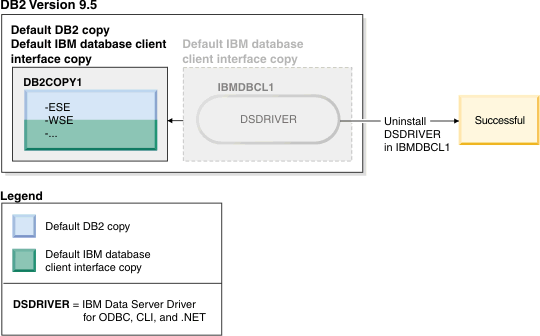
- In the scenario presented here, DB2COPY1 is the default DB2 copy and IBMDBCL1 is the default IBM database client
interface copy.
You decide to uninstall the DSDRIVER in IBMDBCL1.
As part of the uninstall request, the default IBM database client
interface copy is switched by the database manager automatically so
that DB2COPY1 becomes both the default DB2 copy
and the default IBM database
client interface copy. (This is also be true if there is more than
one DB2 copy on the machine.)
 IBM Data Server Client Packages Version 10.1